Install the app
How to install the app on iOS
Follow along with the video below to see how to install our site as a web app on your home screen.
Note: This feature may not be available in some browsers.
-
After 15+ years, we've made a big change: Android Forums is now Early Bird Club. Learn more here.
You are using an out of date browser. It may not display this or other websites correctly.
You should upgrade or use an alternative browser.
You should upgrade or use an alternative browser.
add new contact - default to Google?
- Thread starter weamish
- Start date
-
- Tags
- samsung galaxy s4

BRAINZ2013
Extreme Android User
Are you rooted if not try this
http://howikis.com/Manage_Contacts_on_Samsung_Galaxy_S4
Also when putting the contact into the phone you should see the option to put into gmail or phone
http://howikis.com/Manage_Contacts_on_Samsung_Galaxy_S4
Also when putting the contact into the phone you should see the option to put into gmail or phone
when putting the contact into the phone you should see the option to put into gmail or phone
Yes, there's a drop-down box with options. But the default is Phone, and my wife often forgets to change that. Would be a lot easier if we could just change the default to Google.
Why not just set goggle up to backup contacts.
I have google sync set up. But if a new contact is added to device, it won't be synced.

sreum
Android Enthusiast
I never really gave it much thought I guess as I get this screen every time I manually add a contact.
And if I'm in the log history and long press on a number in order to add a contact, after I add one contact as Google account, any others after default to Google. As you can see in this picture...
SEE MY NEXT POST FOR WORKING PICTURE LINKS
And if I'm in the log history and long press on a number in order to add a contact, after I add one contact as Google account, any others after default to Google. As you can see in this picture...
SEE MY NEXT POST FOR WORKING PICTURE LINKS
BRAINZ2013
Extreme Android User
I never really gave it much thought I guess as I get this screen every time I manually add a contact.
View attachment 74184
sreum
Android Enthusiast
I never really gave it much thought I guess as I get this screen every time I manually add a contact.
http://androidforums.com/attachment.php?attachmentid=74186&stc=1&d=1408065621
And if I'm in the log history and long press on a number in order to add a contact, after I add one contact as Google account, any others after default to Google. As you can see in this picture...
http://androidforums.com/attachment.php?attachmentid=74187&stc=1&d=1408065621
Try above. Not sure what happened, was adding the photos thru my mobile, which I can never get right. Lol

Try above. Not sure what happened, was adding the photos thru my mobile, which I can never get right. Lol
Fixed for ya


shmn
Android Enthusiast
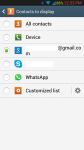
Are Google Contacts the only contacts you are displaying? Don't select any other choices. If you have only Google Contacts selected then when you create a new contact it will default to Google Contact (see attached screenshot). That's the way it works on a Sprint S4 with 4.2.2. If you have another carrier or a different version of Android then I can't help you as carriers change features all the time.When I select my Google contacts to display, it still defaults to Device when I start to enter a new contact. This is SO annoying!