
Install the app
How to install the app on iOS
Follow along with the video below to see how to install our site as a web app on your home screen.
Note: This feature may not be available in some browsers.
-
After 15+ years, we've made a big change: Android Forums is now Early Bird Club. Learn more here.
You are using an out of date browser. It may not display this or other websites correctly.
You should upgrade or use an alternative browser.
You should upgrade or use an alternative browser.
Adding options to power and lock screen.
- Thread starter glore2002
- Start date
-
- Tags
- samsung galaxy s2

ironass
Extreme Android User
Is there an application to add options to this screens? I've tried Darkyota. It lets me choose the items I want to add but they are never shown.
Thanks!
I see that you are on CheckROM v4. I have one of the 70+ JKay deodexed themes installed. These themes come with JKay Deluxe Settings that allow you to change not only your lock screen and Power Menu but also offers you a scrollable drop-down panel as well as a whole host of other settings.
JKay AOSP Lockscreen screenshots
Screenshot1, screenshot2, screenshot3 and screenshot4


Power options dialog:
Screenshot4, Screenshot5, Screenshot6
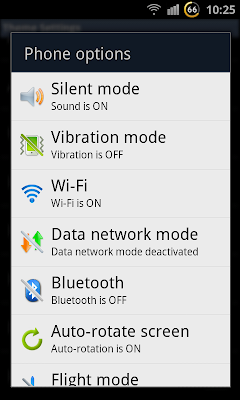
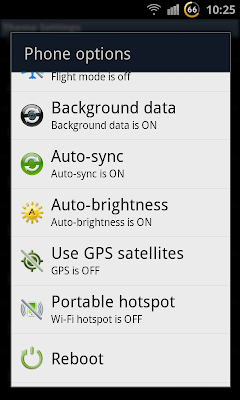

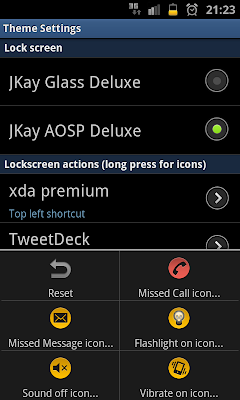
JKay Deluxe Theme Settings App:
Screenshot1, Screenshot2, Screenshot3, Screenshot4


Customizable Deluxe quick panel with 19 toggles (scrollable left and right)

Wifi, Data, Bluetooth, GPS, Silent mode, Vibrate, Auto brightness, Auto rotation, Flight mode, Sync, Secure mode, Flashlight, Screen on, Background data, Wi-Fi hotspot, Reboot, Recovery, Download and Power off
For full installation information and downloads, see here:-
[Theme/Mod/Apk] XWKL1 - JKay Deluxe v13.5 - How the SGS2 should be! 2012-01-30 - xda-developers

I see that you are on CheckROM v4. I have one of the 70+ JKay deodexed themes installed. These themes come with JKay Deluxe Settings that allow you to change not only your lock screen and Power Menu but also offers you a scrollable drop-down panel as well as a whole host of other settings.
JKay AOSP Lockscreen screenshots
Screenshot1, screenshot2, screenshot3 and screenshot4
Power options dialog:
Screenshot4, Screenshot5, Screenshot6
JKay Deluxe Theme Settings App:
Screenshot1, Screenshot2, Screenshot3, Screenshot4
Customizable Deluxe quick panel with 19 toggles (scrollable left and right)
Wifi, Data, Bluetooth, GPS, Silent mode, Vibrate, Auto brightness, Auto rotation, Flight mode, Sync, Secure mode, Flashlight, Screen on, Background data, Wi-Fi hotspot, Reboot, Recovery, Download and Power off
For full installation information and downloads, see here:-
[Theme/Mod/Apk] XWKL1 - JKay Deluxe v13.5 - How the SGS2 should be! 2012-01-30 - xda-developers
Great! You're a kind of Master of The SGS2 Universe!

I new I saw it somewhere. It was frozen :-( I really appreciate your help. I already changed lock screen with quick access to those apps I need often (phone, sms, mail and sound off).
I know this is not the topic but I am having a problem with cwm manager. When I start it, a message pops up saying it needs cf-root 5 to run. This happened after I flashed kernel N.E.A.K. 1.3.2 which I am using now with my checkrom.
Any solution or tip for this?
Thanks again ironass!!!
ironass
Extreme Android User
I know this is not the topic but I am having a problem with cwm manager. When I start it, a message pops up saying it needs cf-root 5 to run. This happened after I flashed kernel N.E.A.K. 1.3.2 which I am using now with my checkrom.
Any solution or tip for this?
This is to be expected with the N.E.A.K. kernel and is normal, although it may change in future releases. I use the Backup and Restore features in the Recovery menu instead as well as the install features.
OK. Then I will do the same. I think accessing directly from Recovery Menu is always better than from an app.This is to be expected with the N.E.A.K. kernel and is normal, although it may change in future releases. I use the Backup and Restore features in the Recovery menu instead as well as the install features.
Thanks again!