• After 15+ years, we've made a big change: Android Forums is now Early Bird Club. Learn more here.

[All Discussion}Your S Pen... Use It? /Help/features ect...

Just got Verizon Galaxy Note 2 and have questions on S Pen use. The main reason I switched from a HTC Evo Shift to a Galaxy Note 2 is so that I can take notes while on the phone with a patient. Fine. I see how to do that. Now what I'd like to be able to do is open a particular saved note and let it float atop my contacts app so I can see it while entering in data for a new contact. I see how to do that if I don't save the note and keep it on the screen as a popup. But once I save it, I don't see a way to open it as popup window and let it float atop the current app.

Is there a way to do this?
 
I've been trying to find a way to do this as well. I would take down contact info quickly with the S Pen, but would like to find a way to have it float so I can enter them into my address book later.
 
Hi to all,
I recently lost my s pen and I wanted to know if there is any way that I can track it (if there is a s pen tracker app or something similar).
I also wanted to know that can I buy the note s pen for my note 2. Will it have the same functions and will there be any differences between them?
I would kindly appreciate an answer. Thank you!
 
I haven't found a floating S Pen type app yet. There are some with regular text, but I'd prefer one with S Pen integration.
I was looking for a way to have contact info I wrote down with my S Pen and address book open at the same time.
I came across an app called DW Contacts. After downloading it, it added a shortcut in Multi View. I set it as the default to replace my stock address book. Now I can have S Note and DW Contacts open at the same time in split screen mode, making it easy to add or edit contacts while looking at my S Notes.
 
Has anyones s pen slot become loose with use? Mine is still okay but I swear the pen comes out easier thanbwhen it was new.
 
By the looks of it, it only support keyboard text entries. Doesn't support hand writing notes using the S Pen

Yeah, sorry 'bout that. Just tried it out. Didn't support s-pen writing. There are a bunch of apps that do support s-pen writing, but hadn't gotten a chance to read through all the ones that came up with a "S-Pen app" search in the play store.
 
Has anyones s pen slot become loose with use? Mine is still okay but I swear the pen comes out easier thanbwhen it was new.
It'll seem loose if it's not fully seated therefore when you pull it out it'll have that loose feeling you're talking about. I've noticed I don't put mine all the way in sometimes and it slides out quickly.
 
I think it will eventually become loose over time through normal wear and tear. If one continually takes out and reinserting the pen, the slot holding the pen will loosen up. It will come to the point where it will just slide out. I know all my old units have a loose stylus slot. Just tip the device and the stylus just slides out. The catch on it is gone or just worn out. I can see this eventually happening with the Note S Pen.

Which is why I went ahead and got the S Pen holder and MS Surface Pen. To prevent me from taking the S Pen out of the slot and reinserting it back in. Also better ergonomics. :p
 
I think it will eventually become loose over time through normal wear and tear. If one continually takes out and reinserting the pen, the slot holding the pen will loosen up. It will come to the point where it will just slide out. I know all my old units have a loose stylus slot. Just tip the device and the stylus just slides out. The catch on it is gone or just worn out. I can see this eventually happening with the Note S Pen.

Which is why I went ahead and got the S Pen holder and MS Surface Pen. To prevent me from taking the S Pen out of the slot and reinserting it back in. Also better ergonomics. :p

Yea but now you have a big hole of the bottom of the note where the pen should be right? Dust and crap are going to get in there.
 
I purchased the Sleek holder from Amazon and due to bring in Paradise, $10 shipping for a total of $43.13. Two have told me their pens are loose.
 
This is a somewhat strange issue. I have never had a case with a magnetic lock, known to do odd things.

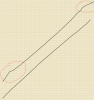
When I draw diagonal lines across the screen from edge to edge the line bumps and changes angle towards each edge. There is no change for vertical or horizontal lines and the issue does not affect finger drawn lines.

In the attachment the top line was drawn with the s-pen and a ruler, the bottom with my finger.

Screenshot_2013-03-29-14-39-25.png
 
...the top line was drawn with the s-pen and a ruler, the bottom with my finger.

View attachment 51944

Do you get the same effect at different angles? I'm thinking that maybe the S-Pen is jumping to the screen's next available detection spots near the screen's edge.

Hmmm... I have been trying to duplicate your issue there with my Note 2 and can't; the lines drawn along the edge of a plastic ruler come out straight from end to end, and at all angles. What material is the ruler made of that you are using?

I'd be guessing if I added more comments, so let's see what other Note 2 users have to say. :)
 
Actually, I just noticed something I had missed before in the S-pen settings. It was set to dominant hand, left. I changed it to right and it's all good again.
 
Actually, I just noticed something I had missed before in the S-pen settings. It was set to dominant hand, left. I changed it to right and it's all good again.

Great find! I feel a little embarrassed not suggesting having a look in the S-Pen menus. That dominant hand feature has its uses. ;)
 
Yeah, why it would make it behave quite like that I don't know. Unless changing it also reset something else that was causing the issue.
 
Back
Top Bottom