
Many GPS fixes are proposed without describing the underlined GPS issues in Galaxy S. This new thread will discuss the underlined GPS issues first and then evaluate the fixes.
All posted GPS fix methods are considered
Install the app
How to install the app on iOS
Follow along with the video below to see how to install our site as a web app on your home screen.
Note: This feature may not be available in some browsers.
-
After 15+ years, we've made a big change: Android Forums is now Early Bird Club. Learn more here.
You are using an out of date browser. It may not display this or other websites correctly.
You should upgrade or use an alternative browser.
You should upgrade or use an alternative browser.
All things GPS
- Thread starter enjoimark
- Start date
-
- Tags
- samsung captivate
I think I figured out the problem. Before doing the factory reset you should undo the one-click lag fix or you lose all data- there is a little paragraph about it during installation of OCLF.
I had the lag fix and did not undo it before applying the reset.
So now I'm screwed.
I can't even get the OCLF to work again- it tells me it's installed but my quadrant score is back to 900's- it was 2200 before.
I might have to get Odin and re-flash everything and start from scratch.
I posted this in response to another persons question about the Ryanza oneClick Lag Fix saying it was "Already installed", in the Vibrant section. Maybe there is a way to link them together? Anyway, I fixed mine, and this was what I wrote...
OH MY! I spent over 4 hours last night trying to figure this out. And I did...ARGH! I was so pissed off about this whole update thing. It has become a thorn in my side. My GPS worked very well, and I made videos etc. about it, and I've always supported my claims. But after the update, things went wacky, and I needed to do a factory data reset. Oh I was so pissed! Anyway, I have Ryanza one-click lag fix, and re-installed allllll of my apps, re-rooted, and the last thing was the lag fix. Well, I started up the app but it said I already had it installed. *My frustration for the night was just beginning*. Hours later I figured it all out, and I will write it here so folks do not need to go elsewhere to read. What frustrated me the most, were people telling other people to go to another forum and "READ". Well, if you know the answer, just type it out! Save some of us hours of frustration searching for the answer in hundreds of threads! So here ya go....
(Disclaimer: If you mess up your phone while doing this, It's not my fault that you didn't follow directions.)
P.S. When I get time, I'll make this post a bit easier to read...
-First, You should backup everything on your SD to your computer and re-format the SD card. You DO NOT need to re-flash or whatever others suggest. It's a very simple fix, but took me hours to find out from gathering information from other threads on different forums! So very frustrating.
-Next, you can either pay for "Root Explorer", or get a free one called "Android Mate" from the market as well, that will work just fine for this purpose. Open Android Mate and do a file explorer search for "/system/bin/playlogos1".
-Find the "playlogos1" file and DELETE it, and RESTART your phone. (Don't freak out, your boot logo will no longer be there, so a few seconds of a blank screen will be there and is FINE...
-After your phone has re-booted, Open OneClick Lag Fix and perform the "Restore Boot Animation", thus re-installing playlogos1 file.
-In the OneClick lag fix app, click "Check free space". After that, you can perform the oneClickLagFix V1 or V2.
(I didn't get much sleep last night/morning, but I'm pretty sure all this was how I did it, in order to re-install the lag fix. If you have any problems along the way or questions, let me know!)
I hope this helps folks out....because this was very confusing to figure out, and still was not clear on other threads about this. Cheers!
The following had been posted by another user
Writing here because the thread was locked.
Disclaimer: I am not responsible if something breaks or you end up bricking your phone.
=============================================
Find your optimal pool server here: pool.ntp.org: NTP Servers in North America, north-america.pool.ntp.org
For US the optimal server is: us.pool.ntp.org
Reference other threads I (http://ip208-100-42-21.static.xda-de...d.php?t=731462) I recommend you do the following:
Use Root Explorer or some other method (I use Root Explorer as it has a built in Text Editor and automatically backs up the altered file.) to go to here:
system/etc/gps.conf
Use the text editor to alter the gps.conf file to this (if you are in the US):
NTP_SERVER=us.pool.ntp.org
XTRA_SERVER_1=north-america.pool.ntp.org
XTRA_SERVER_2=http://xtra2.gpsonextra.net/xtra.bin
XTRA_SERVER_3=http://xtra3.gpsonextra.net/xtra.bin
If you are NOT in the US go to here: pool.ntp.org: How do I setup NTP to use the pool? and look at the links in the center of the page to navigate to the closest pool to your geographical location and use that pool for the top server entry.
======================================================
This fix was awesome my gps locked on within 5 secs. Tried the navigation from work to home (around 30 miles). was extremely accurate.
This is what i did.
My phone already has the latest update being pushed by AT&T.
(updated using Kies 1.5.3)
Still the GPS was not working.
The phone is rooted.
Tried 2 different root file explorer apps (Free ones ). Those did not work.
Had to shell out $3.50 for app "ROOT EXPLORER". So far looks like a good investment.
Once the app is installed. browse to system/etc. change the permissions for the file gps.conf. then open in text editor and make the changes as suggested by the original poster "bigcraig4u".
save the file. the old info will be automatically backed up.
Reboot your phone.
Try to get the GPS status from either "GPS Status" or "GPS Test" or "LbsTestModeLauncher".
Hope this helps.
My only issue with captivate was the GPS. Now this also works fine for me.
Note: I did turn off the option "Use wireless networks" under "location & security" in settings. Hence my location is being computed from satellite info alone.
Writing here because the thread was locked.
Disclaimer: I am not responsible if something breaks or you end up bricking your phone.
=============================================
Find your optimal pool server here: pool.ntp.org: NTP Servers in North America, north-america.pool.ntp.org
For US the optimal server is: us.pool.ntp.org
Reference other threads I (http://ip208-100-42-21.static.xda-de...d.php?t=731462) I recommend you do the following:
Use Root Explorer or some other method (I use Root Explorer as it has a built in Text Editor and automatically backs up the altered file.) to go to here:
system/etc/gps.conf
Use the text editor to alter the gps.conf file to this (if you are in the US):
NTP_SERVER=us.pool.ntp.org
XTRA_SERVER_1=north-america.pool.ntp.org
XTRA_SERVER_2=http://xtra2.gpsonextra.net/xtra.bin
XTRA_SERVER_3=http://xtra3.gpsonextra.net/xtra.bin
If you are NOT in the US go to here: pool.ntp.org: How do I setup NTP to use the pool? and look at the links in the center of the page to navigate to the closest pool to your geographical location and use that pool for the top server entry.
======================================================
This fix was awesome my gps locked on within 5 secs. Tried the navigation from work to home (around 30 miles). was extremely accurate.
This is what i did.
My phone already has the latest update being pushed by AT&T.
(updated using Kies 1.5.3)
Still the GPS was not working.
The phone is rooted.
Tried 2 different root file explorer apps (Free ones
). Those did not work.Had to shell out $3.50 for app "ROOT EXPLORER". So far looks like a good investment.
Once the app is installed. browse to system/etc. change the permissions for the file gps.conf. then open in text editor and make the changes as suggested by the original poster "bigcraig4u".
save the file. the old info will be automatically backed up.
Reboot your phone.
Try to get the GPS status from either "GPS Status" or "GPS Test" or "LbsTestModeLauncher".
Hope this helps.
My only issue with captivate was the GPS. Now this also works fine for me.
Note: I did turn off the option "Use wireless networks" under "location & security" in settings. Hence my location is being computed from satellite info alone.
If you don't know why that is impossible you don't know the Epic GPS system. Or any aGPS systemI tried it with my epic, and it seems a lot less accurate. I tried Hot, Warm, and Cold, and Cold was by far the least accurate. It was about 50 yards off from where I was, where as the other two It was pretty much spot on within a few feet.
None of those changes can have have any negative affect on accuracy, zero. they affect TTFF and the only affect cold start can have on accuracy is to increase it in the presence of a data connection..
So much for your claims
Reviewers find Epics GPS inaccurate, at the default settings of warm start. They have done tests to show it as such. So the inaccuracy you are seeing is inherent and not negatively affected by our workaround. You may have simply been in worse conditions. I have the advantage of debugging and posting fixes and diagnosis on quite a few smartphones on expert forums for years., and more to the point, have a dozen testing units, including three epics to test the changes side by side at identical positions and contemporaneous. I am dumping NMEA using a program called astra on teh Epic and other programs on my WM and WNCE devices
Cold start in the presence of a data connection does one thing, insures you have perfect up to date ephemeris and almanac, it can do nothing at all but insure you have the same or more satellite locks than warm start.
If you are getting worse performance on cold start there is one valid explanation, you have a poorer than standard 3G radio and are not updating cache instantly./
Thanks JDM9499. In the mean time I read up a bit in the xda forum and decided to give a try to the Cognition ROM.
There is an app that installs on your phone called Clockwork Restore ROM that flashes a complete system with all fixes and latest firmware applied.
You install the app from the market, then just download and copy a cognition zip file to your phone's sd card (either direct from the phone's browser, using Kies or straight USB storage mode).
Power down, take out the SIM, power back up, tell Clockwork app to update ROM- navigate to the zip file on your phone and few minutes later you have a de-crapyfied, lag-fixed phone, ready to restore your apps and settings through Titanium Backup (which you should run first, before flashing the ROM).
So now my phone is almost all there- I have no backup file- because I lost it during factory reset, but my contacts synced up and I can reinstall the apps from the market. Paid ones are stored in my google account, free ones I have to do from memory. But, it's no big deal.
Just have to remember to read the xda forum before applying future updates to make sure I don't lose any more data.
I'm yet to test GPS with the latest Cognition ROM. But it hopefully works as well as it did when I restored factory settings earlier today.
There is an app that installs on your phone called Clockwork Restore ROM that flashes a complete system with all fixes and latest firmware applied.
You install the app from the market, then just download and copy a cognition zip file to your phone's sd card (either direct from the phone's browser, using Kies or straight USB storage mode).
Power down, take out the SIM, power back up, tell Clockwork app to update ROM- navigate to the zip file on your phone and few minutes later you have a de-crapyfied, lag-fixed phone, ready to restore your apps and settings through Titanium Backup (which you should run first, before flashing the ROM).
So now my phone is almost all there- I have no backup file- because I lost it during factory reset, but my contacts synced up and I can reinstall the apps from the market. Paid ones are stored in my google account, free ones I have to do from memory. But, it's no big deal.
Just have to remember to read the xda forum before applying future updates to make sure I don't lose any more data.
I'm yet to test GPS with the latest Cognition ROM. But it hopefully works as well as it did when I restored factory settings earlier today.
Your explanations seem reasonable, but I still strongly recommend everyone who has GPS problems to return his phone.
I bought two Samsung Captivate from AT&T at the same time. I took them both on a 100 Mile drive through Manhattan and to Long Island. One of them got consistently good GPS signals, the other one was essentially useless.
I then exchanged the broken one and the replacement now works just as well as the first phone. Accuracy is 5 to 10 meters. The very first fix took about 10 minutes though.
Hope this is useful,
Nikratio
All Samsung Captivate phones inherit serious GPS defect codes inside. Only phone change will not be helpful too much in resolving the basic issues. It requires Samsung fix. The GPS symptoms will be shown up in environments different from your current usage patterns.
Not me. GPS gets locks inside my house. "Use wireless networks" is unchecked. GPS didn't get a lock inside my work but that's expected since it's concrete/steel.Thanks for this explanation. Most of the users who claim they get a signal inside probably have the "Use wireless networks" option enabled giving them the false indication that they have a lock.
Did you try adjusting the settings in My Tracks to a higher resolution than the stock setting? I noticed the stock settings had it polling something like every 600+ feet, which sounds too coarse.Here's my before the update:

And after:

Definitely better... but still not too accurate.

armeck
Newbie
Did you try adjusting the settings in My Tracks to a higher resolution than the stock setting? I noticed the stock settings had it polling something like every 600+ feet, which sounds too coarse.
That is from the Runkeeper app...
Ah, didn't realize that. I never use My Tracks either. Just downloaded it yesterday to test the GPS. Noticed the adjustments for finer resolution and when I tested it, it was spot on.That is fromt he Runkeeper app...
the above user has said they are using tasker to cycle their Epic into airplane and out every three hours. If he had read the workaround notes he would know that this exact kind of thing could possible be having the same affect cold start.Mine works perfect (without any fix) and im no noob either. I have done random tracking on my phone using Tasker and it always locates at a radius of about 20 yards.
Its pretty good in the car too.
from another thread:
What I did was use the app "Tasker" to turn on then off "Airplane" mode automatically every three hours. Im curious to see how long the battery will last. I had 12% before.
ChaoticPurity
Newbie
My GPS is never PERFECT, but it does always put me within 60 meters of where I am. Usually, the center point in the blue circle is where I am, or close to it. Not to be mean, but I laughed pretty hard when I saw the first map and when the person had it sitting on his desk. I often teleport around while in the same location.
I found this at xda. It works for me. I'm getting almost instant lock onto 8 satellites under a rainy sky.
Originally Posted by tysj My settings are:
Applications Settings:
Operation mode - MS Based
SUPL:
Server - supl.google.com
Port - 7276
SUPL Secure Socket - Off ***
*** What really did the trick for me. With it on, it was able to see up to 12 satellites in my area but would not lock onto any of them. After I switched it off, locked onto them in seconds.
Originally Posted by tysj My settings are:
Applications Settings:
Operation mode - MS Based
SUPL:
Server - supl.google.com
Port - 7276
SUPL Secure Socket - Off ***
*** What really did the trick for me. With it on, it was able to see up to 12 satellites in my area but would not lock onto any of them. After I switched it off, locked onto them in seconds.
lordhamster
Member
My Garmin GPSMap 76 doesn't do that...
#1. Zoom in more. You'll see it.
#2. Garmin handheld units have used liberal amounts of averaging since the days of Selective Availability. If these handhelds didn't smooth your position with all sorts of fancy mechanisms you'd get dizzy.
Even in the best of conditions, your GPS position will vary by several meters from one measurement to the next. This is due to atmospheric interference and other factors. What you see on your display ain't the raw data.
Look at the NEMA output, overlay it on a google map and it will look alot like what was posted. A star pattern.
I'd have given my left nut for a lock like he had. I never got my damned captivate to lock at all.
lordhamster
Member
The SamsungSupportUSA facebook site is claiming that the GPS update was released last wednesday!
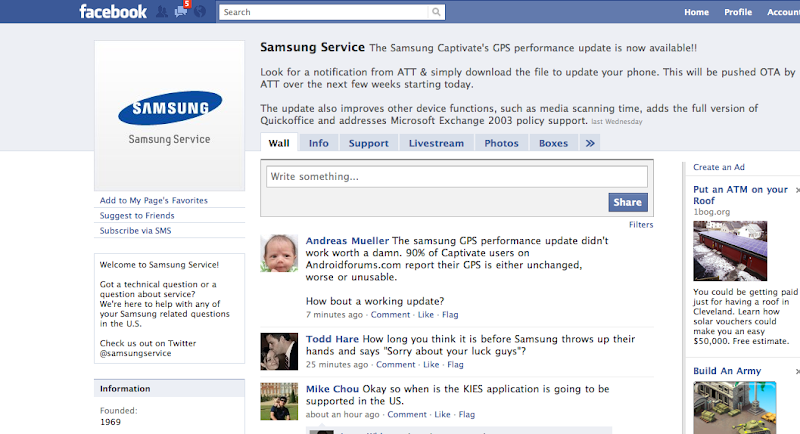
If you are one of the lucky one's who's GPS works now rejoice! Otherwise, if you are still in the 30 days I'd recommend returning the phone if GPS matters to you. Bottom line is, based on the facebook posting out of Samsung I don't think there are any additional updates coming.
If you are one of the lucky one's who's GPS works now rejoice! Otherwise, if you are still in the 30 days I'd recommend returning the phone if GPS matters to you. Bottom line is, based on the facebook posting out of Samsung I don't think there are any additional updates coming.

lordhamster
Member
what I want to know is...how did you take a screen shot of the page like that?
ive always wanted to know how to do that!!
On the Mac I used the Dashboard Widget called Screenshot plus.
On the PC side I can do a similar thing using SnagIt.

MassacrMan
Android Enthusiast
I see no where in that post that GPS is "fixed", I see that they added a performance update. No where were the words "GPS is fixed" used, nice job.
lordhamster
Member
I see no where in that post that GPS is "fixed", I see that they added a performance update. No where were the words "GPS is fixed" used, nice job.
Seriously?
Ok. Let me re-phrase.
<Sarcasm>
"Samsung USA claims they've released a half-assed performance update that helps 5% of users, rejoice".
</Sarcasm>
If another "GPS update" is released before the end of September, I'll eat my hair.
what I want to know is...how did you take a screen shot of the page like that?
ive always wanted to know how to do that!!
Mac: SHIFT + COMMAND + 4.
PC: alt + Prtscn/sysrq key. Next to f12 key
another GPS post great.....why this post is different than the other 100s well is not
just people always think their post is the good one.
please just go away and get an iphone leave this forum and phone alone
another post complaining about a GPS post great.....why this post is different than the other 100s well is not
just people always think their post is the good one.
please just go away and get an iphone leave this forum and phone alone