• After 15+ years, we've made a big change: Android Forums is now Early Bird Club. Learn more here.

Help Android 2.2 update for HTC Desire - Help!!

thom_1999

Lurker
Hi guys,

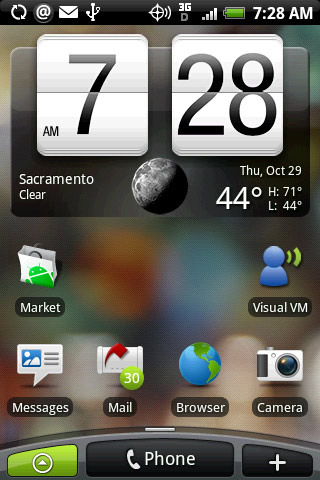
I updated my htc desire to android 2.2 today, all seemed well, when I noticed that the interface resembled the previous version of android 2.1 what I mean by this is I still have the huge clock at the top of the homescreen, and the "phone" button at the bottom with the two buttons on either side for the apps and "add to home". My software number is software number 2.17.61.2 - is this the right version for 2.2 or am I due another update shortly?

Could someone advise me if I've gone wrong somewhere, or how I could correct?

Many thanks
 
What did you expect the 2.2 update to change?

The update will not replace the HTC Sense UI that your Desire is using. It updates the OS capabilities. You can, if you want for some reason, to remove the Sense UI and revert to a plain Android experience.
 
My homescreen after the 2.2 update looks like this...still

Home%20screen%20with%20focus%20on%20applications.jpeg


However on various photos/videos I have seen homescreens for the HTC Desire running Android 2.2 to look like this

Android_2_2.jpg


Have I reason to be worried? I really like the design on 2.2 and was a bit disappointed to see the old 2.1 homescreen on the 2.2 update.
 
That i believe is stock android OS 2.2, while yours is running Sense 2.2

To get the Android OS you would need to root, and install a custom rom.

The other option is to use something like LauncherPro which resembles the Android OS you desire (and does not require you to root).
 
Android 2.2 on the Desire has a user interface called sense that HTC place on top of the android one. That is what you show in the first pic. Stock (vanilla) android looks like pic 2.

you can customise the look of your 2.2 android Desire any way you like, you can remove the clock widget by long pressing it and dragging it to the bin, you can change the clock to another by adding other widgets using the + symbol or by long pressing a clean space on the homescreen.

If you install an alternate launcher app like launcerpro, you can further modify the look of your phone to look like pic 2, or anywhere inbetween, or completely different... its up to you.

take a look at this thread showing other peoples desires:
http://androidforums.com/htc-desire/84650-show-us-your-desire-homescreens.html
 
Back
Top Bottom