
Install the app
How to install the app on iOS
Follow along with the video below to see how to install our site as a web app on your home screen.
Note: This feature may not be available in some browsers.
-
After 15+ years, we've made a big change: Android Forums is now Early Bird Club. Learn more here.
You are using an out of date browser. It may not display this or other websites correctly.
You should upgrade or use an alternative browser.
You should upgrade or use an alternative browser.
Android Battery Should Last All Day according to Google's CEO
- Thread starter monsterenergy22
- Start date
-
- Tags
- motorola droid


Lock-N-Load
Android Expert
Go to settings>about phone>battery use>press cell standby. Some people have been seeing their "Time without a signal" (I think that is the phrase) at around 50%. This means your phone has been constantly searching for a signal and will lead to a lot of battery usage.
mine is 9%
anyway, it does not say "Time without a signal" it says "battery used by cell radio" and "time on" so not sure what your recalling?

SoDroid
Android Enthusiast
mine is 9%
anyway, it does not say "Time without a signal" it says "battery used by cell radio" and "time on" so not sure what your recalling?
If you have "time without a signal", it will look like this:
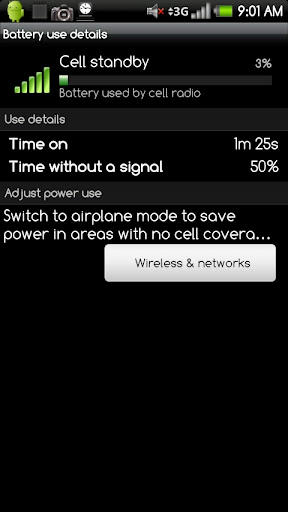
If it doesn't say "time without a signal", then you haven't had any signal loss since your last charge.
Lock-N-Load
Android Expert
If it doesn't say "time without a signal", then you haven't had any signal loss since your last charge.
ahh.. that splains it. That was not clear before, I was expecting to see it and maybe see 0% or something. It was not clear it would not be there.
I guess NOT having that there is a good thing

BTW - you must be rooted, no? to take a screenshot
SoDroid
Android Enthusiast
ahh.. that splains it. That was not clear before, I was expecting to see it and maybe see 0% or something. It was not clear it would not be there.
I guess NOT having that there is a good thing
BTW - you must be rooted, no? to take a screenshot
Its definitely a good thing! Unfortunately I get a lot of signal lost at my house. I'll add that to my original post for clarity.
I am rooted, I use Drocap2 found in the market to take screenshots.The only way to take screenshots without rooting, to my knowledge, is by using ADB. I've never taken a screenshot with ADB though.
Lock-N-Load
Android Expert
Its definitely a good thing! Unfortunately I get a lot of signal lost at my house. I'll add that to my original post for clarity.
I am rooted, I use Drocap2 found in the market to take screenshots.The only way to take screenshots without rooting, to my knowledge, is by using ADB. I've never taken a screenshot with ADB though.
check out an app called No Signal Alert
Lock-N-Load
Android Expert
So it has been about a day since I found out I had 50% waiting for reception and toggled Airplane mode.
I am still at full battery today and my cell standby dropped to 8%. Maybe too early to call this a miracle cure for my battery, but so far so good.
you mention trying some "solution" - what exactly did you do - the toggle airplane mode - as I see a few concepts here
SoDroid
Android Enthusiast
check out an app called No Signal Alert
Just downloaded this. Assuming it works, my plan is to toggle airplane mode whenever this app notifies me that I am loosing signal. I'll try it for a couple days and see if I notice a difference in my battery life. This should really only make a significant difference if you loose signal often daily, which I do, unfortunately.
you mention trying some "solution" - what exactly did you do - the toggle airplane mode - as I see a few concepts here
I just turned on Airplane mode for 10 seconds and then switched back. Not sure yet how often I'm going to have to do this.
Hi guys, just wanted to add my 2 cents... everytime you hook up your phone to the charger make sure you turn your phone off, it will automatically turn itself back on and once charged the battery will last a lot longer, at least for me it does. Just remember this phone is a small computer so it needs to be restarted every once in a while. Hope this helps!
Lock-N-Load
Android Expert
Hi guys, just wanted to add my 2 cents... everytime you hook up your phone to the charger make sure you turn your phone off, it will automatically turn itself back on and once charged the battery will last a lot longer, at least for me it does. Just remember this phone is a small computer so it needs to be restarted every once in a while. Hope this helps!
huh?
I hook mine up to a charger - the dock - off and on all day long. no way I would shut it off to do so, I need to take calls, check email, check calendar, alarms. I can never conceive of a time I am willing to shut my phone of to charge it. never even considered doing this. phone is and will always be on when charging in my world. can't go without it being on.
huh?
I hook mine up to a charger - the dock - off and on all day long. no way I would shut it off to do so, I need to take calls, check email, check calendar, alarms. I can never conceive of a time I am willing to shut my phone of to charge it. never even considered doing this. phone is and will always be on when charging in my world. can't go without it being on.
Do not leave it turned off, a quick reboot is what i meant, just make sure you restart the phone after you plug it in. I do not own a dock but i know when it is plugged in to the regular charger it will automatically turn itself back on after i select turn off. At least from my experience.
I sometimes think we're all talking about completely different phones. For every "great battery life" comment I read, there's someone else like me that's completely fed up with the way the Droid eats the battery... and I have yet to figure out why.
Mine will consistently drain 40-50% of a fully-charged battery in only 4 hours - and that's just sitting there with ZERO use! I've tried everything I can think of: I've tested a number of different ROMs, different kernels, and different speeds. I've even tried under-clocking, but still the same disappointing results. I have stopped every user app that I can, and turned off almost every type of background notification.
I do connect to Exchange email (using Touchdown), but turning push email completely off doesn't help. The only widgets I'm running are Beautiful Smaller Home, Genie (aka News & Weather), Power Manager, and Pure Calendar.
And heaven forbid I actually try to *use* the phone! 30-45 minutes of Web browsing via 3G at fairly low screen brightness, leaves me with only 10-20% left. Just playing a basic Solitaire game for an hour does the same thing.
Thinking it might be the battery itself, I bought a new replacement -- but it drains just as quickly.
I'm at a loss to know what else to try. Looking at battery use stats in Settings or Spare Parts says that it's not any one app sucking the battery dry; the vast majority shows as normal cell and phone standby.
So if anyone has suggestions, I'd be very grateful to hear them. I love this phone, but I have never owned any portable device with worse battery life. What could be wrong?
I'm on your side on this one. The battery simply does not last long enough.
kyleonfire
Well-Known Member
Mine is usually at 30% and below by the end of the day. Rarely can I get away with charging it once every 2 days. Thats what I miss about my voyager is I wouldn't have to charge it every night.