• After 15+ years, we've made a big change: Android Forums is now Early Bird Club. Learn more here.

Help Annoying Message "Prevention Information"

chris2464

Lurker
My phone is displaying the following message randomly, and always when I reboot the phone. No idea why.

"Prevention Information. An application has been forced to stop for an unauthorised attempt to access system on your device. It may be safe to delete an application obtained from an unauthorised route. Check now?"

I then have the option to press OK and my list of applications displays. Or I can press Cancel and the message disappears for a while. I also have tick box for "Do not show for 30 days", which I don't want to press yet until I get some more information.

My phone is a new Note 3, unrooted, with just the normal applications running - all downloaded from PlayStore

Thanks
 
I get the same message on my rooted UK spec Note 3. I got a lot of it when I tried to do a Titanium Backup restore. In the end I had to factory reset the phone and set everything up manually. I'd also like to know specifically what it is and if possible how to disable it. I feel like I don't have full control of my phone.
 
Maybe a pop up ad which has a bug?
... pushed by ad networks like AirPush, Leadbolt etc. and caused by a recently installed or updateted app on your phone.

To be sure you'd install and run a detector app like 'Ad Network Detector' by Lookout.
 
BTW Chris, hi and welcome to Android Forums!

It sounds to me like there may be a root app on the phone. Without root access, it will be denied every time. Check the apps you've downloaded to make sure none are for rooted phones. You said everything you downloaded is "normal"... but that word has little meaning around here, as everyone seems to have their own version of "normal" :p

It’s great to have you here :)
 
....It sounds to me like there may be a root app on the phone. Without root access, it will be denied every time.

I don't think that's the case. :confused: I've had the same message on my phone before I rooted it and afterwards. The message doesn't mention anything about root access. At first I thought it was Knox but I haven't even installed/enabled that. I know when you root the Note 3 you trip what people are calling the Knox counter and so far that can't be reversed. But before I rooted (and also for chris2464 who hasn't rooted) I had that message. I think it's something specific to either Android 4.3 or the Note 3 itself. I'm just glad someone else has had the same message. Sorry chris2464. ;)
 
I have a new un-rooted Note 3 and am getting this message a few times a day as well. All of my apps came from the play store and running Lookout reports no problems.

"Prevention information
----------------------
An application has been forced to stop for an unauthorized attempt to access system in your device. It may be safe to delete an application obtained from an unauthorized route. Check now?"

And like the others said. There is no mention of which application did it. And when you select 'OK' it just goes to the list of downloaded applications. Nothing is highlighted or gives any hint. The only option really is to start uninstalling apps until you find the one and since it happens randomly it could take quite a bit of uninstalling.
 
For to find at least the app which caused the message you'd try 'Notification History'.
 
My phone is displaying the following message randomly, and always when I reboot the phone. No idea why.

"Prevention Information. An application has been forced to stop for an unauthorised attempt to access system on your device. It may be safe to delete an application obtained from an unauthorised route. Check now?"

I then have the option to press OK and my list of applications displays. Or I can press Cancel and the message disappears for a while. I also have tick box for "Do not show for 30 days", which I don't want to press yet until I get some more information.

My phone is a new Note 3, unrooted, with just the normal applications running - all downloaded from PlayStore

Thanks
Uninstall apps until it you're no longer able to recreate the error. Just because it was in the Play Store doesn't mean it will work on an unrooted phone, or gets along with Knox.

Whatever app it is, likely isn't running correctly anyway.
 
I think the cause of this message is in the phone's Settings -> Security -> Verify apps ...

But I'd not want to uncheck the option ;)
 
The problem is none of the above. My Note 3 did this right out of the box, with nothing new downloaded. The only apps on the phone is what it came with. Samsung was no help. Unchecking the box to verify apps in the security settings has no effect, the box is unchecked on my phone.
 
I started having that message myself, today. It was after I had activated that Lookout app though.

I just cut it off. Will see if that makes a difference. Do you have that app?

I clicked the '30 day' thing though, so won't know if that was it or not.
 
My phone is displaying the following message randomly, and always when I reboot the phone. No idea why.

"Prevention Information. An application has been forced to stop for an unauthorised attempt to access system on your device. It may be safe to delete an application obtained from an unauthorised route. Check now?"

I then have the option to press OK and my list of applications displays. Or I can press Cancel and the message disappears for a while. I also have tick box for "Do not show for 30 days", which I don't want to press yet until I get some more information.

My phone is a new Note 3, unrooted, with just the normal applications running - all downloaded from PlayStore

Thanks
This started on my nonrooted N3 a cpl days ago as well. First I had an incoming call problem with the number coming in with a ;63 or ;00 afterwards. Immediately after that seemed to clear up, this "prevention" message started. One issue after another. Waited a long time to finally get a Note phone but now I'm thinking I should have stuck with my regular Sammy S Series phones.
 
My phone is displaying the following message randomly, and always when I reboot the phone. No idea why.

"Prevention Information. An application has been forced to stop for an unauthorised attempt to access system on your device. It may be safe to delete an application obtained from an unauthorised route. Check now?"

I then have the option to press OK and my list of applications displays. Or I can press Cancel and the message disappears for a while. I also have tick box for "Do not show for 30 days", which I don't want to press yet until I get some more information.

My phone is a new Note 3, unrooted, with just the normal applications running - all downloaded from PlayStore

Thanks
I'm seeing many across the net with similar problems and everyone saying it's a system problem with KNOX. Smh
 
I am also getting the 63 after phone calls. I do not see lookout on my phone and I have not downloaded/activated knox. I do have a shortcut to download Knox but have not used it. I am sending the Note 3 back. Does anyone know if the T-Mobile Galaxy S4 updates via air or updates via Kies?
 
This is first Sammy phone I have had that Kies applies to, so i do not know.

I sort of think it would update either way though, when there is an update available for them to push out to you. Seems like they only push out a limited number in a timeframe though.

Regarding Knox, supposedly I have that disabled, at this point.
 
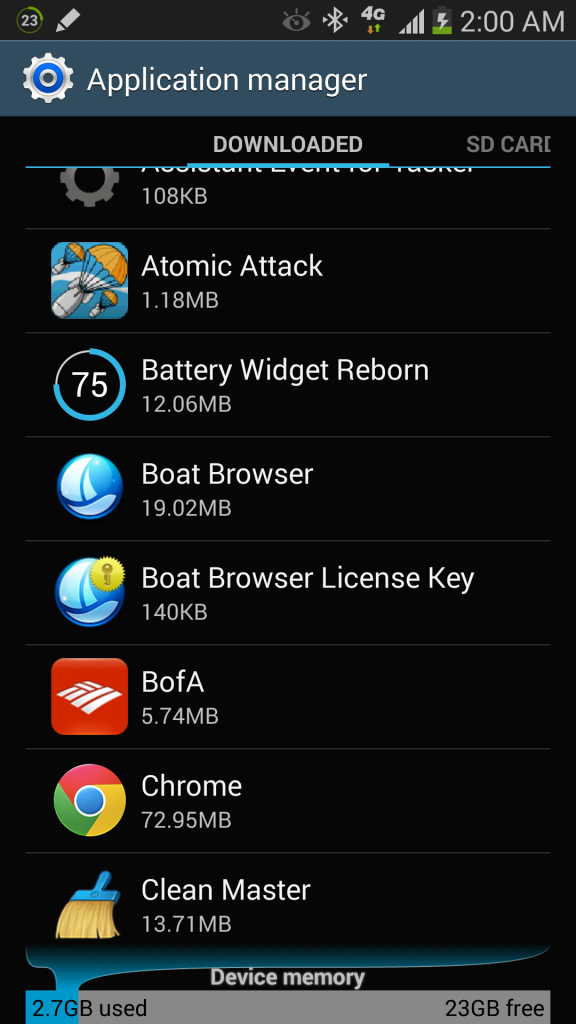
I get the message as well. I think it relates to the Boat Browser activation .apk I downloaded. It was the only app with a ? mark on it when I checked the programs. Now I just have to figure out how to stop it.
 
I am most certain this has to do with starting or opening knox for the first time.. I had my N3 since day one and never once had this message.. Just the other day I decided to open knox to see what it was.. Halfway thru setting it up I just cancelled and closed it.. Since then I noticed that this message started to pop up.. I had no clue what it was but now after thinking about it I know that's the problem.. I have since done a clean wipe /install and don't plan on touching the knox app nor opening it and so far so good
 
I get the message as well. I think it relstes to the Boat Browser activation .apk I downloaded it was the only app with a ? mark on it when I checked the programs. Now I just have to figure out how to stop it.

Boat doesn't need to be "activated" does it? Just install and use, that's it AFAIK. I'd be suspicious of an app that just had "?" for a title or ID though. Where did that come from?
 
The question mark was like a tag on the app name itself. I'll post a picture in a few minutes. I have to power down to get the message and status bar icon to show up again.

I downloaded the activation to get all the premium features Boat Browser has. Plus I didn't mind sending a little cash those folks way.
 
I think the cause of this message is in the phone's Settings -> Security -> Verify apps ...

But I'd not want to uncheck the option ;)
I unchecked it but it didn't help. Here's that screenshot of what I think is causing it on mine. Tapping on the message in the notification window to take this shot erased the icon on the status bar though. It looked like a gray shield.

Screenshots_2013-11-01-02-00-17_zps5dd27827.png


Darn. Now that I looked at it closely that's a key not a question mark. Back to the drawing board...
 
Whenever disconnecting or connecting to Wifi I would also get the Prevention message.
My work around, Press and hold the Prevention notification message, then stop knox and clear cache. No messages since.
 
Hello everyone,

Here are two things that I did.

About the message: "an application has been forced to stop for an unauthorized attempt to access system in your device", I may have found the solution. While playing with the S Health application on my Note 3, Samsung asked to update the application. I updated the S Health application as asked by Samsung, and voila, the message does no longer show. It has now been about 5 hours with or without WiFi, and with several restarts, and still no message with the shield. Keep my fingers crossed.

Hope this helps. Please pass the info along.

Rolf Schreiner

Note: The updated S Health Samsung app is version: SH-V25H ver 2.5.3.49

Another update:
The message seems to appear every time that you connect to WiFi...
To kill the message on Note 3:
When the message appears, long press on it. It will show you the app info: the Knox notification manager. Then "clear cache" and "clear data", clear the message, and the message will no longer show, until the next reboot...
 
Back
Top Bottom