• After 15+ years, we've made a big change: Android Forums is now Early Bird Club. Learn more here.

Apps anyone good with apk tool?

Lordvincent 90

▓▓▓▓▓▓▓▓▓▓▓▓▓▓▓▓▓▓▓▓
im trying to make some changes to secsettings.apk on my galaxy rush and i keep getting some errors.

if i decompile and recompile without making any changes it builds fine.

but once i make the changes (trying to add an additional menu) i get this error
Code:
Exception in thread "main" brut.androlib.AndrolibException: brut.androlib.AndrolibException: brut.common.BrutException: could not exec command: [aapt, p, --min-sdk-version, 16, --target-sdk-version, 16, -F, C:\Users\Admin\AppData\Local\Temp\APKTOOL2329342052280133144.tmp, -I, C:\Users\Admin\apktool\framework\1.apk, -S, C:\users\admin\_working\SecSettings.apk\res, -M, C:\users\admin\_working\SecSettings.apk\AndroidManifest.xml]
    at brut.androlib.Androlib.buildResourcesFull(Androlib.java:358)
    at brut.androlib.Androlib.buildResources(Androlib.java:283)
    at brut.androlib.Androlib.build(Androlib.java:206)
    at brut.androlib.Androlib.build(Androlib.java:176)
    at brut.apktool.Main.cmdBuild(Main.java:228)
    at brut.apktool.Main.main(Main.java:79)
Caused by: brut.androlib.AndrolibException: brut.common.BrutException: could not exec command: [aapt, p, --min-sdk-version, 16, --target-sdk-version, 16, -F, C:\Users\Admin\AppData\Local\Temp\APKTOOL2329342052280133144.tmp, -I, C:\Users\Admin\apktool\framework\1.apk, -S, C:\users\admin\_working\SecSettings.apk\res, -M, C:\users\admin\_working\SecSettings.apk\AndroidManifest.xml]
    at brut.androlib.res.AndrolibResources.aaptPackage(AndrolibResources.java:357)
    at brut.androlib.Androlib.buildResourcesFull(Androlib.java:336)
    ... 5 more
Caused by: brut.common.BrutException: could not exec command: [aapt, p, --min-sdk-version, 16, --target-sdk-version, 16, -F, C:\Users\Admin\AppData\Local\Temp\APKTOOL2329342052280133144.tmp, -I, C:\Users\Admin\apktool\framework\1.apk, -S, C:\users\admin\_working\SecSettings.apk\res, -M, C:\users\admin\_working\SecSettings.apk\AndroidManifest.xml]
    at brut.util.OS.exec(OS.java:89)
    at brut.androlib.res.AndrolibResources.aaptPackage(AndrolibResources.java:355)
    ... 6 more
anyone have any insight?
this is the guide i followed, if that helps any
http://forum.xda-developers.com/showthread.php?t=2341389

 
Hey, LV! :)

Did the .apk you had me build from my side work in your ROM?

Also, did you get your build to work using my aapt.exe?

I didn't see any "eureka!" posts in our Google Hangout from last night after I crashed for the evening, but crossing fingers :).
 
Hey, LV! :)

Did the .apk you had me build from my side work in your ROM?

Also, did you get your build to work using my aapt.exe?

I didn't see any "eureka!" posts in our Google Hangout from last night after I crashed for the evening, but crossing fingers :).

Your apk worked fine. After that i got tired and feel asleep :o I'll give it a go when i get back home from work
 
Well, still no go. Tried it using the same guide I linked above using the apktool you sent me.

I also found this guide
http://mobility.forumsee.com/a/m/s/...ng-adding-applications-the-settings-menu.html
Which has an additional step involving public.XML
(Well, I guess another member found it and posted the link... I just 'found' it in the thread I created in my device's section)

I'm still getting the same error
 
Hmm, weird...wonder if it's a Windows issue?

I'm on Windows 7 Professional, 64 bit processor.

Lemme do the build thing with your files...just getting re-settled from today's goings-on...

I'll let you know here in a bit.
 
Hmm, weird...wonder if it's a Windows issue?

I'm on Windows 7 Professional, 64 bit processor.

Lemme do the build thing with your files...just getting re-settled from today's goings-on...

I'll let you know here in a bit.

I'm running 7 ultimate 64bit.
(PS, I had to edit your apktool.bat)
I changed
Code:
C:\Program Files (x86)\java\jre7\bin\java.exe
To
Code:
C:\Program Files\java\jre7\bin\java.exe
which is the path to java on my laptop.
 
Well, sort-of "good news": I'm getting the same build error with your files that you reported above.

I think that tells us that's it's related to the changes that you've made vs. the build environment.

Agree?

If so, I think I'd start with a series of small changes until you run into the one that gives you issues--then you'll know what the offending code change was.
 
Hey LV!

Just got around to doing a comparison between the two sets of files and wanted to ask if it's just differences in the strings.xml and settings_headers.xml files?

If so, I can try to do the incremental changes on my .apk set from last night (that I presume was the base .apk and didn't include your changes).

Lemme know and I'll see what trips me up with the build errors and we can compare notes.

Thanks!
 
Okay, no problems building with the original SecSettings files and the changes to the strings.xml file :thumbup:.

Now onto the settings_headers.xml file...(wish me luck! :))
 
Okay, getting the build error again--but that's kind of good...

Ah, I have an idea (now that I can see what your code changes are...).

Gimme a few to dig into things...
 
Well... I have some kinda 'good news' I got it to build but it bootlooped. But at lease I'm one step closer... the strange thing is I didn't do anything differently. What i did was follow the guide to a t (using the app in the example... rom toolbox) and it built fine. So I then went back to my working directory and changed it to match the info in the app I want to add and again it built fine... ... :confused:


*turns to logcat for answers*
 
I'm thinking / guessing that you need changes / tweaks to the AndroidManifest.xml file like you mentioned last night.

I think the apktool build is looking for the references in the settings_headers.xml file, but I don't know exactly what you need.

My brain's pretty mush tonight, but I'll re-read the XDA thread tomorrow and try again.

:p (closer, but not there yet!)
 
Yea, I'm not giving up... but since I did it with a clean install. USB debugging isn't turned on :facepalm:

Thanks for all the help. It has to be something simple I'm missing. (I only followed the steps in the first guide I linked, so I'm going to try again with the edits to public.xml. )

I'll be sure to post my results here :)
 
Yea, I'm not giving up... but since I did it with a clean install. USB debugging isn't turned on :facepalm:

Thanks for all the help. It has to be something simple I'm missing. (I only followed the steps in the first guide I linked, so I'm going to try again with the edits to public.xml. )

I'll be sure to post my results here :)

I use apk multitool on win7, but pretty sure its a similar process

the public.xml gets automatically built on compile, so making changes to it just complicates stuff. like when you add a resource(images or whatever), you can compile and it adds a ID for it by itself (like 0x0703134). the guides that make you add a resource id make things harder. I always make changes, compile, decompile, then check what ID it has, cuz it can be different for every added item.

and changing the manifest on a system file means you will need the system UID or it will bootloop.

what do you get the bootloop, when you try to click on the added menu? or can you not open settings at all?

Once it builds and you can put it on your phone, it is much easier to logcat the errors. post your logcat if you can (specifically the Exception and casued by part.)
 
It bootloops as in won't even fully boot the rom. It gets stuck at the bootanimation. I tried both flashing it with a fresh install of the rom, and by copying it with esfile explorer. Once I reboot, it just hangs.
 
eh I hate those.

just out of curiosity, does your phones settings.apk use the same style form the guide you followed

<header android:title...></header>

style or is it more like this

Code:
<PreferenceCategory android:title="@string/settings_icscamwich" />
    <com.android.settings.IconPreferenceScreen android:title="@string/settings_icscamwich" settings:icon="@drawable/ic_launcher_settings">
             <intent android:targetPackage="com.vdevs.icscamwichsettings" android:action="android.intent.action.MAIN" android:targetClass="com.vdevs.icscamwichsettings.MainActivity"" />
    </com.android.settings.IconPreferenceScreen>
    <com.android.settings.IconPreferenceScreen android:title="@string/overclocktool_title" settings:icon="@drawable/ic_overclocktool">
             <intent android:targetPackage="it.sineo.android.noFrillsCPUClassic" android:action="android.intent.action.MAIN" android:targetClass="it.sineo.android.noFrillsCPUClassic.activity.MainActivity" />
    </com.android.settings.IconPreferenceScreen>
    <com.android.settings.IconPreferenceScreen android:title="@string/qp_options" settings:icon="@drawable/qp_settings">
              <intent android:targetPackage="com.lidroid.quickpanel" android:action="android.intent.action.MAIN" android:targetClass="com.lidroid.quickpanel.MainActivity" />
    </com.android.settings.IconPreferenceScreen>
    <com.android.settings.IconPreferenceScreen android:title="@string/lockscreen_title" settings:icon="@drawable/ic_launcher_settings">
                <intent android:targetPackage="com.mobint.locker" android:action="android.intent.action.MAIN" android:targetClass="com.mobint.locker.SettingsActivity" />
    </com.android.settings.IconPreferenceScreen>
cuz you have to follow the convention you phone uses. I thought that sony and htc used <header> and other phones didnt but im not 100% about that.

also, you didnt put the cr/lf stuff right? i dont know what thats about.

and if your using notepad++, make sure to check in Edit/EOL conversion that it is set to UNIX conversion and not Windows. that used to give me lots of problems.

and your logcat might not be helpful yet at that point, buts it's always worth a look.

just going through some checklist stuff to try and help ya.
 
eh I hate those.

just out of curiosity, does your phones settings.apk use the same style form the guide you followed

yeah my settings.apk looks the same.

<header android:title...></header>

style or is it more like this

[Hide]
Code:
<PreferenceCategory android:title="@string/settings_icscamwich" />
    <com.android.settings.IconPreferenceScreen android:title="@string/settings_icscamwich" settings:icon="@drawable/ic_launcher_settings">
             <intent android:targetPackage="com.vdevs.icscamwichsettings" android:action="android.intent.action.MAIN" android:targetClass="com.vdevs.icscamwichsettings.MainActivity"" />
    </com.android.settings.IconPreferenceScreen>
    <com.android.settings.IconPreferenceScreen android:title="@string/overclocktool_title" settings:icon="@drawable/ic_overclocktool">
             <intent android:targetPackage="it.sineo.android.noFrillsCPUClassic" android:action="android.intent.action.MAIN" android:targetClass="it.sineo.android.noFrillsCPUClassic.activity.MainActivity" />
    </com.android.settings.IconPreferenceScreen>
    <com.android.settings.IconPreferenceScreen android:title="@string/qp_options" settings:icon="@drawable/qp_settings">
              <intent android:targetPackage="com.lidroid.quickpanel" android:action="android.intent.action.MAIN" android:targetClass="com.lidroid.quickpanel.MainActivity" />
    </com.android.settings.IconPreferenceScreen>
    <com.android.settings.IconPreferenceScreen android:title="@string/lockscreen_title" settings:icon="@drawable/ic_launcher_settings">
                <intent android:targetPackage="com.mobint.locker" android:action="android.intent.action.MAIN" android:targetClass="com.mobint.locker.SettingsActivity" />
    </com.android.settings.IconPreferenceScreen>
[/spoiler]
cuz you have to follow the convention you phone uses. I thought that sony and htc used <header> and other phones didnt but im not 100% about that.

also, you didnt put the cr/lf stuff right? i dont know what thats about.

HAHA. Of course I didn't :D:p

and if your using notepad++, make sure to check in Edit/EOL conversion that it is set to UNIX conversion and not Windows. that used to give me lots of problems.

I am using notepad++. It is set correctly. I know windows uses a different carriage return than Unix. I've edited several other apks using notepad++ before and was successful.

and your logcat might not be helpful yet at that point, buts it's always worth a look.

just going through some checklist stuff to try and help ya.

I appreciate the help. :)
I'm probably not going to get a chance to work on this until Friday night. (I'm driving to Milwaukee, WI tonight for work, but its just a there-and-back)
 
Yay! Progress!
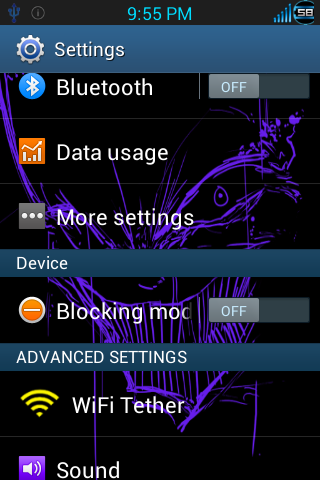
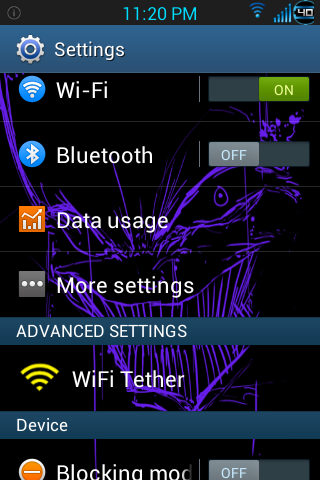
Screenshot_2013-09-07-21-56-10_zps2e5f3658.png


The only downside is I had to use the stock sec settings.apk the one we were using was from teamblackout. It works 'as is' in the rom, but it seems that making changes breaks it. :confused:

(And yes I know the header is out of place... but its more proof of concept)
 
Nice job, do you know how hard this would be to do on say a pac man rom? Or Cyanogenmod?

I imagine it wouldn't be any harder than this was. If the format is the same it would essentially be the same exact process. If the format is different, you would just need to find the correct edits to make it function.
 
Back
Top Bottom