
• After 15+ years, we've made a big change: Android Forums is now Early Bird Club. Learn more here.

Root APN settings

verdooch96

Well-Known Member
Is there a way to edit the APN settings already in the metro l70 or would one just have to select add APN and modify as wanted?
TY
 
Their is an app on the market called short cut master ..use it create a shortcut to hidden menu . The app needs root or its not going to work. But in the hidden menu u will find APN unlock and APN edit. I edited mine to Fast.t-mobile.com and boy u really tell the difference
 
Once inside sc master click app explorer scroll down to com.lge.hidden menu.com .Click the hiddenmenu and another list of menus will come up. Inside these menus look for APN unlock . Once u press APN unlock it will ask u to create a short cut, or launch .. U want to launch it . It will bring up a simple screen just says unlock APN. Click on the words. And now u will be able to edit your apn. Now go back to the hidden menu and find APN settings from there u can edit it.
 
Unlocked APN then went back to hidden menu it wasnt there. The only thing that was there with apn in its name was apn delete. What could i have done wrong?

FOUND IT...mine was already set to fast and it has no other options. So, cool.
 
Their a lot of other interesting stuff those menu more menus another menu I found was the modem it. Lets u change the different type of wcmda network that u can connect. I'm trying to find a way. To stay connected to utms network do that when our data plan is reach we can stay away from hpsa+ which be dramatily showed once it's up
 
I don't know if it's a good idea to change it.

bzo22 changed his to fast.t-mobile.com.
When I tried to change mine in the regular settings menu it said the fast.t-mobile.com network was unavailable.

I guess you could change it, and see if it makes any difference (use "Floating Network Monitor" from the PlayStore). If it doesn't work, change it back.
 
Make. Sure u all or capitalizing. The f it had to be exactly this Fast.t-mobile.com. It is case sensitive
 
Ok. I thought it was a typo.
Can you give us more concrete evidence of it improving data connection and speed?
Give us speed with that setting, then speed with the metropcs setting.
 
Their is an app on the market called short cut master ..use it create a shortcut to hidden menu . The app needs root or its not going to work. But in the hidden menu u will find APN unlock and APN edit. I edited mine to Fast.t-mobile.com and boy u really tell the difference

Is your provider Metro or Tmobile?
Can you list any APN settings you're using for either?
Ty.
 
I think some speed test with both settings are going to be needed before anybody is convinced to try changing APN.

Could you post those please?
 
I change it from fast.metro.pcs.com to Fast.t-mobile.com that's the only thing I change
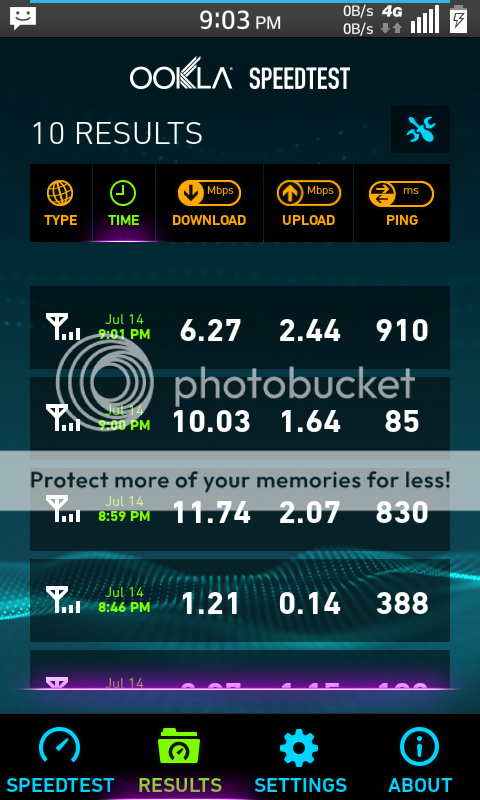
Got some speed test resuts as requested?
That would be really helpful.
If the t-mobile setting is faster than the metropcs setting I'll change in a heart beat, but I've got to see some hard evidence instead of just speculation.
 
Are you using the forum app on your phone, or a computer?

To add from phone you need to first post in Photo Bucket then copy link and paste in. You shouldn't need url wrappers if using Photo Bucket.

From computer you need to select the advanced edit. There should be an option to upload attachment from computer.
 
Screens
Screenshot_2014-07-14-21-03-34.png
[/URL][/IMG]

Screenshot_2014-07-14-13-18-12.png
[/URL][/IMG]
 
I gave this a try, these are my speed test results. bottom one is the 4G metropcs untouched, second middle is with my WiFi on, & the third top is with the APN edited to T-mobile.

2j0gjmh.png
 
Ok. Now that's what I'm talking about.

Looks like the winner is Fast.t-mobile.com
 
Um, I changed mine to the Fast.t-mobile.com and now i get no service. Changed it back, still no service. Also, where it shows in the pic above it says name then APN...well mine says APN NI...is that an issue? Now Im getting Network Communication Issue and no Internal IP on speedtest. I tried my web and it gets no service. Cant get Play store. No email. Did I screw myself? Help me out here, please.

So, it looks like Network Identifier is jacked now.
 
Edited to:
T-Mobile
Fast.t-mobile.com
Saved.
Rebooted phone.
Network unavailable.

Changed back to default. Network is now available.

I guess here in Lakeland, Florida T-Mobile just haven't got as many towers as a big city.
 
Back
Top Bottom
