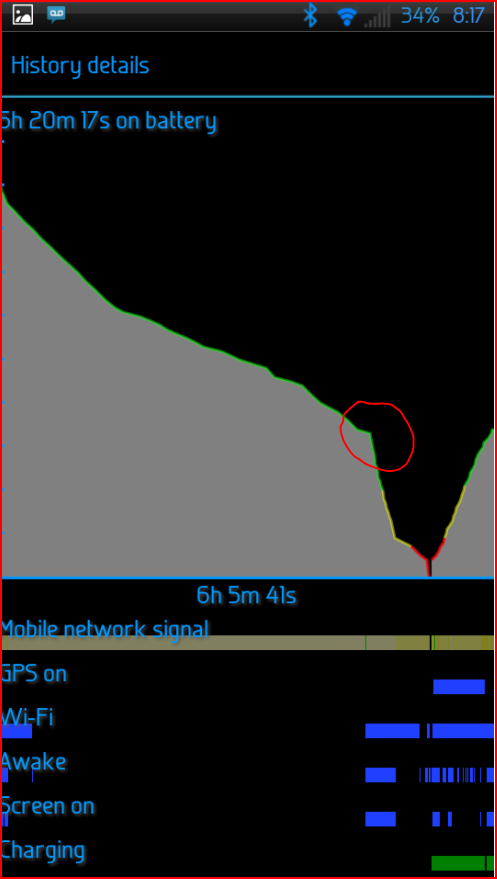
I used to have ICS ROM and it was working properly. One week ago, I flashed two JB ROMs and met some serious problems. One is CM10 by g60madman, another is AlienDroid|V1.0, I have same issues under these two different ROMS, so I assume the problem is from somewhere else.
The issue:
1. Battery drains very fast. My newly bought and fully charged Seidio 3500mAh extended battery drops to 10% battery within seven hours during my sleep, and I can confirm the screen is kept off and no serious apps running background. Changes to another battery, got similar results and only dies faster. I checked Android Battery option and found out the "Android System" ate 70% of the battery.
2.System apps growing very fast. I still have 700MB place available yesterday on the ROM and today it runs out, and I didn't install any apps yesterday. I used tools to check it and found out the "Android System" occupies like 800MB and obviously it is growing to squeeze all the room.
I suspected that it may be malware or virus that's doing bad things to my phone. I used Avast mobile version to scan the phone and SD card but didn't find anything wrong.
Can anyone help me here? Thanks.
The issue:
1. Battery drains very fast. My newly bought and fully charged Seidio 3500mAh extended battery drops to 10% battery within seven hours during my sleep, and I can confirm the screen is kept off and no serious apps running background. Changes to another battery, got similar results and only dies faster. I checked Android Battery option and found out the "Android System" ate 70% of the battery.
2.System apps growing very fast. I still have 700MB place available yesterday on the ROM and today it runs out, and I didn't install any apps yesterday. I used tools to check it and found out the "Android System" occupies like 800MB and obviously it is growing to squeeze all the room.
I suspected that it may be malware or virus that's doing bad things to my phone. I used Avast mobile version to scan the phone and SD card but didn't find anything wrong.
Can anyone help me here? Thanks.