
Is there anyway to get the battery percentage on top of or somewhere next to the battery icon in the status bar? I use Battery Indicator right now, but I'd rather have it on the battery icon like the iPhone has it. It's kinda hard to believe a smartphone wouldn't have an option to display the battery percentage.
Install the app
How to install the app on iOS
Follow along with the video below to see how to install our site as a web app on your home screen.
Note: This feature may not be available in some browsers.
-
After 15+ years, we've made a big change: Android Forums is now Early Bird Club. Learn more here.
You are using an out of date browser. It may not display this or other websites correctly.
You should upgrade or use an alternative browser.
You should upgrade or use an alternative browser.
Help Battery Percentage
- Thread starter Emrys
- Start date
-
- Tags
- htc evo 4g

ScorpDX
Android Expert
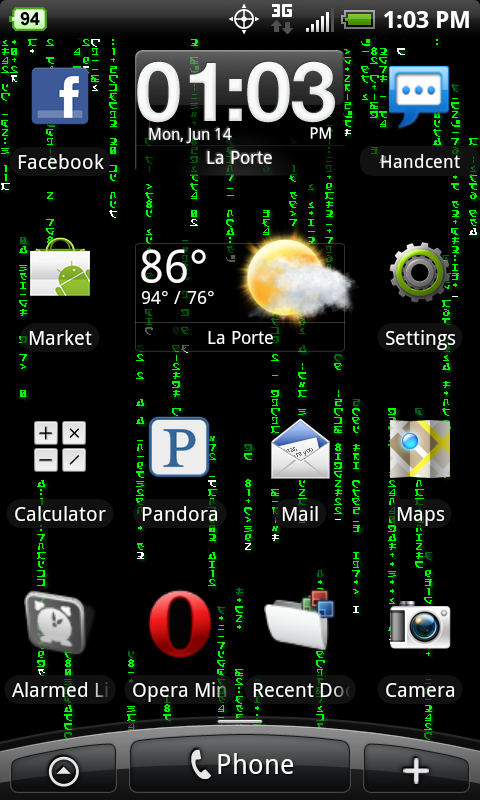
That's still not what I'm asking for, I'm asking for ON TOP OF or NEXT TO the battery icon on the right side of the notification bar. Every app I have found is either a widget, or displays it as a general notification instead of as part of the system notifications. I'm wondering if theres any kind of mod for root users or anything that could change this?
ScorpDX
Android Expert
You didn't state on the right side to begin with, you just said next to. Next to means next to, not next to on the right. Good luck finding what you asked the second time around...That's still not what I'm asking for, I'm asking for ON TOP OF or NEXT TO the battery icon on the right side of the notification bar.
Is there anyway to get the battery percentage on top of or somewhere next to the battery icon in the status bar?
heavychevy
Android Expert
For a nitpicky question like that I would think you might want to try having a little patience with people who took their time to at least try and help you....

sagedil
Android Expert
If you would reread my post, you'd see I already mentioned I'm using Battery Indicator. If you would of paid even more attention you'd see thats not what I'm asking for. Thanks anyways though.
Well. I can at least promise you this. Most people will never try and help you again. Well done.
+1Well. I can at least promise you this. Most people will never try and help you again. Well done.
Well. I can at least promise you this. Most people will never try and help you again. Well done.
I don't mean for it to sound rude, but seriously, why would someone post in a topic to answer a question without reading the post? He suggested the exact same app that I already mentioned I had installed.
ScorpDX
Android Expert
I can see where that 3" is a killer strain to move ones eye.I'm sorry, I thought it would be clear enough by saying next to. Generally next to implies right next to something, not across the screen.
I live "next to" my neighbor, but I guess by your definition the 500' between us means I don't live "next to" him??? Oh, I live "next to" one on the right and left also!
It's not the space per say that bothers me, I'd just like it away from the notification area right there to free up space. Once you get a couple emails, texts, and such there is no longer room to display all the notifications on the status bar so you get the little icon sayings theres more. It's not a big problem, it's just something I was looking for to see if theres a mod for it.
sagedil
Android Expert
Well. I can at least promise you this. Most people will never try and help you again. Well done.
I don't mean for it to sound rude, but seriously,.
But you WERE rude. And stuff just happens. We are not Robots. See how many thanks I have? Much of my time here is devoted to helping folks. But I am not perfect, I screw a post up occasionally.
But to react the way you did? Just wrong. Suggest just apologizing for it and we can move on.
certifiedfryguy
Newbie
Does this app consume any more Battery? This is my first time back to Android Since i had the Moto Droid, then the Eris (then i went to a blackberry) And now i have a Evo. Anyway i do remember certain battery status apps actually drained the battery even more.
So i'm curious if you noticed any battery performance loss since you've installed this?
certifiedfryguy
Newbie
Exactly what i'm looking for then.
Thanks!
Thanks!
Does this app consume any more Battery? This is my first time back to Android Since i had the Moto Droid, then the Eris (then i went to a blackberry) And now i have a Evo. Anyway i do remember certain battery status apps actually drained the battery even more.
So i'm curious if you noticed any battery performance loss since you've installed this?
I'm not sure about that app, but Battery Indicator, as far as I can tell, does not drain the battery. They look to be the same, besides the graphics.

TF1984
Android Enthusiast
WOW! I just have to say, I'm with the OP.
Senior member comes in, briefly scans the post and answers with the exact app mentioned in the original post. Then you try to blast the OP for not having patience?
Maybe we should all take a little more care of what we are posting and the threads wouldn't cause such headaches trying to sift through the useful information. I for one knew and understood exactly what the OP was inquiring about, course I did read his entire question before moving on.
And I am not burning anyone, but I think the OP deserves a little defense here based on the side of logic.
Senior member comes in, briefly scans the post and answers with the exact app mentioned in the original post. Then you try to blast the OP for not having patience?
Maybe we should all take a little more care of what we are posting and the threads wouldn't cause such headaches trying to sift through the useful information. I for one knew and understood exactly what the OP was inquiring about, course I did read his entire question before moving on.
And I am not burning anyone, but I think the OP deserves a little defense here based on the side of logic.
ok i understand where i was wrong in this and i admit that, its just how he responded to it.WOW! I just have to say, I'm with the OP.
Senior member comes in, briefly scans the post and answers with the exact app mentioned in the original post. Then you try to blast the OP for not having patience?
Maybe we should all take a little more care of what we are posting and the threads wouldn't cause such headaches trying to sift through the useful information. I for one knew and understood exactly what the OP was inquiring about, course I did read his entire question before moving on.
And I am not burning anyone, but I think the OP deserves a little defense here based on the side of logic.
TF1984
Android Enthusiast
ok i understand where i was wrong in this and i admit that, its just how he responded to it.
Well +1 to you for owning up. I think his response is a matter of perspective, I am a pragmatic person and to me I see his replies as simply trying to outline WHERE you guys MISSED what he ASKED about.
See, I mean no aggression, just trying to highlight the key points. anyway, you guys have fun.
WOW! I just have to say, I'm with the OP.
Senior member comes in, briefly scans the post and answers with the exact app mentioned in the original post. Then you try to blast the OP for not having patience?
Maybe we should all take a little more care of what we are posting and the threads wouldn't cause such headaches trying to sift through the useful information. I for one knew and understood exactly what the OP was inquiring about, course I did read his entire question before moving on.
And I am not burning anyone, but I think the OP deserves a little defense here based on the side of logic.
I could be wrong.. have been in the past.. but I learned that if you go in somewhere asking for help on something.. the last thing you do is blast the person that's trying to help you, especially when its an honest mistake... maybe its just wisdom on my part I don't know... It actually took me reading it again to catch that he had battery indicator....
Maybe a response such as, "sorry, I've already tried that one, but I'm looking for one that indicates % on top of the stock indicator" ... see how I deflected and restated my initial question?
You catch more flies with honey than with vinegar....

edlex
Android Expert
ScorpDX said:
Don't mean to highjack the thread but, where did you get that wallpaper? Is it video?
edlex
Android Expert
ScorpDX said:"The matrix live wallpaper" found in the market. Yes it scrolls...
Thank you for the quick reply. First thing I'm getting as soon as I get my evo. Now back to refreshing sprint store online......waiting......refresh....