
ROM: BCM Cyanogenmod 9 Ice Cream Sandwich for GSM and CDMA phones
Device: HTC Desire CDMA
Provider: Us Cellular
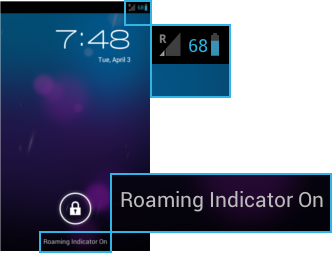
This is to fix the false roaming indicator icon while using BCM Cyanogenmod 9 ICS rom on the HTC Desire CDMA for Us Cellular.
I didn't come up with this, but liamf1 helped me fix mine (as seen in the posts below), so if you are going to thank anyone, thank him. (Go down to his post, post number 6, and click the thanks button below it to the right.)
First, before we begin, lets see if you are actually roaming or not... Go to Menu > System Settings > About Phone > Status, scroll down to where it says "Roaming" if it says "Not Roaming" underneath it, then proceed to follow these directions.

Needed:
A File Explorer/Manager: ES File Explorer or Root Browser
I used Root Browser, because I couldn't get ES File Explorer to work on my phone. It worked like a charm. They can be found in the Google Play Store.
A Text Editor: Jota Text Editor It can be found in the Google Play Store.
Thank liamf1 for posting these directions.
Directions:
01: Download a text editor.
(Jota Text Editor)
02: Download a file manager like root explorer.
(ES File Explorer or Root Browser)
03: Head over to http://dl.dropbox.com/u/30169771/eri.xml (from your phone).
04: Highlight text from eri.xml and copy to clipboard.
05: Open text editor and paste text from eri.xml into a new document.
06: Save as eri.xml
07: Open ES Root Explorer, or Root Browser.
08: Mount as R/W
(If on Root Browser, you don't have to do this, at least I didn't anyway.)
09: Find the eri.xml that you just created.
10: Select move from the menu.
11: Move eri.xml to phone/data/
12: Reboot to make changes take effect.
(Wait a minute or two, mine didn't take effect for about a minute. If it doesn't do it this time, try rebooting again.)
If done correctly, you should see this:


My original post.
Hey guys, i flashed Bcm cm9 ics GSM/cdma rom and everything went great and I'm loving it, but it shows the roaming icon and on the notification bar it says roaming indicator on, but when I go to settings under roaming it says not roaming... so am I roaming, or not?
Fixed thanks to liamf1, if this helped you too, thank him!
Thanks!!!
Device: HTC Desire CDMA
Provider: Us Cellular
This is to fix the false roaming indicator icon while using BCM Cyanogenmod 9 ICS rom on the HTC Desire CDMA for Us Cellular.
I didn't come up with this, but liamf1 helped me fix mine (as seen in the posts below), so if you are going to thank anyone, thank him. (Go down to his post, post number 6, and click the thanks button below it to the right.)
First, before we begin, lets see if you are actually roaming or not... Go to Menu > System Settings > About Phone > Status, scroll down to where it says "Roaming" if it says "Not Roaming" underneath it, then proceed to follow these directions.
Needed:
A File Explorer/Manager: ES File Explorer or Root Browser
I used Root Browser, because I couldn't get ES File Explorer to work on my phone. It worked like a charm. They can be found in the Google Play Store.
A Text Editor: Jota Text Editor It can be found in the Google Play Store.
Thank liamf1 for posting these directions.
Directions:
01: Download a text editor.
(Jota Text Editor)
02: Download a file manager like root explorer.
(ES File Explorer or Root Browser)
03: Head over to http://dl.dropbox.com/u/30169771/eri.xml (from your phone).
04: Highlight text from eri.xml and copy to clipboard.
05: Open text editor and paste text from eri.xml into a new document.
06: Save as eri.xml
07: Open ES Root Explorer, or Root Browser.
08: Mount as R/W
(If on Root Browser, you don't have to do this, at least I didn't anyway.)
09: Find the eri.xml that you just created.
10: Select move from the menu.
11: Move eri.xml to phone/data/
12: Reboot to make changes take effect.
(Wait a minute or two, mine didn't take effect for about a minute. If it doesn't do it this time, try rebooting again.)
If done correctly, you should see this:
My original post.
Hey guys, i flashed Bcm cm9 ics GSM/cdma rom and everything went great and I'm loving it, but it shows the roaming icon and on the notification bar it says roaming indicator on, but when I go to settings under roaming it says not roaming... so am I roaming, or not?
Fixed thanks to liamf1, if this helped you too, thank him!
liamf1 said: 01. Download a text editor. 02. Download a file manager like root explorer. 03. Head over to http://dl.dropbox.com/u/30169771/eri.xml (from your phone). 04. Highlight text from eri.xml and copy to clipboard. 05. Open text editor and paste text from eri.xml into a new document. 06. Save as eri.xml 07. Open root explorer. 08. Mount as R/W 09. Find the eri.xml that you just created. 10. Select move from the menu. 11. Move eri.xml to phone/data/12. Reboot to make changes take effect.
Thanks!!!


