• After 15+ years, we've made a big change: Android Forums is now Early Bird Club. Learn more here.

Best micro SD card to use

tambuak

Lurker
First off thanks to all the great folks here, I've finally rooted my rush and excited about getting more apps to my SD card.
On that note, I've seen many sites recommend class 10 SD cards, was wondering what micro SD cards seem to work best for yall out there? Esp, in terms of running apps off of the SD card.

Thanks:)
 
Not 100% sure, but a class 10 micro SD card is usually for things like HD cameras, etc. and might be too fast.

I made the mistake of putting on in my Droid X a back in 2011 and it was pretty flaky... A class 6 should be fine, though.

Of course, the newer devices nowadays might be able to handle a class 10 card, so I may be all wet regarding this :p.

Secure Digital - Wikipedia, the free encyclopedia

Cheers!
 
Noob question how do you find out the class of your card?

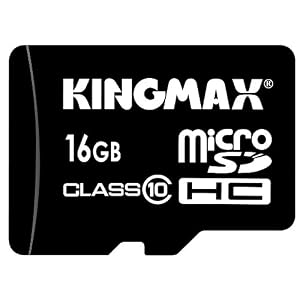
There'll be the word "Class " followed by a semi-circle with the class number/designation on it stamped on the SD card:

41VDgac35NL._SL500_AA300_.jpg


^^^ This one is a Class 10 card.

:)
 
There'll be the word "Class " followed by a semi-circle with the class number/designation on it stamped on the SD card:

41VDgac35NL._SL500_AA300_.jpg


^^^ This one is a Class 10 card.

:)

Thanks & one more question what exactly does your class of card mean?

P.S. Nice Vector drawing if an sd card.:thumbup::cool:


P.P.S. I checked and I have a class 6 Samsung 16GB Micro SD it also says HC(whatever that means) under the micro sd logo
 
Thanks & one more question what exactly does your class of card mean?

P.S. Nice Vector drawing if an sd card.:thumbup::cool:


P.P.S. I checked and I have a class 6 Samsung 16GB Micro SD it also says HC(whatever that means) under the micro sd logo

Check out this thread: Secure Digital - Wikipedia, the free encyclopedia--there's a big section on "Speeds"...here's an except from there:

Speeds

An SD card's speed is measured by how quickly information can be read from, or written to, the card. In applications that require sustained write throughput, such as video recording, the device might not perform satisfactorily if the SD card's class rating falls below a particular speed. For example, a high-definition camcorder may require a card of not less than Class 6, suffering dropouts or corrupted video if a slower card is used. Digital cameras with slow cards may take a noticeable time after taking a photograph before being ready for the next, while the camera writes the first picture.
A card's speed depends on many factors, including:

The frequency of soft errors that the card's controller must re-try

The fact that, on most cards, writing data requires the controller to read and erase a larger region, then rewrite that entire region with the desired part changed

File fragmentation: where there is not sufficient space for a file to be recorded in a contiguous region, it is split into non-contiguous fragments. This does not cause rotational or head-movement delays as with electromechanical hard drives, but may decrease speed by requiring the controller to do more computation[citation needed].

With early SD cards the speed was specified as a "times" ("
 
Not sure but I have actually been running a UHS-1 in my Phone since my prevail. It did not seem unstable in that and so far it is fine in my Rush even though I have not rooted and ROMed yet. I do only run a 16GB though because that was safe size for prevail and it was very stable running CTMod. Hoping to have just as much luck and fun with my Rush once I get issues worked out and can get on with rooting and ROMing it.
 
Back
Top Bottom