• After 15+ years, we've made a big change: Android Forums is now Early Bird Club. Learn more here.

Help "Big Clock" on Homescreen?

Ryudo

Lurker
Hello! Recently upgraded my wife to an LG Optimus S and she is really liking it.

However, she saw the "big digital clock" on the front of the box the device came in and she is wondering how she can dock that to her screen.

I have tried looking at the Widgets and have had no luck, only able to download an old-school analog clock to it.

Is there something I'm missing, or are there any apps that can duplicate that look?

She is looking for something along the lines of the HTC Sense UI clock.

 
I believe you can get that specific clock by installing the Fashion ID pack. You can always go back and uninstall that ID but keep the clock widget afterwards.
 
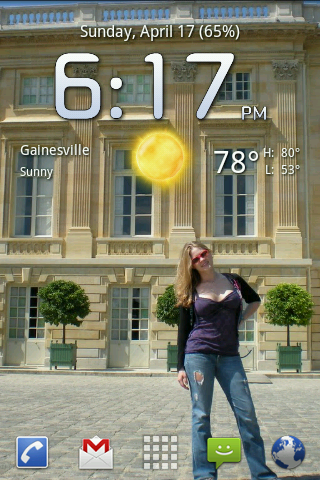
I'm sure beautiful widgets is the best, but if you are simply looking for a clock/weather widget for free then "Fancy Widget" is the best that I have found so far.

snap20110417_181800.png
 
what is the fancy widget skin you are using? I like it.


It is just how it came. I didn't download any additional skins. I set the clock background to clear and I set the clock "style" to "new digital" I believe. I basically just tinkered with the settings until I found something I liked.
 
Hello! Recently upgraded my wife to an LG Optimus S and she is really liking it.

However, she saw the "big digital clock" on the front of the box the device came in and she is wondering how she can dock that to her screen.

I have tried looking at the Widgets and have had no luck, only able to download an old-school analog clock to it.

Is there something I'm missing, or are there any apps that can duplicate that look?

She is looking for something along the lines of the HTC Sense UI clock.

:(I have the same problems and i have tried everything I can,still the same and I have given up.
 
I can tell you exactly wh:)at to do to get the Droid flipclock. I got my optimus s in Feb and was absolutely determmined to get that clock. You need to buy the "weather and toggle" widget on the android market. Once you do that you'll need the skin to make it look like the Droid clock. The settings in the weather and toggle widget has a skin downloader and you download the "h7c" skin and viola
 
Back
Top Bottom