• After 15+ years, we've made a big change: Android Forums is now Early Bird Club. Learn more here.

Black background, White text

The JB skin has a black background for the stock email and text programs. For us with older eyes, that combo is a bit hard on the eyes! Has anyone found a way to change it to a white background/black text? Someone suggested changing the theme, but not sure how to do that...

I can't find any option to make this change, and Google doesn't have any ideas either.
 
How old are you? Speaking as an eye doctor maybe you need to upgrade your glasses or get some? Personally I love a black background. I wear bifocals and no problems.
Go (Launcher)has a white theme I know that. But I don't what the background is.
 
Old enough to prefer the white background! This new skin looks like it was programmed by a gamer...my world is filled with black text and it just seems easier on my eyes. A Google search of the topic shows I am not alone in wanting to change this!
 
Open the email program and find the settings link near the bottom right (three dots in vertical column). Press that and then settings. On the screen that comes up, press General. There is a menu option for "dark theme." Uncheck the box and you will have black on white for the email program.
 
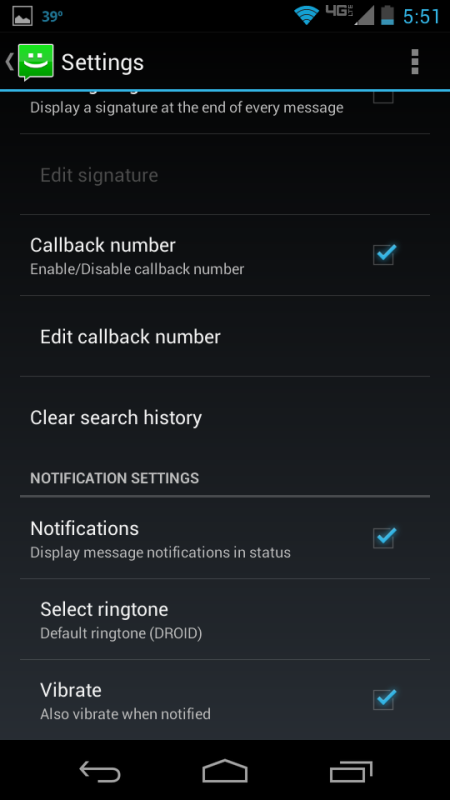
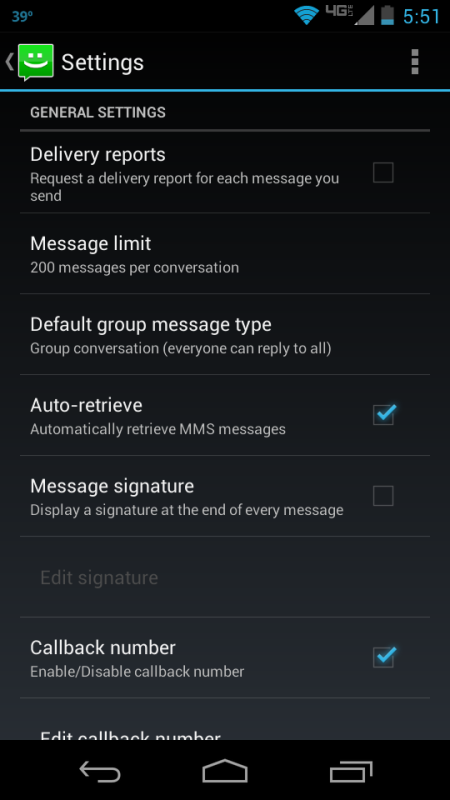
This is what is in our General Settings:
Screenshot_2012-12-11-17-51-14.png


Screenshot_2012-12-11-17-51-27.png
 
Awesome!! I had been there before, but the screen that had "General" on it also had the accounts listed below it, and I didn't know that General was a category that would open! I had opened the accounts listed below it, but that took me to the settings for each account. This is great!
 
Back
Top Bottom