• After 15+ years, we've made a big change: Android Forums is now Early Bird Club. Learn more here.

Root [Boost Mobile] Cyanogenmod 7 progress/updates (daily!)

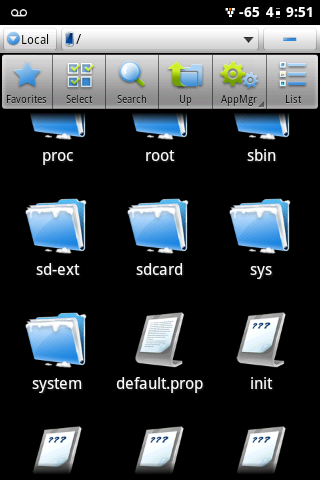
There is (also ?) on the root of the phone (/default.prop)
screenshot-1330051887502.png

Pretty sure thats from the ramdisk. It gets extracted automatically at boot. Ramdisk also contains the init file, as well as system and sys folders. (among others) So it should be extracting starting at the root level.
 
Yup did some googling... That is the case... I'm still learning kernels... Also, computer still fubar... So is going slow
 
As long a you're playing with ram disk... Maybe you could look into enabling init.d support... :) it would open the door for many tweaks...
 
Cool. Glad to get confirmation. Just because something seems to behave a certain way doesn't always make it so. Still a noob at this stuff, but learning more every day.

Anyhoo...I would be happy just to get a bootable version of the ROM so we can at least see some logs and show some progress. Would love to do something as far as init.d, but not sure even where to start. (aside from google) lol


Unfortunately no. That shows how to extract the ramdisk/kernel from the boot.img, but I've already got that part. Now it's more of what specific files/settings need to be added/updated, etc. (not just in the kernel/ramdisk, but as a whole) The tutorial below seemed to fill in a lot of gaps, but still no boot. :-( Snake & I are missing something, just don't know what.

Free Your Android - How to Port Android to Another Device
 
I don't think that section applies to the Warp though. Warp uses emmc file system/partitions and I'm assuming they aren't compatible. Doesn't really matter though cuz I can already extract/repack boot.img via the link I posted. Just need to know specifically what to do to add init.d to it. (assuming the size limit doesn't become an issue) Probably wouldn't be able to test that until we have a bootable ROM as there will be no way to know if it's any problems are related to ramdisk size or some other ROM issue.
 
I guess i don't understand what you are missing... What step are you suck on? Once you un yaff the ramdisk you will see default.prop edit it and repack it...

. Change this line from ro.secure=1 to ro.secure=0
 
That's a big part of the problem. We don't know where we're stuck either. :D

However to answer your question, default prop doesn't need to be updated. I looked and it's currently set to 0. These are the current settings:

#
# ADDITIONAL_DEFAULT_PROPERTIES
#
ro.secure=0
ro.allow.mock.location=1
ro.debuggable=1
persist.service.adb.enable=1

I manually updated the build.prop file as well since it did have ro.secure=1 and rebuilt the boot.img file, but Snake confirmed it still wouldn't boot.
 
That's news to me. Could be an issue. However, I will say that the default.prop is built as part of the make process when building the ROM. I would assume that make would take care of such things, but you never know.

Edit: Just found the kernel config file. Only 2575 lines... *sigh*
 
I'm reading about build prop lines

# Attempt to keep ADB root
ro.sys.atvc_allow_netmon_usb=0
ro.sys.atvc_allow_netmon_ih=0
ro.sys.atvc_allow_res_core=0
ro.sys.atvc_allow_res_panic=0
ro.sys.atvc_allow_all_adb=1
ro.sys.atvc_allow_all_core=0
ro.sys.atvc_allow_efem=0
ro.sys.atvc_allow_bp_log=0
ro.sys.atvc_allow_ap_mot_log=0
ro.sys.atvc_allow_gki_log=0

Also this

adb and adbd control (Located in init.rc.) # adbd is controlled by the persist.service.adb.enable system property service adbd /sbin/adbd disabled

# adbd on at boot in emulator on property:ro.kernel.qemu=1 start adbd

on property:persist.service.adb.enable=1 start adbd

on property:persist.service.adb.enable=0 stop adbd


And this

Howto: Build a Kernel Port - CyanogenMod Wiki

 
That's the problem. There's all kinds of options for various files/configs out there that don't show up in guides. Hard to know which are really needed. However, as a side note, I personally don't think the default.prop file would be the big issue as far as the CM7 boot issues go. It could very well have to do with the changes he's looking to make with CWM though. It sounds like the phone isn't even booting up enough for Windows/Linux to recognize it as a device so adb probably won't work until it we can get it to get farther along in the boot process. Just my opinion, but I don't know how adb via CWM will work.
 
Neither do i, but one thing i am good with is finding info, my Google-fu is way strong.... You guys needed more info on adb on boot/cwm... I'm trying. I really want to see this phone go places :)
 
yeah, google has been my best friend since I started helping out with this. I didn't know anything about android before this. Heck, I just rooted the other day and installed cwm yesterday. lol

Definitely appreciate all the help. You never know when someone will come across some obscure bit of info that is needed.
 
Quick question, a couple of posts back it was said that the warp uses an emmc file system, i really couldn't find any info on that, i thought it was yaffs2. But in the init.rc showed both. Sorry, trying to keep up, just a little lost now :confused:
 
EMMC is the partition type (?) And yaffs2 is the format. (as opposed to ext)

Sorry, I'm still a little this stuff, but it's making more sense now. Yes, I believe you are correct. emmc is just the partition type. I'm not totally sure what filesystems are used on the Warp, but boardconfig.mk does appear to set some partitions to ext4, however boot doesn't have a format specified. I dunno. Maybe it is yaffs2?
 
Just found this link which looks promising.

[DEV][SENSE] Porting sense to other sense devices - xda-developers

It's similar to the other guide I was using, but has some additional info I haven't seen mentioned anywhere else. One thing of note is that it suggests deleting boot.img created by the build and replacing with the boot.img from the phone. (instead of manually editing the boot.img/ramdisk from the build) Seems like it could help with the boot issue. Guess we'll see.
 
Back
Top Bottom
