irmac
Android Enthusiast
Really liking build 3 from the 22nd, but it took away my root... zerg won't re root it..
I'm confused on the builds. It seems like there are four builds under May 22nd?
Follow along with the video below to see how to install our site as a web app on your home screen.
Note: This feature may not be available in some browsers.
Really liking build 3 from the 22nd, but it took away my root... zerg won't re root it..
We have a keeper. This one is really good. Lots of good tweaks.
b00stedICS | shadow | build 2 | May 7 1346 EST - Droid X Development - RootzWiki
First off, do a nandroid of your rom. That way you can get back to where you are.
Once done, reboot into recovery, wipe the entire thing, goto install zip from card, select the Boosted file, once done, install the same way the gaps file, reboot phone. It really is that easy. The thing to be sure is to always have a nandroid backup to go back to just in case.
Worst case scenario:
You brick it.
SBF to 621
Linux SBF to milestone 604
Root
install clockword
restore back to where you are now
As you are on 621, you are stuck with only 2nd init roms as they are called. Generally if you wipe the device, then install the rom you are good. Most issues come from not flashing all that is required, or not wiping the device. For example, I tried to flash Boosted over 604 with out wiping. Didn't work. I just popped into the boot menu, wiped the device, reflashed boosted and all was well.
With clockwork and SBF files, it is hard (not impossible) to brick a device to where you can not recover.

I do not have an official answer for you, but I wipe all but battery stats just to be sure.
And it is easy, I been jumping around on ROMS. The hardest part is setting homescreens, reloading all the apps and remembering to back up certain things and restoring on the new ROM. That is what is killing me and wearing me out.
Just remember, first boot after install takes a long time. And if you use the FIRST build 2 that he has out there, screen brightness will be an issue.
Might want to use one of the nightly builds.
encounterpc : index of /bmc08gt/shadow/nightlies
Also if you do not want the soft keys, there is a frame-res.apk that you can download, then copy to the zip file under system/framework/ that will change it so you do not have softkeys since you have physical ones on the DX.
I have been going the extra step and adding my ringtones under system/media/audio/ringtones so I don't have to copy them later.

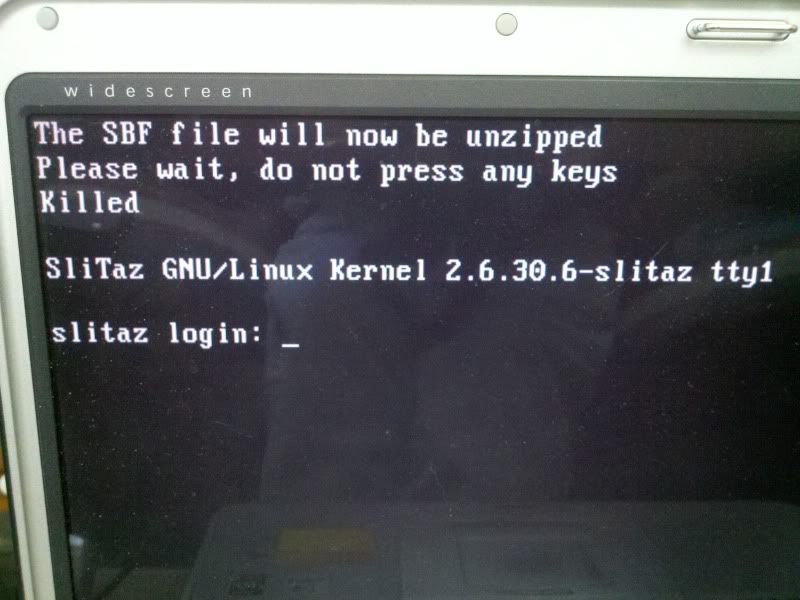
I'm having problems doing the .604 Milestone SBF. I made a bootable CD of the Linux link, and it works. I choose 1 ( SBF with option to root later), then follow the instructions: pull battery, put it back in, hold both volume buttons and power button until screen flashes. Phone goes to bootloader screen, I plug it in to the computer via USB and hit enter, and it says its unzipping the SBF, then it says Killed and asks for a sLiTaZ login. Only instruction I'm not following exactly is the one where it says to use the original Motorola USB cable, I don't know where mine is. I tried using a Nook cable and an LG cable, no dice. Is the cable really that important, and is that why it keeps getting killed before anything gets done to the phone?
I used an aftermarket cable when I did that, are you downloading the prebuilt image? KDStar or something like that? It is prebuilt and you just have to burn it to a disc and boot off it, the image will prompt you for the steps.

I understand the Nightly Builds are like little tweeks to the latest big release. Is there anywhere that explains what each of these "Nightly Builds" attempt to do so I know which one to try? How do I install them, the same way and right over what is there?
Also I am a little confused between the difference between booting into "Recovery" versus using Droid 2 Bootstrapper to boot into recovery, is there a difference and if so which do I use?
Not sure if that is the correct one. Your shots do not match with the ones in the link below that I used.
Linux solution to your Windows/RSD lite problems
Also if you do not want the soft keys, there is a frame-res.apk that you can download, then copy to the zip file under system/framework/ that will change it so you do not have softkeys since you have physical ones on the DX.
Open the zip file and look around. It is your system partition basically. I just edit and add it to the folder I mentioned. Then when you install the zip file it copies them as well. Easier than doing it with a root explorer on my phone.

Generally a dirty upgrade as you did between builds is ok. Worst case, you start back into clockwork, then wipe and reapply it and you are good.
As for the droid x sounds, yea they are not apart of this as it is being built from ASOP not the Droid X roms. I backed all mine up and copy them over.
And yes the zip file you install is the one I am talking about.
Replace the matching framework.apk (for the version you are installing) in your zip before flashing if you do not want the nav bar. You probably don't want the nav bar if you have hard keys like the x does.What do we do with all the framework apk's?