• After 15+ years, we've made a big change: Android Forums is now Early Bird Club. Learn more here.

Help Bypassing Stock Lockscreen

Hello, I have a few questions. Can you tell me if it is possible to bypass the Samsung Galaxy Note 2 stock lock screen please? I have tried to place an ICE widget on my lock screen (I tried Go Locker and Widget Locker) so that in the event of an emergency, First Responders would have access to my medical information. I end up with either 2 lock screens (which I find undesirable) and/or an ICE widget that takes me directly to my stock lock screen, so the emergency information is not accessible. My next question is as follows: what does "all about root" mean on this forum? (forgive me I am a rookie). Thanks for your time. Clementines
 
Hi
Can you put the emergency info in the owner information which scrolls across the stock lock screen?

Rooting in android speak is like jailbreaking in iphone speak ( but more) All things root is a sub forum specifically for tips relating to "hacking" the phones operating system (in a good way)

Roger
 
Thank you Roger. The scroll is slow and a person could easily not notice that it contains emergency information. I will type up my medical information, take a screenshot of it and then use the screen shot as my wallpaper on stock lock screen. Not the greatest solution, but that's the best I can come up with until a richer emergency button is created for the Note 2. Clementines
 
If you are talking about the swipe screen, can't you just switch it to none. In settings then lock screen, then screen lock. The bottom setting is none. Then if you have another locker that has your info, it should be the only one. I am not sure if this will do what you want, just my suggestion.
 
If you are talking about the swipe screen, can't you just switch it to none. In settings then lock screen, then screen lock. The bottom setting is none. Then if you have another locker that has your info, it should be the only one. I am not sure if this will do what you want, just my suggestion.
That unfortunately may not be an option for the OP. Especially if accessing/activating certain settings requiring a PIN or password protection (and no way of going around it).
 
That unfortunately may not be an option for the OP. Especially if accessing/activating certain settings requiring a PIN or password protection (and no way of going around it).

Thank you to Saltz and NeoGrandizer! I figured out how to disable the lock screen...(by logging in incorrectly 5 consecutive times, until the system asked me if I forgot my login). That finally opened up the option for me to select "no security". Then I installed WidgetLocker and am in the process of customizing it to my liking.

It's from reading through all the threads that I got my answer to how to bypass the stock lock screen. It's great to have all this information at my fingertips!

Clementines:)
 
I also use an ICE app and I use AppLock. It allows you to lock just about everything; apps, settings, even making calls. It was the only way I could secure my phone without using a lock screen. When I'm out I just enable a profile which has everything locked except for the ICE app. Plus I changed the icon so it's more obvious what it is.
 

Attachments

  • Screenshot_2013-09-18-18-54-04.jpg
    Screenshot_2013-09-18-18-54-04.jpg
    1.3 MB · Views: 119
I also use an ICE app and I use AppLock. It allows you to lock just about everything; apps, settings, even making calls. It was the only way I could secure my phone without using a lock screen. When I'm out I just enable a profile which has everything locked except for the ICE app. Plus I changed the icon so it's more obvious what it is.

Hello Giggity,

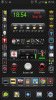
Is the screen shot you attached an image of your Lock Screen??? Wow, that looks really great!!!

I ended up uninstalling WidgetLocker when I finally came to the realization that it did not give me an option to create a secure swipe pattern (or PIN)to enter my phone. So I sadly gave up on the idea of having an ICE icon on a secure lock screen. Your idea is interesting, but it also sounds inconvenient to have to go back and forth with enabling and disabling apps and settings. You are far more advanced in set-up than I am.

Thank you for sharing.

Clementines:)
 
Hello Giggity,

Is the screen shot you attached an image of your Lock Screen??? Wow, that looks really great!!!

No, that's my normal home screen. I don't use a lock screen, hence needing an app locker. AppLock has many options, you can set the app to lock via a timer or by a location and you can enable/disable it any time via widget. It's worth taking a look at. Oh, and I didn't write the app I just use it. :)
 
No, that's my normal home screen. I don't use a lock screen, hence needing an app locker. AppLock has many options, you can set the app to lock via a timer or by a location and you can enable/disable it any time via widget. It's worth taking a look at. Oh, and I didn't write the app I just use it. :)

Hello Giggity, can you tell me which home screen app you use please? I like the look of it as well as how much you can fit onto one single screen. Thank you, Clementines
 
Hello Giggity, can you tell me which home screen app you use please? I like the look of it as well as how much you can fit onto one single screen. Thank you, Clementines

No problem. Some people find my setup a little busy or cluttered but I like having as much as I can on one screen without it getting crazy. It has taken me a while to get to grips with the relevant apps and get the setup I was finally happy with but it was worth it. First off I use GoLauncher EX. It's free but I use the paid version. GoLauncher lets me specify how many icons I can have on screen and customise/add my own. I find it much better than the standard Samsung Touch Wiz interface. Then the vertical and horizontal sections are made with the Elixir2 widgets. It allows you to make icons even smaller to allow more apps in a specific space. If you have a space that is 1 icon wide and 5 deep you can fit 1 by 9 icons in the same space. The date/time and weather widgets are done with HDWidgets. The two red buttons are another app called Circle Launcher. When you touch each button it expands out in a circle with whatever you want in it (apps, contacts etc). It's basically a different style of folder.

You might find it a bit daunting but I'd say get each app one at a time, get to grips with the basics then install the next one and carry on that way.
 
No problem. Some people find my setup a little busy or cluttered but I like having as much as I can on one screen without it getting crazy. It has taken me a while to get to grips with the relevant apps and get the setup I was finally happy with but it was worth it. First off I use GoLauncher EX. It's free but I use the paid version. GoLauncher lets me specify how many icons I can have on screen and customise/add my own. I find it much better than the standard Samsung Touch Wiz interface. Then the vertical and horizontal sections are made with the Elixir2 widgets. It allows you to make icons even smaller to allow more apps in a specific space. If you have a space that is 1 icon wide and 5 deep you can fit 1 by 9 icons in the same space. The date/time and weather widgets are done with HDWidgets. The two red buttons are another app called Circle Launcher. When you touch each button it expands out in a circle with whatever you want in it (apps, contacts etc). It's basically a different style of folder.

You might find it a bit daunting but I'd say get each app one at a time, get to grips with the basics then install the next one and carry on that way.

Thank you Giggity (I was only expecting a one-sentence answer!:D). I was experimenting with Lightning Launcher this week and it is extremely versatile. I watched the tutorials, but the designs I come up with look messy and/or amateurish (so I am still defaulting to TouchWiz). It does take a good measure of creativity to get where you want and I am not accustomed to being creative in a techno arena. Are you going to transition to the Note III when it's released or will you stick to the Note II? Merci, Clementines
 
...Are you going to transition to the Note III when it's released or will you stick to the Note II? Merci, Clementines

Funny you should say that, just yesterday I was just about to complete my purchase of one and stopped at the last second. I will get one but not for a while. Probably early next year. My Note 2 is an awesome phone and regardless of how much more awesome the Note 3 is I'm going to get more use out of mine first. :)
 
Back
Top Bottom