
• After 15+ years, we've made a big change: Android Forums is now Early Bird Club. Learn more here.

Help Camera-

Skymrnlit

Newbie
I am having pictures disappear from my gallery. Is there a better app for storing pics, or is there something I should be doing that I don't know coming from a different OS?

A bit worried as the Verizon rep had transferred all my pics off the BB and they didn't show up either.. Maybe just a fluke.

Also, I have never done a screen capture.. could someone tell me how?
 
I am having pictures disappear from my gallery. Is there a better app for storing pics, or is there something I should be doing that I don't know coming from a different OS?

A bit worried as the Verizon rep had transferred all my pics off the BB and they didn't show up either.. Maybe just a fluke.

Also, I have never done a screen capture.. could someone tell me how?
look in market for 3d gallery froyo
and you cant do a screen capture without root
 
Also, I have never done a screen capture.. could someone tell me how?

You can do a screen capture using the Android SDK Tools.

Go to developer.android.com and download the SDK tools appropriate for your OS.

Install the application, which takes about an hour or so.

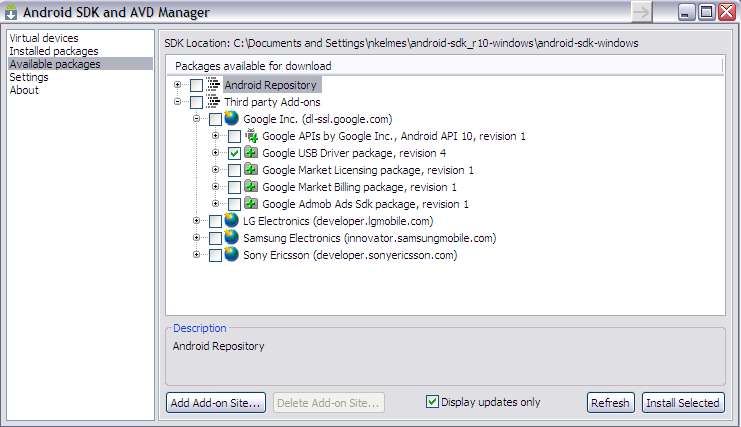
In the SDK Manager select 'Available Packages' on the left, on the right expand 'Third Party Add-Ons'>'Google Inc.' and select 'Google USB Driver Package'. Install this package.

Once installed connect your phone to your computer. Windows should prompt you to install drivers for your phone. Navigate on your filesystem to where you installed the SDK Manager application and go into 'extras>google>usb_driver' and use that folder to install the USB driver for your phone.

Once the driver is installed, go back to the 'android-sdk-windows' folder and go into 'tools'. Fire up 'ddms.bat' and this is the application used to capture screens.

It's not an easy process but you can do screen captures without root.

androidusb.jpg


sc.jpg


If you have any questions feel free to PM me. Also the You Tube video I watched that walked me through it.

http://youtu.be/8Ug3lIN-r9o
 
Wow, Nate.. I'm fairly computer literate, but that looks like a lot of work for something I may use only occasionally. Thank you so much for your time..

Checking out the Gallery app now...
 
I have the same problem with pictures disappearing from the gallery. I downloaded a file manager app and the pictures are still on my SD card. I opened one of them from the file manager and they reappeared in the gallery.
 
look in market for 3d gallery froyo

That's the exact app I'm using and I have the same problem. Another user recommended quickpick, they said all their pictures show up all the time. I have not tried it yet. All my pics showed up after a reboot.
 
Back
Top Bottom