
Install the app
How to install the app on iOS
Follow along with the video below to see how to install our site as a web app on your home screen.
Note: This feature may not be available in some browsers.
-
After 15+ years, we've made a big change: Android Forums is now Early Bird Club. Learn more here.
You are using an out of date browser. It may not display this or other websites correctly.
You should upgrade or use an alternative browser.
You should upgrade or use an alternative browser.

I'm outside of the original worry as I got the phone in the January following its release. I might give it a try anyway. Thanks for your help ��
If you're handy and have a spare $15 and a half hour, you can do it yourself.
Here's the part:
http://www.amazon.com/ePartSolution-LG-Charging-Connector-Repair-Seller/dp/B00CMWCVTM/ref=pd_sim_sbs_cps_1?ie=UTF8&refRID=1SZSNF17FVPG76W7X0ZV
Here's a video showing how to get to it. It's actually about screen replacement, but it shows how the N4 comes apart. I don't think you have to take out the motherboard or battery to get to the charging port assembly. Looks pretty simple.
I went and replaced the USB charging port. I have exactly the same problem! The phone charges, but is still not recognised by the PC/ the phone does not recognise it is plugged in either. I have tried in several USB ports on 2 computers with 2 different USB cables.
Guess I'm all out of luck on this
Guess I'm all out of luck on this

bip_bip
Newbie
I went and replaced the USB charging port. I have exactly the same problem! The phone charges, but is still not recognised by the PC/ the phone does not recognise it is plugged in either. I have tried in several USB ports on 2 computers with 2 different USB cables.
Guess I'm all out of luck on this
have you tried to connect your device to another pc or laptop?
Did you give Linux a try? That would, at least in my mind, rule out any driver issues and pretty much tell me it's a hardware problem. I know you said you tired multiple cables, but have you tried the OEM cable? Not all USB cables are created equally.
(Sorry, I don't want to sound condescending, but sometimes even a little thing overlooked can turn into a big problem.)
(Sorry, I don't want to sound condescending, but sometimes even a little thing overlooked can turn into a big problem.)
I've definitely been using the OEM cable.
Today has been strange. I decided to try the phone in my work PC again and it worked!!! Well, it did for a short time then decided it didn't want to lay anymore
I then went about installing Ubuntu as you (helpfully) detailed. I plugged the phone in and it came back with an error message 'Unable to mount Nexus 4' 'unable to open mtp device '[usb:002,041]'. I googled what this was, but am confused by the fixes that people say. Here's a link to the page
As this was my first time of using Linux, I'm not sure how to progress this.
Today has been strange. I decided to try the phone in my work PC again and it worked!!! Well, it did for a short time then decided it didn't want to lay anymore
I then went about installing Ubuntu as you (helpfully) detailed. I plugged the phone in and it came back with an error message 'Unable to mount Nexus 4' 'unable to open mtp device '[usb:002,041]'. I googled what this was, but am confused by the fixes that people say. Here's a link to the page
As this was my first time of using Linux, I'm not sure how to progress this.
I just booted Ubuntu on my old laptop from a LiveUSB and plugged in my N4 and it popped right up. No problems at all.
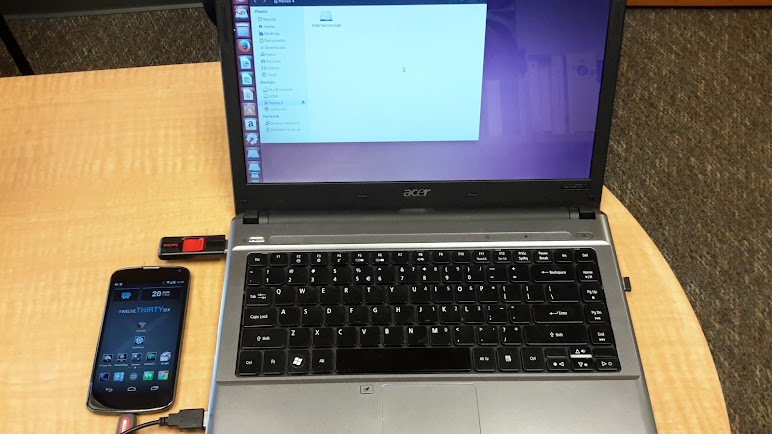
I used the Ubuntu 14.04LTS 64-bit release. I had both MTP mode and USB Debugging enabled, and I used a non-OEM cable.
The link you provided talks about not being able to mount when the phone is locked or in stand-by. Do you have a screen pattern or pin code lock? Are any of your personal files encrypted? You might try removing any security temporarily and try again.
I used the Ubuntu 14.04LTS 64-bit release. I had both MTP mode and USB Debugging enabled, and I used a non-OEM cable.
The link you provided talks about not being able to mount when the phone is locked or in stand-by. Do you have a screen pattern or pin code lock? Are any of your personal files encrypted? You might try removing any security temporarily and try again.
I had a profile set in tasker to turn the lockscreen on and off when connected to wifi. I've factory reset my phone, so this is no longer an issue.
I connected my phone again in ubuntu, but nothing happened. I then turned usb debugging and mtp storage off and rebooted the phone. Once rebooted I re-enabled usb debugging which then brought up a notification saying USB debugging was enabled - however, it seemed to constantly lose connection and re-enable. All through this there was no notification in ubuntu saying the phone was connected.
I then enabled mtp storage on the phone and got the same pop up message as before, saying it couldnt mount MTP device. The phone just had its slide to unlock.
I connected my phone again in ubuntu, but nothing happened. I then turned usb debugging and mtp storage off and rebooted the phone. Once rebooted I re-enabled usb debugging which then brought up a notification saying USB debugging was enabled - however, it seemed to constantly lose connection and re-enable. All through this there was no notification in ubuntu saying the phone was connected.
I then enabled mtp storage on the phone and got the same pop up message as before, saying it couldnt mount MTP device. The phone just had its slide to unlock.
Many thanks for all your help in trying to help me fix this. I've learned some new things, so its been useful. I have an old PC that I can now put Ubuntu onto and maybe use as a media server!
I've lost all faith in my phone
The USB port is new now, so thats ruled out also.
I'm on the hunt for a new phone now, but not sure where to go. I like the look of the One Plus One, but it looks too big. The nexus 5 could have been good, but the changes from the Nexus 4 weren't that great. The other option is to wait for the Nexus 6/ Android Silver - but I suspect Android Silver may be too expensive for me.
I've lost all faith in my phone
The USB port is new now, so thats ruled out also.
I'm on the hunt for a new phone now, but not sure where to go. I like the look of the One Plus One, but it looks too big. The nexus 5 could have been good, but the changes from the Nexus 4 weren't that great. The other option is to wait for the Nexus 6/ Android Silver - but I suspect Android Silver may be too expensive for me.
Trying to figure these things out is like being in an episode of C.S.I.  Sorry it isn't working out better for you. I know there have been instances of insecure kernels causing issues with hardware and connectivity, but not for the N4 and If I remember you are pretty much stock. I'd suggest trying to reflash the factory firmware, but you have to be able to connect to a PC in fastboot/adb mode. Since the reset, have you tried the Android Unified Toolkit?
Unless we've missed something so blatantly obvious that group face-palm is warranted, I am going to have to go with a hardware issue.
New phone ... that's like asking which girl you should marry. The one *you* want.
I am approaching 2 years with the N4 and I'm really pretty happy with it, but I do find myself looking at the new phones and wanting to try one or two. Not excited about Samsung phones right now, although the Note 10.1 (2014 edition) I just picked up is fantastic. I might go with the HTC M8, but that's nothing I'm in a great hurry to do.
Sorry it isn't working out better for you. I know there have been instances of insecure kernels causing issues with hardware and connectivity, but not for the N4 and If I remember you are pretty much stock. I'd suggest trying to reflash the factory firmware, but you have to be able to connect to a PC in fastboot/adb mode. Since the reset, have you tried the Android Unified Toolkit? Unless we've missed something so blatantly obvious that group face-palm is warranted, I am going to have to go with a hardware issue.
New phone ... that's like asking which girl you should marry. The one *you* want.
I am approaching 2 years with the N4 and I'm really pretty happy with it, but I do find myself looking at the new phones and wanting to try one or two. Not excited about Samsung phones right now, although the Note 10.1 (2014 edition) I just picked up is fantastic. I might go with the HTC M8, but that's nothing I'm in a great hurry to do.
Is the Android Unified Toolkit the same as Wug's toolkit? I'm going to give Wug's a try now.
I am stock ROM though I use franco's kernel
One thing that puts me off the new phones is their size. I held an M8 and it was huge. I wont be going with a Samsung. I had the S2 for a while, but grew tired of Samsungs ways.
This is my first Nexus phone and I got it for the quick updates. So while the hardware from other manufacturers looks great, im disappointed at how long it typically takes them to release their updates.
I am stock ROM though I use franco's kernel
One thing that puts me off the new phones is their size. I held an M8 and it was huge. I wont be going with a Samsung. I had the S2 for a while, but grew tired of Samsungs ways.
This is my first Nexus phone and I got it for the quick updates. So while the hardware from other manufacturers looks great, im disappointed at how long it typically takes them to release their updates.
