
• After 15+ years, we've made a big change: Android Forums is now Early Bird Club. Learn more here.

Help change device status

Hi Guys,
So I had my Samsung Galaxy Grand Prime SM-G530H problem not recognizing my sd card so i took it to a guy to fix it. He said the problem was at the firmware and hardware issue. He said I can fix it so i gave my phone to him. After a week when i got my phone i saw a new ota update firmware so i tried to download it but when i tap update it says this
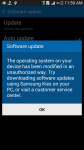
The operating system on your device has been modified in an unauthorized way. Try downloading software updates using Samsung Kies on your PC, or visit a customer service center.

82057-17910e44108d54819b744bf2e0b3e05c.jpg


When I saw this i gone to the same guy and he said i can`t do anything about it. But you can manually flash a official firmware from sammobile.com. I am totally unfamiliar with flashing firmware.

 
Go to Sammobile. Click on firmware, type your model number.
Power the phone off, hold volume down, home and power at the same time.
Press volume up to continue, connect the phone.

Open Odin on your PC. Click on AP or PDA depending on which version of Odin you're using.
Choose the firmware file you downloaded. Press start....
 
Go to Sammobile. Click on firmware, type your model number.
Power the phone off, hold volume down, home and power at the same time.
Press volume up to continue, connect the phone.

Open Odin on your PC. Click on AP or PDA depending on which version of Odin you're using.
Choose the firmware file you downloaded. Press start....

is this safe???
 
Note this will factory reset your phone to a like new state. And you're welcome.
I tried to flash Russia KitKat Firmware because my country was not there and i heard russia firmware have lolipop ota so i tried russia firmware. but the odin said FAIL.
 
Note this will factory reset your phone to a like new state. And you're welcome.
here`s the log -
<ID:0/004> Added!!
<OSM> Enter CS for MD5..
<OSM> Binary Check MD5.. Do not unplug the cable..
<OSM> Please wait..
<OSM> Checking MD5 finished Sucessfully..
<OSM> Leave CS..
<ID:0/004> Odin engine v(ID:3.1100)..
<ID:0/004> File analysis..
<ID:0/004> SetupConnection..
<ID:0/004> Initialzation..
<ID:0/004> Get PIT for mapping..
<ID:0/004> Firmware update start..
<ID:0/004> SingleDownload.
<ID:0/004> aboot.mbn
<ID:0/004> NAND Write Start!!
<ID:0/004> FAIL! (Auth)
<ID:0/004>
<ID:0/004> Complete(Write) operation failed.
<OSM> All threads completed. (succeed 0 / failed 1)
<OSM> All threads completed. (succeed 0 / failed 0)
<ID:0/004> Removed!!
 
here`s the log -
<ID:0/004> Added!!
<OSM> Enter CS for MD5..
<OSM> Binary Check MD5.. Do not unplug the cable..
<OSM> Please wait..
<OSM> Checking MD5 finished Sucessfully..
<OSM> Leave CS..
<ID:0/004> Odin engine v(ID:3.1100)..
<ID:0/004> File analysis..
<ID:0/004> SetupConnection..
<ID:0/004> Initialzation..
<ID:0/004> Get PIT for mapping..
<ID:0/004> Firmware update start..
<ID:0/004> SingleDownload.
<ID:0/004> aboot.mbn
<ID:0/004> NAND Write Start!!
<ID:0/004> FAIL! (Auth)
<ID:0/004>
<ID:0/004> Complete(Write) operation failed.
<OSM> All threads completed. (succeed 0 / failed 1)
<OSM> All threads completed. (succeed 0 / failed 0)
<ID:0/004> Removed!!
Right....... if the Csc doesn't match it will fail. Match the Pda to your build number. Or post your build number here.
 
Did you try following the on-screen advice i.e. "Try downloading software updates using Samsung Kies on your PC"?

I can't see the Grand Prime listed on Samsung's US website, so I have doubts as to whether it's officially sold in N America. Without knowing what the original CSC was it's difficult to advise on how to recover,
 
Did you try following the on-screen advice i.e. "Try downloading software updates using Samsung Kies on your PC"?

I can't see the Grand Prime listed on Samsung's US website, so I have doubts as to whether it's officially sold in N America. Without knowing what the original CSC was it's difficult to advise on how to recover,

as i know i got a ota update before everything and i did not update that one but after the fix of my phone it is not letting me to install update
 
as i know i got a ota update before everything and i did not update that one but after the fix of my phone it is not letting me to install update

As far as i seen, there is no OTA update for your device with that CSC. When one is available you could then flash the proper firmware using Odin or Kies.
 
As far as i seen, there is no OTA update for your device with that CSC. When one is available you could then flash the proper firmware using Odin or Kies.

btw.....now is there any way to make device status to official and maybe set flash counter to 0 i just want device status to official or normal
 
Note this will factory reset your phone to a like new state. And you're welcome.

When you say "like new state", does it mean the same thing as a BlackBerry means in that it wipes EVERYTHING off the phone? (I know...BB is a dirty word to me... have brand new one with Arabic keyboard that 'coincidentally clouded and remotely locked' after Russian plane attack and before Paris bombing and can't unlock it to save my life nor can/will BB).
 
Back
Top Bottom