• After 15+ years, we've made a big change: Android Forums is now Early Bird Club. Learn more here.

Root changing to a sprint prl, think itll make any speed difference?

if i were to change to a sprint prl you guys think itd make any difference in my speeds? im tethering till i can get home internet again, and my speeds are lousy here in my area of sacramento. when i check my ip, it says im in los angeles, sometime other areas, is this normal?

i changed prl once, but it was several months ago and i forgot how to do it, so i thought id ask, before i bothered re-learning how to do it.

also, on megatron, how do i get into programming mode or whatever you call it, dialing ## ?# ?

thanks ;)
 
I copied this from the MegaTron 6.0.4 thread. It is a spot on writeup from Slayer72. Follow his directions closely and changing Prls will be no sweat at all. Make sure to throw Slayer a thanks for this writeup. :thumb:


Not hard to do at all, basically all you have to do is download DFS CDMA Tool, then install it, after you have it loaded go to your phone bring up your stock dialer type ##7678# then type in your MSL Code, then tap DM for DM Mode, it'll reboot and come back up under DM Mode, now you can go back to DFS CDMA Tool and click Port, double click the Diagnostic Serial Port to use for the port it'll flash the PRL on, click connect after the port selection box, now click in the SPC box and put in your MSL Code and click the blue button to the left of the box, in the log window you should see something to the effect of DEVICE UNLOCKED, now click on Programming Tab, then click the NAM Tab, then under PRL to the right click the READ button, once it shows your current PRL then click SAVE button to backup your current PRL, after that's done click LOAD to load in the Sprint PRL you wanna try, after it shows in the box click write and look at the log, at the end of it it'll say complete, now bring up your stock dialer again and type ##7678# enter your MSL Code, then click UMS, then it'll reboot, now you can go to about phone then status and see if your new PRL is displayed... :D
 
It helped very little for me, what did help was 3G Turbo charger...I have noticed better speeds since doing that
:smokingsomb:
 
if i were to change to a sprint prl you guys think itd make any difference in my speeds? im tethering till i can get home internet again, and my speeds are lousy here in my area of sacramento. when i check my ip, it says im in los angeles, sometime other areas, is this normal?

i changed prl once, but it was several months ago and i forgot how to do it, so i thought id ask, before i bothered re-learning how to do it.

also, on megatron, how do i get into programming mode or whatever you call it, dialing ## ?# ?

thanks ;)

Here is the post I did on Megatron and the speeds I was getting after I changed PRL's : http://androidforums.com/transform-...-6-0-4-updated-10-02-12-a-50.html#post5046447
 
i rebooted into diagnostic mode, but the phone doesnt seem to connect properly to cdma tool, it shows only one port which is samsung modem or somethin like that, i see no diagnostic port. surely i have the samsung drivers installed right, since i can connect mass storage?

any tips?
 
i rebooted into diagnostic mode, but the phone doesnt seem to connect properly to cdma tool, it shows only one port which is samsung modem or somethin like that, i see no diagnostic port. surely i have the samsung drivers installed right, since i can connect mass storage?

any tips?

Are you on MegaTron? Are you with Sprint?
 
sorry guys - everything's fine, the instructions above worked exactly as they were explained. i just didn't have the samsung drivers installed for whatever reason - once i installed the drivers, it worked as explained.

actually no im with boost, but i wanted to try a sprint prl (24006), but now that i have, it seems to make no speed difference - i think i just live in a bad reception area, since when i go to a relatives house on the other side of town, speeds go up to like 2 mbps ;)

thanks alot gentleman ;)
 
sorry guys - everything's fine, the instructions above worked exactly as they were explained. i just didn't have the samsung drivers installed for whatever reason - once i installed the drivers, it worked as explained.

actually no im with boost, but i wanted to try a sprint prl (24006), but now that i have, it seems to make no speed difference - i think i just live in a bad reception area, since when i go to a relatives house on the other side of town, speeds go up to like 2 mbps ;)

thanks alot gentleman ;)

Not a problem. My signal was weird at first too. I could be inside my house with a weak signal then move outside and 5 bars. That was until I changed my PRL to the one you changed too. lol.
 
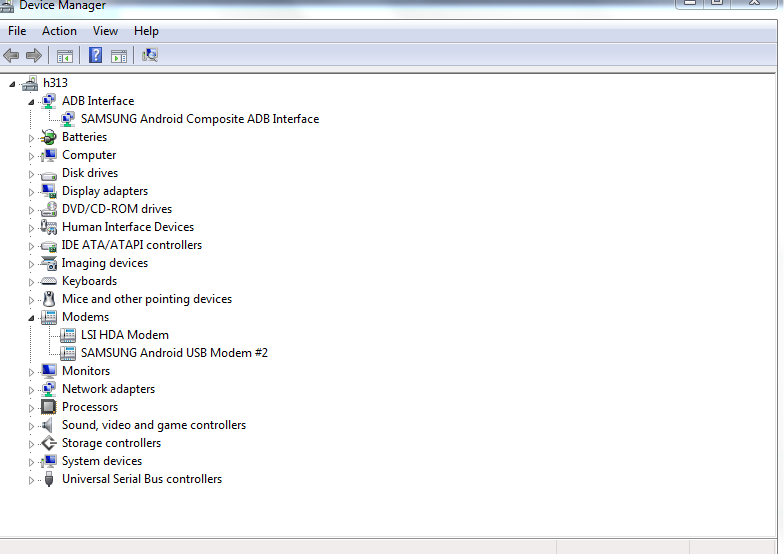
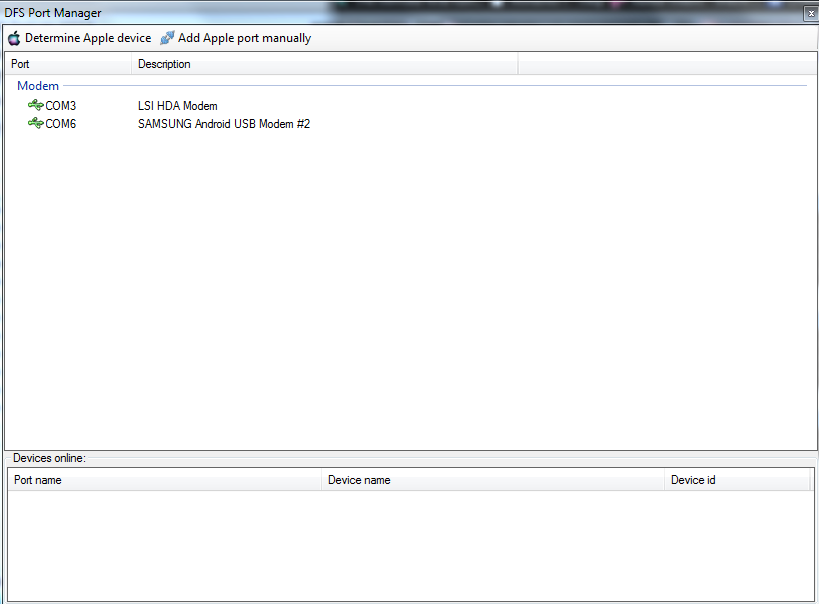
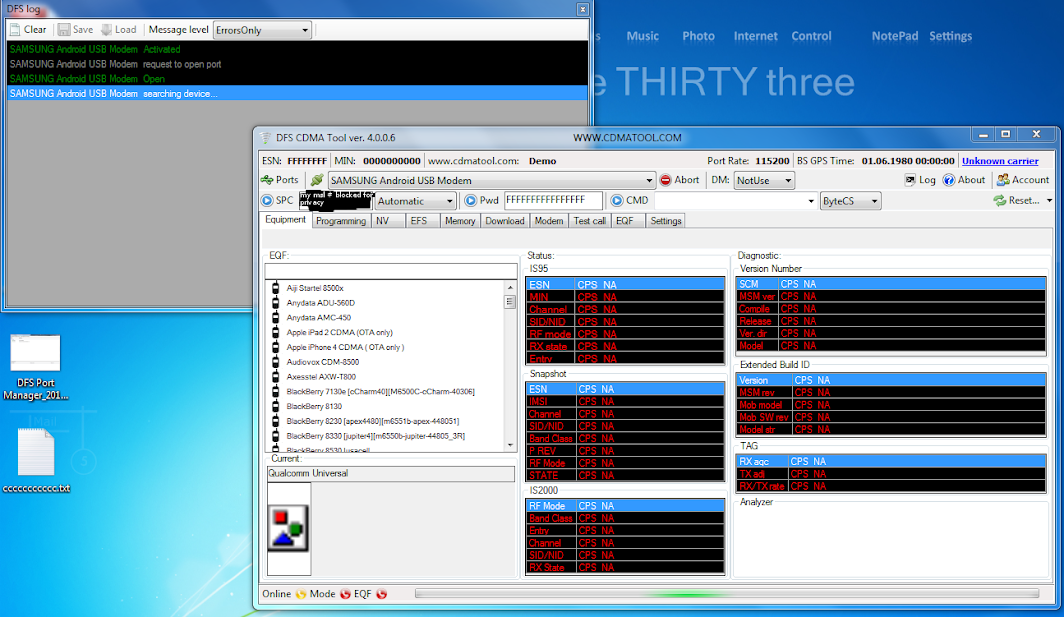
ok i am running 2.3.4 star-rom with bobs kern and ff27 baseband and cant connect to DFS i put device in usb debug then in DM mode it reboots plug in usb cable only see device as a modem double click to select Samsung android usb modem #2 on 6 enter my msl in SPC field hit send and program hangs on "searching device" in log. could really use some help here connecting my tu to DFS. i changed the PLR a year ago no problem with cdma ws but i don't have that program anymore. so tried the new version and same thing couldn't get a answer. really need help please also reinstalled drivers from Samsung and tried a different cable same thing. maybe i need to flash a stock rom?
Device+Manager_2012-10-12_10-16-40.png

DFS+Port+Manager_2012-10-12_10-19-58.png


Program+Manager_2012-10-12_12-33-33.png
 
ok i am running 2.3.4 star-rom with bobs kern and ff27 baseband and cant connect to DFS i put device in usb debug then in DM mode it reboots plug in usb cable only see device as a modem double click to select Samsung android usb modem #2 on 6 enter my msl in SPC field hit send and program hangs on "searching device" in log. could really use some help here connecting my tu to DFS. i changed the PLR a year ago no problem with cdma ws but i don't have that program anymore. so tried the new version and same thing couldn't get a answer. really need help please also reinstalled drivers from Samsung and tried a different cable same thing. maybe i need to flash a stock rom?
Device+Manager_2012-10-12_10-16-40.png

DFS+Port+Manager_2012-10-12_10-19-58.png


Program+Manager_2012-10-12_12-33-33.png
I had to goto stock in order to change my PRL via ##8778* USB. Then you will find the Diagnostic Port.

USE ABOVE CODE WITH CAUTION.

After that then reflashed what ever ROM you perfer and your all set.
 
  • Like
Reactions: h20
thanks i coudnt remember if i did it on stock or not i will give that a try or what about megatron will that rom work?
 
thanks i coudnt remember if i did it on stock or not i will give that a try or what about megatron will that rom work?

If you are on Boost, I have heard you can access the hiddenmenu while on MegaTron.
If you are on Sprint, you can access the hiddenmenu but can't do anything with it.
 
If you are on Boost, I have heard you can access the hiddenmenu while on MegaTron.
If you are on Sprint, you can access the hiddenmenu but can't do anything with it.
got it to work on the StarSCROM by booting into clockwork then connecting to pc dfs connected with no problem changed plr done in like 3min :d
 
got it to work on the StarSCROM by booting into clockwork then connecting to pc dfs connected with no problem changed plr done in like 3min :d
Sweet. I'm going to see if that will work for me. Thanks for the idea.

EDIT: Works for me too. NICE FIND. VERY NICE FIND.
 
Back
Top Bottom