• After 15+ years, we've made a big change: Android Forums is now Early Bird Club. Learn more here.

Help Connect as HDD??? how?

Anruari

Newbie
I have just upgraded from a HTC DHD to the Note 2. My HTC and my motorola Xoom can be connected to a PC Via USB, and the computer sees them as a USB hard drive (or 2 drives)

The Samsung is only seen as a media device (MTP) or as a Camera (PTP)
this is really annoying, I want to be able to transfer documents, pdf's delete contents of folders etc....
how do I mount it as a standard USB drive?
( I am installing KIES now... so I'll see what happens then...)
 
I have just upgraded from a HTC DHD to the Note 2. My HTC and my motorola Xoom can be connected to a PC Via USB, and the computer sees them as a USB hard drive (or 2 drives)

The Samsung is only seen as a media device (MTP) or as a Camera (PTP)
this is really annoying, I want to be able to transfer documents, pdf's delete contents of folders etc....
how do I mount it as a standard USB drive?
( I am installing KIES now... so I'll see what happens then...)

After installing drivers, MTP will show it as a drive.
 
grrr.
with my HTC that was unnecessary.... the device showed up as a drive by default, and all it's own software and tethering drivers were in it's SD card
 
Whilst mine needed drivers it downloaded them automatically in about 30 seconds and was ready to use like a HDD


Likewise for me too, it. click my computer and you should see the device name there, open that and you see the phone storage device as you would before as removable hard drive.
 
I have just upgraded from a HTC DHD to the Note 2. My HTC and my motorola Xoom can be connected to a PC Via USB, and the computer sees them as a USB hard drive (or 2 drives)

The Samsung is only seen as a media device (MTP) or as a Camera (PTP)
this is really annoying, I want to be able to transfer documents, pdf's delete contents of folders etc....
how do I mount it as a standard USB drive?
( I am installing KIES now... so I'll see what happens then...)

Let me know if KIES works when you connect the phone via the USB cable method mine would not connect and would display an error message, have contacted Samsung support they replied with the obvious solutions do this and that but it did not work so I await another reply and solution from them Maybe the KIES software needs tweaking to accommodate this new phone and it's software
 
Note works perfectly fine for me as a HDD but not Note 2 and I know how frustrating it is! I've tried so many ways but to no avail. KIES is troublesome and it does not even detect my phone most of the times.
 
I'm another person who did NOT have problems. Just plugged in the phone, drivers downloaded and done!
Sorry to read others are having problems.

Lateck,
 
After installing drivers, MTP will show it as a drive.

When I connect my phone via usb cable to my pc, the only message I see is on the phone's notification bar that says it is connected as a media device. It does not show up as a drive on the pc. Also, I cannot seem to find any drivers for this. Any help would be appreciated.:rolleyes:
 
When I connect my phone via usb cable to my pc, the only message I see is on the phone's notification bar that says it is connected as a media device. It does not show up as a drive on the pc. Also, I cannot seem to find any drivers for this. Any help would be appreciated.:rolleyes:

I tried it on both Windows XP and Windows 7 and it shows up on both. I could drag and drop files to all the folders. If the phone is locked with pattern or pass code, the phone drive will only show up when you unlocked the phone though. If you only locked it with swipe, then it will show up even if the screen is locked. At least that's the way it works on the AT&T version.
 
I tried it on both Windows XP and Windows 7 and it shows up on both. I could drag and drop files to all the folders. If the phone is locked with pattern or pass code, the phone drive will only show up when you unlocked the phone though. If you only locked it with swipe, then it will show up even if the screen is locked. At least that's the way it works on the AT&T version.
I can also confirm the AT&T Note 2 works with Win7 64 Pro

No separate USB driver install was necessary.

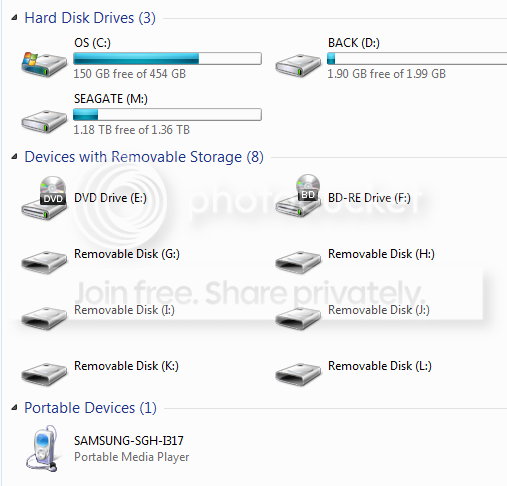
* Connect the Note 2 to Win7 64 Pro PC via USB

* A message pops up in lower right of my Win7 PC saying "found Samsung SGH-I317"
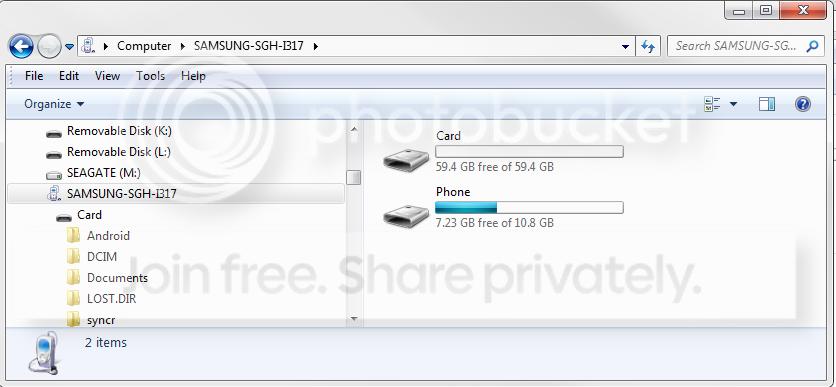
* 10 seconds later

ATT_Note2_Win7_1.png


and

ATT_Note2_Win7_2.png
 
Hi all

I found the easiest way is to set you phone as a wireless FTP server - easy using File Expert or Solid Explorer (or many other apps) and then you can use an FTP client like Filezilla on any platform (Linux, Mac, Win. or even another phone) to browse and read/write to the whole phone (except system unless rooted). It works great and is wireless, you just have to have both items connected to the same network.

OR

you could use an app called Airdroid, but I don't think its as easy as a real ftp client.

Roger
 
Boo, that is not good! Guess that means the new USB drivers does not have some sort of emulation built in. Maybe that will change as updates comes in?
 
Back
Top Bottom