
Install the app
How to install the app on iOS
Follow along with the video below to see how to install our site as a web app on your home screen.
Note: This feature may not be available in some browsers.
-
After 15+ years, we've made a big change: Android Forums is now Early Bird Club. Learn more here.
You are using an out of date browser. It may not display this or other websites correctly.
You should upgrade or use an alternative browser.
You should upgrade or use an alternative browser.
Help Deleting bookmarks that can't be deleted
- Thread starter oholdeno
- Start date
I'm not a fan of being force fed this kind of intrusive junk. At the same time, I'm too chicken to root my phone to get rid of all the stuff I don't want.
As an original Inc owner who upgraded to the S3 to retain the unlimited data plan but still had an eye on the Inc 4g, hearing these reports bums me out. I'm sure the S3 will have its own pile of junk too but was hoping the Inc 4g would be a little more pristine.
As an original Inc owner who upgraded to the S3 to retain the unlimited data plan but still had an eye on the Inc 4g, hearing these reports bums me out. I'm sure the S3 will have its own pile of junk too but was hoping the Inc 4g would be a little more pristine.
Nightwind Hawk
Well-Known Member
There are apps that can delete them for you - I don't think you have to be rooted or anything either.
I think it was this one??? https://play.google.com/store/apps/details?id=com.happydroid.bookmarks&hl=en I might be wrong... But it is possible!!
I think it was this one??? https://play.google.com/store/apps/details?id=com.happydroid.bookmarks&hl=en I might be wrong... But it is possible!!
There are apps that can delete them for you - I don't think you have to be rooted or anything either.
I think it was this one??? https://play.google.com/store/apps/details?id=com.happydroid.bookmarks&hl=en I might be wrong... But it is possible!!
Worked great thanks


kjarrett
Android Enthusiast
Worked great thanks
I installed this app but cannot delete:
VZW Home
Your Guide Mobile
...anyone?


hilmar2k
Android Expert
I installed this app but cannot delete:
VZW Home
Your Guide Mobile
...anyone?
You could just disable it, couldn't you?
kjarrett
Android Enthusiast
You could just disable it, couldn't you?
You mean delete the widget?
Can't find the 'most used' setting either...
Sorry for being so dense,
-kj-
hilmar2k
Android Expert
You mean delete the widget?
Can't find the 'most used' setting either...
Sorry for being so dense,
-kj-
You can disable any app you don't want to use.
Settings -> Apps -> All -> Choose the app and click "Disable"
I've been able to disable a bunch of the VZW apps which is great, they no longer show up in my app tray or in the Android play store.
But these are just the bookmarks that are within the stock Internet app. They are a little annoying to see.
And yes, the GS3 will have just as much bloatware. It's just how it is with Verizon.
But these are just the bookmarks that are within the stock Internet app. They are a little annoying to see.
And yes, the GS3 will have just as much bloatware. It's just how it is with Verizon.
I installed this app but cannot delete:
VZW Home
Your Guide Mobile
...anyone?
To clarify, it only seems to delete bookmarks from the widget.
Chrome is a fantastic solution for that.
Seriously. USE CHROME! Dont bother tinkering with the slow stock Internet browser. Chrome is so much better/faster/cleaner and allows you to customize your favorites (and remove whichever ones you like).
Also the biggest thing that was annoying me about the stock Internet browser was it would have to reload web pages that youve already loaded if you happened to put your phone in idle/sleep mode after you pulled that page up. I dont understand why the page needed to be reloaded when you turn back on and open the browser, but with chrome it doesnt.
Do yourself a favor and just use chrome.
I did switch to Chrome for about a week and it was ok. The bookmark button is hidden under the menu unless I'm missing something and after the menu pops up the bookmark link is all the way up top which is a far stretch for my short fingers. I actually prefer Dolphin to Chrome and started using that more recently.
I rooted the other night and got rid of all the booksmarks I didn't want. I just never really had an issue with the stock browser on my Thunderbolt, but it's changed under ICS.
I rooted the other night and got rid of all the booksmarks I didn't want. I just never really had an issue with the stock browser on my Thunderbolt, but it's changed under ICS.

sully5981
Well-Known Member
Do you know how to get pages to not open in "page overview" mode? That's my only beef with chrome.Seriously. USE CHROME! Dont bother tinkering with the slow stock Internet browser. Chrome is so much better/faster/cleaner and allows you to customize your favorites (and remove whichever ones you like).
Also the biggest thing that was annoying me about the stock Internet browser was it would have to reload web pages that youve already loaded if you happened to put your phone in idle/sleep mode after you pulled that page up. I dont understand why the page needed to be reloaded when you turn back on and open the browser, but with chrome it doesnt.
Do yourself a favor and just use chrome.
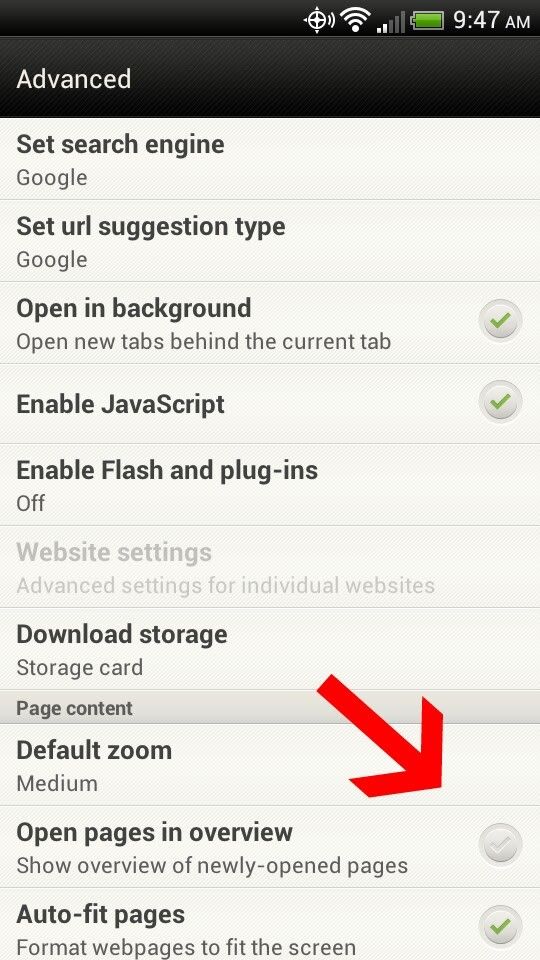
Do you know how to get pages to not open in "page overview" mode? That's my only beef with chrome.
No. I dont think Ive ever seen that.
sully5981
Well-Known Member
This is the option on the stock browser, I can't find it on chrome and it was one thing I didn't like about chrome.No. I dont think Ive ever seen that.

Galaxy44
Newbie
=VODA galaxy S3 rooted=
There are probably too many steps here but it worked for me doing this
Anyone can contribute a shorter version
I think Titanium backup wipe data is the main bit, but backup you bookmarks first
---
also other solution
http://forum.xda-developers.com/showthread.php?t=1738760
- Added app - bookmark sort and backup https://play.google.com/store/apps/details?id=com.happydroid.bookmarks&hl=en
- backed up my bookmarks
--this steps may not be necessary- -
[*]task manager - (long press middle button)
[*]task manager - active aplications - end internet app her (you may have to scroll top bit left or right)
[*]task manager - page RAM - clear memory
..
titanium backup - i got the paid version not sure if wipe data is on free one - find internet
- wipe app data
bookmark sort and backup app
[*](--tried a restore - it didn't work---launched the internet--logged out of google) - bookmark sort and backup app - restore bookmarks worked
- then delete the bad bookmarks (copies of these have been made by the restore of you bookmarks)
There are probably too many steps here but it worked for me doing this
Anyone can contribute a shorter version
I think Titanium backup wipe data is the main bit, but backup you bookmarks first
---
also other solution
http://forum.xda-developers.com/showthread.php?t=1738760
callmecolt
Well-Known Member
I've been able to disable a bunch of the VZW apps which is great, they no longer show up in my app tray or in the Android play store.
But these are just the bookmarks that are within the stock Internet app. They are a little annoying to see.
And yes, the GS3 will have just as much bloatware. It's just how it is with Verizon.
Thanks for the tip on disabling stock applications so you can't see them anymore. Neatens things up a bit.