bbexperience
Lurker
I've searched and searched via Google and have found mentions of a similar issue, but no resolutions and no issues exactly like this. Hopefully someone here can shed some light on this. Here's the problem:
I've had my Charge for about a month and a half and can't complain about the battery life because it's been very good so far. With no use except for GMail auto syncing and popping the screen on to check in once in awhile it would drain at about 1% per hour. Obviously when I actually used it for calls or web browsing it would drain much faster. Anyway, yesterday I noticed that the battery was draining much quicker than usual - around 3% per hour with no use. This was with NO changes - no new apps, no settings changes, etc. In fact, the only thing I used the phone for was to receive one text message and then delete all of my existing messages.
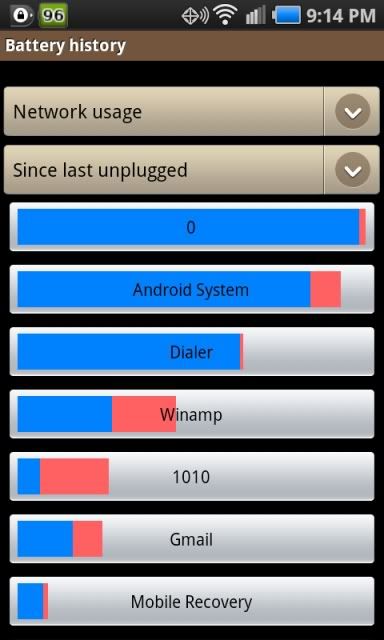
So today I went to troubleshooting mode. I had previously downloaded Spare Parts so I started checking around in there and the only odd thing I saw was the Dialer app under Network seemed to be using a lot of bandwidth. Now here's the weird part: I turned off 3G and WiFi and it continued to use data, and lots of it. I turned off background data, and it continued. The only way I could get it to stop was to turn on airplane mode, which obviously just kills everything. I'm also seeing that I've got a higher than usual "Time Without Signal" under Battery Usage -> Cell Standby which may be related but I'm not sure.
Does anyone know why the Dialer app would be using "data" that's not actually 3G data? It would make sense if I was making a phone call or sending texts or something but the amount of data sent seems to just continue to grow with the phone just sitting on my desk.
I've had my Charge for about a month and a half and can't complain about the battery life because it's been very good so far. With no use except for GMail auto syncing and popping the screen on to check in once in awhile it would drain at about 1% per hour. Obviously when I actually used it for calls or web browsing it would drain much faster. Anyway, yesterday I noticed that the battery was draining much quicker than usual - around 3% per hour with no use. This was with NO changes - no new apps, no settings changes, etc. In fact, the only thing I used the phone for was to receive one text message and then delete all of my existing messages.
So today I went to troubleshooting mode. I had previously downloaded Spare Parts so I started checking around in there and the only odd thing I saw was the Dialer app under Network seemed to be using a lot of bandwidth. Now here's the weird part: I turned off 3G and WiFi and it continued to use data, and lots of it. I turned off background data, and it continued. The only way I could get it to stop was to turn on airplane mode, which obviously just kills everything. I'm also seeing that I've got a higher than usual "Time Without Signal" under Battery Usage -> Cell Standby which may be related but I'm not sure.
Does anyone know why the Dialer app would be using "data" that's not actually 3G data? It would make sense if I was making a phone call or sending texts or something but the amount of data sent seems to just continue to grow with the phone just sitting on my desk.