• After 15+ years, we've made a big change: Android Forums is now Early Bird Club. Learn more here.

Help Disable gmail notifications at night?

why not make it so it just vibrates for gmail and not make a sound?

It's not just gmail though ... you would have to change the setting in every app that could make any noise, every time you want it to turn volume off but still have the ringer volume enabled ... that's a hassle I can do without!
 
I am sure there are apps that can set your email notification to silent for a specified time, sorry I don't know any; if they don't exist, they should and I'm sure someone will come up with a solution. The AOKP milestone 3 rom is supposed to be able to separate ringtone and notification volumes --- I haven't tested it.
 
Sometimes techies look for complex tech solutions, and overlook a very simple solution anybody can easily use.

In this case, make sure your Gmail setting for your work account is set to "notify once" (i.e. uncheck "Notify for every message"). Then, just mark an e-mail as unread before going to sleep. You will get no more notifications. Read it in the morning, and you'll get notifications again. What could be simpler? :)
 
Tasker - Context - Set the time
Actions - Plugins - Secure Settings (plugin, must de installed first) - (Press configuration) Root actions - Package Notifications, select the app and select toggle, then you're good to go
 

Attachments

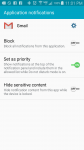
  • Screenshot_2015-12-11-23-01-43.png
    Screenshot_2015-12-11-23-01-43.png
    153.4 KB · Views: 152
Back
Top Bottom