• After 15+ years, we've made a big change: Android Forums is now Early Bird Club. Learn more here.

Evo's Lock Screen....

Stepintothedark

Well-Known Member
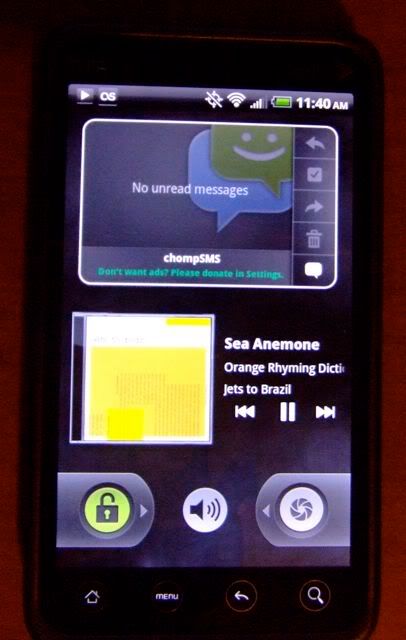
How do you get THIS lock screen... ???

nexus_one_3.png


I just updated to Froyo...

There's a video with the nexus one live wall paper...

GRANTED, they said that it was just a custom rom, but does anyone have that kind of lock screen?

YouTube - Android 2.2 Froyo on the Evo 4G
 
If you are rooted, you can delete the htclockscreen.apk. The stock lockscreen will appear after a restart.
 
I use Widget Locker:

lockscreen.jpg


Widgets on the lock screen, as well as a customizable unlock slider. And it can look like that screen you posted if that's what you want.
 
I use Widget Locker:

lockscreen.jpg


Widgets on the lock screen, as well as a customizable unlock slider. And it can look like that screen you posted if that's what you want.

I'm using the pure music widget on the lock screen with widget locker, but I like the look of your music widget better. What's it called? Thanks.
 
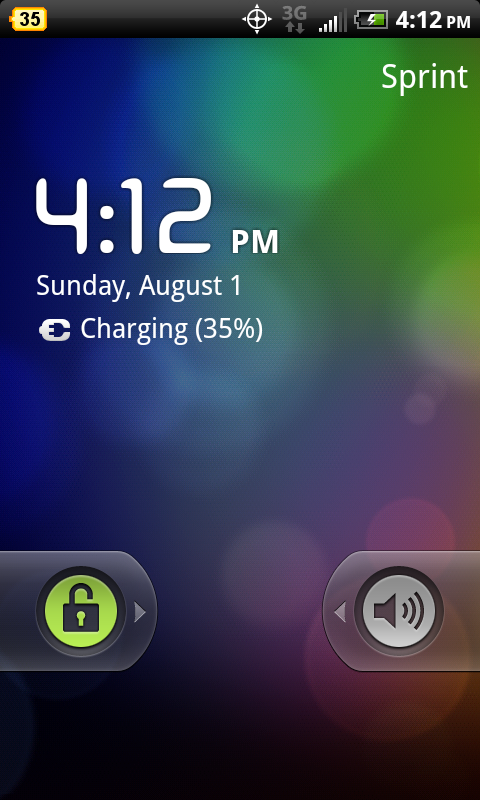
like this?

snap20100801_161209.png


all you have to do is get like root explorer or something and navigate to

system/apps/htclockscreen.apk

and rename it to htclockscreen.bak

thats what i did and it work oh and reboot after you rename it
 
So do I need to root to get this lock screen or just need a root explorer? IF so how do I go about obtaining the root explorer and deleting the HTC lock screen apk?

I really dislike the stock sense lock screen but dont wanna root right now until the "Official" OTA Update is released. I upgraded to 2.2 Friday with the unofficial release.
 
Hey jrstinkfish, how did you change the right slider and add the volume in the middle?
If you're using Widget Locker:

1) On your lock screen, press the Menu button and choose Settings
2) Under Look & Feel, choose Slider & Layout, and then select No Slider. That removes the stock slider and gives you space to add the custom slider.
3) Back at your lock screen, long press and add a widget. There is a Custom Slider widget I believe, and when you choose it, it will present you with a screen allowing you to customize the slider. You can then move it to the bottom of the screen, giving you more real estate for other widgets.
 
So do I need to root to get this lock screen or just need a root explorer? IF so how do I go about obtaining the root explorer and deleting the HTC lock screen apk?

I really dislike the stock sense lock screen but dont wanna root right now until the "Official" OTA Update is released. I upgraded to 2.2 Friday with the unofficial release.

yes you need to be rooted in order to use root explorer. i personally don't like stock android lock screen because mostly you see that one or the HTC lock screen. i prefer a modded version of the HTC lock screen :)
 
widget locker is awesome. It is one of my favorite apps. I would also suggest putting the 'LED Light' widget on your lockscreen... it turns your phone into a VERY handy flashlight.
 
adb remount
adb shell
#cd /system/app
#mv HtcLockScreen.apk HtcLockScreen.bak
#exit
adb reboot

This will move the htc lock out of the way. HTC didn't break the vanilla lock with this release! (as you mentioned you were on froyo) so you should be good to go after a reboot
 
adb remount
adb shell
#cd /system/app
#mv HtcLockScreen.apk HtcLockScreen.bak
#exit
adb reboot

This will move the htc lock out of the way. HTC didn't break the vanilla lock with this release! (as you mentioned you were on froyo) so you should be good to go after a reboot

Does your phone need to be rooted for this to work?
 
Back
Top Bottom