
Install the app
How to install the app on iOS
Follow along with the video below to see how to install our site as a web app on your home screen.
Note: This feature may not be available in some browsers.
-
After 15+ years, we've made a big change: Android Forums is now Early Bird Club. Learn more here.
You are using an out of date browser. It may not display this or other websites correctly.
You should upgrade or use an alternative browser.
You should upgrade or use an alternative browser.
Help find host name
- Thread starter carpman
- Start date
-
- Tags
- htc desire hd

D-U-R-X
turbo drinker
Hello, i wish to assign a static IP to phone using my router, but i need the host name of phone to be able to do this, trouble is can't find out what the host name for phone is?
any ideas?
cheers
Carpman - this is how to get a static IP address for your phone:
First up, connect to your desired network.
Settings -> Wireless & Networks -> WiFi Settings -> Menu (the button at the bottom of the handset) -> Advanced Settings -> Tick the box which says "Use Static IP".
You'll then need to enter the options specific to that network.
The screen should look like this -
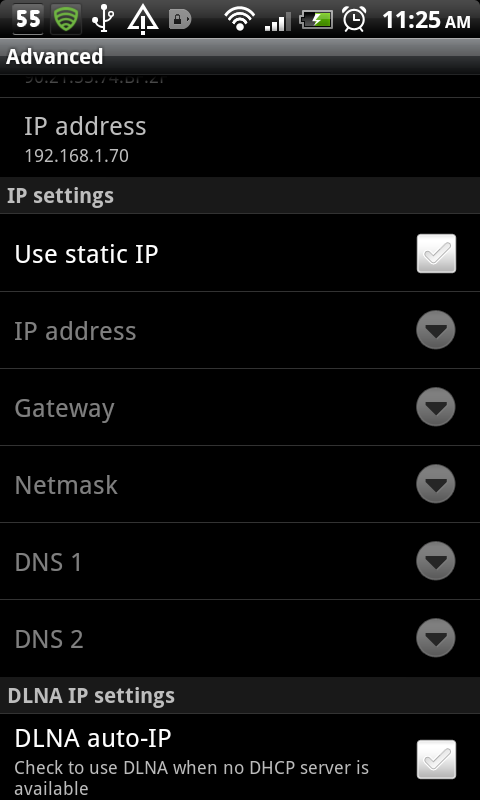
If you're connected to a network, the IP address you're currently using will already be displayed (as it is in the top of the picture), enter that into the IP address pull down.
Your gateway will be the internal IP address of your networks router. You can get this by accessing a PC, going to the start menu, typing CMD and pressing enter. In the DOS window which opens, type ipconfig and press enter. You'll see a load of info displayed, you're looking for something called Default Gateway, take a note of that then enter it into Gateway section on the phone.
Netmask will always be 255.255.255.0
I think you can leave DNS blank as DNS should be handled by the default gateway.
The above may or may not fix the issue, but give it a shot and report back either way.
If you find this info helpful, click thanks on El Presidente's original (4 or 5 down in the following thread) http://androidforums.com/desire-hd-support-troubleshooting/345055-desire-hd-wifi-problem.html
Thanks for reply.
I know how to setup a static via the phone, but this is of no use if you use different wireless connections which i do.
I have also used Wifi-Static app to assign a static IP for my home network, but this can be unreliable.
I have the ability to assign static IP to network device via mac address and hostname, i do this for my laptops fine.
The questions still remains, how i find out what my phones host name is?
cheers
I know how to setup a static via the phone, but this is of no use if you use different wireless connections which i do.
I have also used Wifi-Static app to assign a static IP for my home network, but this can be unreliable.
I have the ability to assign static IP to network device via mac address and hostname, i do this for my laptops fine.
The questions still remains, how i find out what my phones host name is?
cheers

Can you do it by MAC Address? All HTC Android devices have a MAC address beginning 90:21:55 (as far as I'm aware).
Which router do you have?
Which router do you have?
Thanks for reply,
nope i need both mac and hostname.
I am using Express Open Source Firewall Project for my firewall/router.
nope i need both mac and hostname.
I am using Express Open Source Firewall Project for my firewall/router.
I've had a look at how my router is configured and my phones name on the router is the same as the it's Bluetooth name. I can't remember whether or not it was like that by default, or whether I've changed it so I can easily recognise from the routers admin panel.
Via the router, can you see connected devices? Look for that MAC and see what the router is calling it.
Via the router, can you see connected devices? Look for that MAC and see what the router is calling it.
See 2nd post in this thread ... community.smoothwall.org • View topic - [3.0] Allow only hosts with static DHCP entries ...
Dave
Dave

Thanks for replies.
I can find nowhere in smoothwall where it will show me the host name of desire?
In the dhcp section it does not, if i give the phone a static IP it does not show it static dns page.
This is odd as the commercial versio of smoothwall that is used in office will show dhcp clients details, but free version will not!
I have a rooted phone so is there any file on the phone from which i can get the host name?
cheers
I can find nowhere in smoothwall where it will show me the host name of desire?
In the dhcp section it does not, if i give the phone a static IP it does not show it static dns page.
This is odd as the commercial versio of smoothwall that is used in office will show dhcp clients details, but free version will not!
I have a rooted phone so is there any file on the phone from which i can get the host name?
cheers
seems free version of smoothwall does not show dhcp leases
Express Open Source Firewall Project Feature Comparison Chart
Express Open Source Firewall Project Feature Comparison Chart
Thanks for your replies they put me on the right track and have no installe smoothwall mod to show dhcp leases
community.smoothwall.org • View topic - [3.0] Modded DHCP.CGI (WOL, lease table, state, and prefs)
community.smoothwall.org • View topic - [3.0] Modded DHCP.CGI (WOL, lease table, state, and prefs)
As Fonzig said, the host name will start ANDROID_...
My router gave me a list of Hosts, IP's and MAC's and lists ANDROID_...
What I can't find is this name written on the phone anywhere
On my HTC desire, the 15 digits in the hostname following "Android_" equates to the unique IMEI of the phone's cellular radio. The global GSM standard requires that this number is printed on the device but can also be found as follows:
1. In the phone app, press *#06# and the IMEI should appear in a popup window (not sure if this works for CDMA)
2. In Android, go to Settings / About Phone / Phone Identity / IMEI
What I'm also unsure of is how non-cellular Android devices generate their hostname as my tablet is using a hexadecimal sequence that doesn't look like the MAC address or the device Serial Number.