
• After 15+ years, we've made a big change: Android Forums is now Early Bird Club. Learn more here.

For those complaining about Froyo and Battery Life!

SB13X

Android Expert
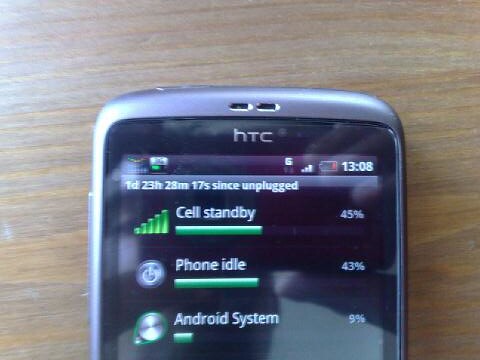
Here is just a quick photo of my desire just bordering on 2 days use which it did last to 2 Days and 2 Hours post photograph without charging:
4932194160_640206ecb2.jpg


This was based on medium to light usage I might add, phone calls, texts, market use, web browsing and around half an hour mp3 player usage. No gaming as I do find gaming using anything other than the "oid" range of emulators kills battery life fast. However heavy use generally nets me minimum 20 hours. Sorry about the dodgy picture, trying to get a decent close up shot using my N95 wasn't easy...
 
I recently took mine overseas, so switched off all data, didn't make any calls, and just sent a handful of texts.

Got 5 days out of it!
 
in 9 hours, with 2 hours of web browsing (which is the biggest killer IMO), emails, texts, couple of short calls and general playing around, I use about 50%, which is great - Especially since I am overclocked too.
 
None whatsoever, no task killer, no juice defender nothing, okay I have a screen with these:

homer3.png


All I do is switch things on and off when required and monitor dodgy apps that use CPU when they should be in the background.
http://img64.imageshack.us/img64/1814/homer3.png

Hey, the screenshot has some pretty cool apps/widgets. May I ask what widget/apps are they? So I can look it up the Android Market.

Are they free or paid for?

Ta!
 
Mix of paid and free the top left is BatteryLife, top right is Mini Info, then all the icons below are part of Astro File Manager then Audio Manager and last but not least Extended Controls. HTH Stu
 
Nice, hope Extended Controls is available for the Galaxy S Vibrant.

With the odd exception, Android apps generally work on all android phones.

Kind of like how Microsoft word works on all windows pcs. It doesn't matter if its a dell or HP.
 
With the odd exception, Android apps generally work on all android phones.

Kind of like how Microsoft word works on all windows pcs. It doesn't matter if its a dell or HP.

Cant find that widget with all those controls.

Anyone know the real name?
 
Cant find that widget with all those controls.

Anyone know the real name?

With extended controls - which is the bottom bar only (after purchased from the market), when you add the widget to your home screen, you choose what buttons you want to have on it, by selecting them in a menu.
 
You are wasting your time comparing battery life.

HSDPA signal strength is everything when it comes to battery life. Unless you are stood next to each other battery life is going to vary wildly regardless of how your phone is set up, unless you turn off mobile data of course.
 
You are wasting your time comparing battery life.

HSDPA signal strength is everything when it comes to battery life. Unless you are stood next to each other battery life is going to vary wildly regardless of how your phone is set up, unless you turn off mobile data of course.
Touche. However, we can use our own battery life as a benchmark or baseline before following advice.
 
How do you monitor what apps use what CPU and battery? That would be very handy to be able to do

Download Quick System Info to see how the CPU is being utilised live or enter *#*#4636#*#* from the dialer to get to the hidden stat menu and go through battery history
 
Mini Info now displays CPU usage and the Astro Processes icon allows you to monitor whats making up that CPU usage. My phone is also constantly switching between HSDPA and GSM (which is known to be a heavy drain) because certain areas of my workplace and home cause switches because of their structural makeup. Therefore even with this issue I can still manage to above and quite easy a days worth of battery 20-24hours on medium-heavy use.
 
Mix of paid and free the top left is BatteryLife, top right is Mini Info, then all the icons below are part of Astro File Manager then Audio Manager and last but not least Extended Controls. HTH Stu


Hi, so could you please tell how to put those Astro file manager icons on a desktop screen of Desire? I can't find that option.. :confused:
 
Just to add, suddenly my battery seems much better than it has been for about a month now. All I did was disable all syncs and do it manually. Also not used much 3G (switching it on to browse) only wifi. Its lasted 1 day 3 hours do far and still got 47% left.
 
Back
Top Bottom