
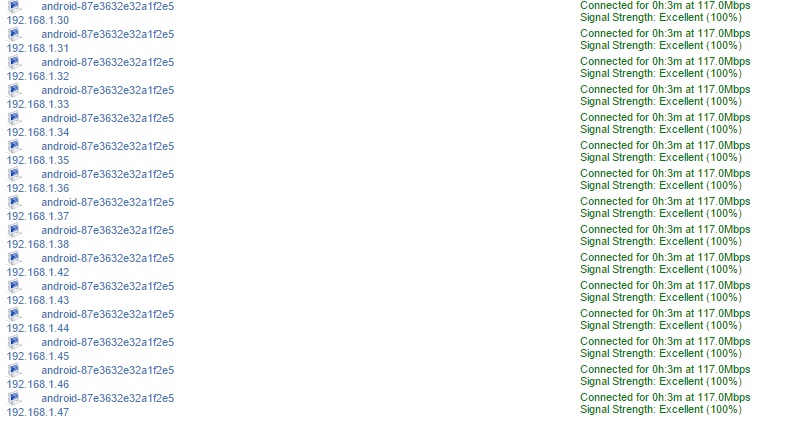
So, I noticed that my phone is taking up about 15 IP addresses on my wifi modem/router. It's a D-Link router provided by Verizon. I've included a screenshot to show the issue. I shut off wifi on my phone, all IPs disconnect. Turn it back on, they come back. It's a bit disconcerting, though it doesn't seem to be causing me any problems. Would still like an answer and/or solution if there is one. Thanks!
Install the app
How to install the app on iOS
Follow along with the video below to see how to install our site as a web app on your home screen.
Note: This feature may not be available in some browsers.
-
After 15+ years, we've made a big change: Android Forums is now Early Bird Club. Learn more here.
You are using an out of date browser. It may not display this or other websites correctly.
You should upgrade or use an alternative browser.
You should upgrade or use an alternative browser.
Help Galaxy S5 - multiple IP addresses
- Thread starter mawelch74
- Start date

My guess is that the default lease time configured by Verizon is 3mins, so your device is repeatedly renegotiating with the router every 3mins and obtaining the next available IP address in the DHCP pool.
Going to http://192.18.1.1/ in a web browser should land you at the router's admin login. Sign in, and look in the settings for a DHCP section. Dig into that and you should be able to extend the lease time to something more realistic i.e. 24hrs as well as limit the actual IP addresses offered.
As an example, my own router has a DHCP pool of ten addresses, *.*.*.90 - *.*.*.99, which fits the number of devices that are likely to connect (five of my own, plus five for "guests"). The default lease time is set to 72hrs, as it's rare for me not to connect within that timescale so all my own devices effectively have static IPs.
Going to http://192.18.1.1/ in a web browser should land you at the router's admin login. Sign in, and look in the settings for a DHCP section. Dig into that and you should be able to extend the lease time to something more realistic i.e. 24hrs as well as limit the actual IP addresses offered.
As an example, my own router has a DHCP pool of ten addresses, *.*.*.90 - *.*.*.99, which fits the number of devices that are likely to connect (five of my own, plus five for "guests"). The default lease time is set to 72hrs, as it's rare for me not to connect within that timescale so all my own devices effectively have static IPs.

My guess is that the default lease time configured by Verizon is 3mins, so your device is repeatedly renegotiating with the router every 3mins and obtaining the next available IP address in the DHCP pool.
Going to http://192.18.1.1/ in a web browser should land you at the router's admin login. Sign in, and look in the settings for a DHCP section. Dig into that and you should be able to extend the lease time to something more realistic i.e. 24hrs as well as limit the actual IP addresses offered.
As an example, my own router has a DHCP pool of ten addresses, *.*.*.90 - *.*.*.99, which fits the number of devices that are likely to connect (five of my own, plus five for "guests"). The default lease time is set to 72hrs, as it's rare for me not to connect within that timescale so all my own devices effectively have static IPs.
Thanks. I will check into this. However, wouldn't this issue have shown up from the day I installed the modem/router? It seems to have just started. I know as recently as a month ago, this wasn't a problem, and I've made no changes to any settings on the unit.
I know as recently as a month ago, this wasn't a problem, and I've made no changes to any settings on the unit.
Any chance Verizon pushed out a firmware upgrade recently? I can't think of any setting on an Android device that would cause this, which is why I suspect a router setting.
Any chance Verizon pushed out a firmware upgrade recently? I can't think of any setting on an Android device that would cause this, which is why I suspect a router setting.
Ha. It's Verizon, so anything is possible. I am definitely going to take your suggestion and see what's what in the router. It's been acting odd lately as it is. Worst case, I will dive down the rabbit hole and call Verizon if I have to and see if I can get a new unit.