
Install the app
How to install the app on iOS
Follow along with the video below to see how to install our site as a web app on your home screen.
Note: This feature may not be available in some browsers.
-
After 15+ years, we've made a big change: Android Forums is now Early Bird Club. Learn more here.
You are using an out of date browser. It may not display this or other websites correctly.
You should upgrade or use an alternative browser.
You should upgrade or use an alternative browser.
Getting the MSL & Loading Sprint PRL
- Thread starter UPdownLoAD
- Start date

UPdownLoAD
Member
so any new experiment?
Yup.
-Try downloading and installing the following programs:
http://www2.alcatelonetouch.com/usa/downloads/otu/one-touch-upgrade-5-4-3-setup.exe & http://www2.alcatelonetouch.com/usa/downloads/pcsuite/AlcatelPCSuiteV6.3.28.zip
-DEVELOPER MODE "probably" needs to be checked first, but I could be wrong
##PORT# on phone, put in MSL, change to ON
-connect to PC
marcos8202
Newbie
Until we can figure out what drivers it needs when connecting to the PC via ##PORT# it's not happening.
so that generic driver from pdanet doesnt help any? Im a total noob, i did get alogcat to detect the phone with it
UPdownLoAD
Member
so that generic driver from pdanet doesnt help any? Im a total noob, i did get alogcat to detect the phone with it
Basically, we need a diagnostic mode driver which may/may not exist.
marcos8202
Newbie
Basically, we need a diagnostic mode driver which may/may not exist.
Is that why you suggested those download links to see if it will work? If so, I will download it asap and let you know the results

after download and installing the software from this link http://www.alcatelonetouch.com/usa/products/smartphones/ot-909b.html#.UYpdmLXIV0W given by UPdownLOAD
you should have something like this on device manager if your running windows

then download the ALCATEL - QUALCOMM - Usb Drivers.zip from here
http://forum.xda-developers.com/showthread.php?t=1467676
after extract the files
then in device manager double click "Alcatel onetouch"
then click "Update Driver..."
then click "Browse my computer for driver software"
then click "let me pick from a ..."
then make sure "Show All Devices" is highlight then click "next"
then click "Have Disk..."
then click "Browse..."
browse to the extracted directory
then open "qcmdm.inf" from "WIN32" if your 32-bit or "WIN64" if your 64-bit
after pressing ok you'll get soemthing like the image bellow
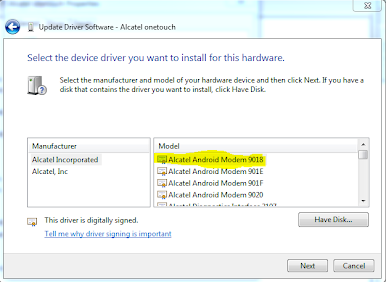
then you should click any ending with "9018" like the highlighted selection
you will probably get a driver update warning which you press yes
you should then get this under modems

and now cdma workshop should recognize your phone
If your phone can't be read by cdma workshop try installing another driver ending with "9018"
you should have something like this on device manager if your running windows
then download the ALCATEL - QUALCOMM - Usb Drivers.zip from here
http://forum.xda-developers.com/showthread.php?t=1467676
after extract the files
then in device manager double click "Alcatel onetouch"
then click "Update Driver..."
then click "Browse my computer for driver software"
then click "let me pick from a ..."
then make sure "Show All Devices" is highlight then click "next"
then click "Have Disk..."
then click "Browse..."
browse to the extracted directory
then open "qcmdm.inf" from "WIN32" if your 32-bit or "WIN64" if your 64-bit
after pressing ok you'll get soemthing like the image bellow
then you should click any ending with "9018" like the highlighted selection
you will probably get a driver update warning which you press yes
you should then get this under modems
and now cdma workshop should recognize your phone
If your phone can't be read by cdma workshop try installing another driver ending with "9018"

sunsuke
Well-Known Member
after download and installing the software from this link ALCATEL ONE TOUCH - United States - Products - Smartphones - ONE TOUCH 909 given by UPdownLOAD
you should have something like this on device manager if your running windows
then download the ALCATEL - QUALCOMM - Usb Drivers.zip from here
http://forum.xda-developers.com/showthread.php?t=1467676
after extract the files
then in device manager double click "Alcatel onetouch"
then click "Update Driver..."
then click "Browse my computer for driver software"
then click "let me pick from a ..."
then make sure "Show All Devices" is highlight then click "next"
then click "Have Disk..."
then click "Browse..."
browse to the extracted directory
then open "qcmdm.inf" from "WIN32" if your 32-bit or "WIN64" if your 64-bit
after pressing ok you'll get soemthing like the image bellow
then you should click any ending with "9018" like the highlighted selection
you will probably get a driver update warning which you press yes
you should then get this under modems
and now cdma workshop should recognize your phone
If your phone can't be read by cdma workshop try installing another driver ending with "9018"
nice find


Ken C
Well-Known Member
I'm going to assume that this is for those running aosp type roms. Or maybe just a non-sense rom. Used to carry an og evo, back on that phone I was able to change the prl using the epst program that's in the phone. Is that not possible anymore? We used to be able to flash kernels through recovery, but without s-off maybe it's just one of those things we can't do.
Where are y'all getting your prl's from?
Where are y'all getting your prl's from?
UPdownLoAD
Member
I'm going to assume that this is for those running aosp type roms. Or maybe just a non-sense rom. Used to carry an og evo, back on that phone I was able to change the prl using the epst program that's in the phone. Is that not possible anymore? We used to be able to flash kernels through recovery, but without s-off maybe it's just one of those things we can't do.
Where are y'all getting your prl's from?
http://forum.xda-developers.com/showthread.php?t=1880781
after download and installing the software from this link ALCATEL ONE TOUCH - United States - Products - Smartphones - ONE TOUCH 909/909A/909B/909S given by UPdownLOAD
link not working can you help Thanks
SHARAA09
UPdownLoAD
Member
after download and installing the software from this link ALCATEL ONE TOUCH - United States - Products - Smartphones - ONE TOUCH 909/909A/909B/909S given by UPdownLOAD
link not working can you help Thanks
SHARAA09
anybody having the file, please help me thanks
sharaa09
Their website has almost no support for Android phones right now. I was able to find this on there, don't recall if that's what you need or not. If not, I *may* have the files still archived.
http://54.247.87.13/softwareupgrade/Driver/ALCATEL_ADB_%20Driver%20Qualcomm_ADB.rar
Their website has almost no support for Android phones right now. I was able to find this on there, don't recall if that's what you need or not. If not, I *may* have the files still archived.
http://54.247.87.13/softwareupgrade/Driver/ALCATEL_ADB_%20Driver%20Qualcomm_ADB.rar
if you can archive the file it willbe a great help for me.sorry for the trouble
sharaa09
UPdownLoAD
Member
if you can archive the file it willbe a great help for me.sorry for the trouble
sharaa09
Happy to help!
I will look this evening to see if I still have the files archived. When I was playing with this phone, I was using a dedicated XP machine for phone flashing/hacking. I believe I archived all my drivers on an external hard drive, but that may have been one I deleted.
UPdownLoAD
Member
I couldn't find any archive of this programs, but I was able to find working links from Alcatel:
http://www.alcatelonetouch.com/usa/downloads/pcsuite/alcatel-androidmanager-2-2-1209-2565.exe
http://www.alcatelonetouch.com/usa/downloads/otu/one-touch-upgrade-q-1-9-9-setup.exe
I don't remember which was needed for the instructions, but both were linked on the page you said wasn't working above. (When I clicked Support tab, it gave a 503 error. I hit back, tried again, and hit ESC which kept the page from loading and let me copy the links)
http://www.alcatelonetouch.com/usa/downloads/pcsuite/alcatel-androidmanager-2-2-1209-2565.exe
http://www.alcatelonetouch.com/usa/downloads/otu/one-touch-upgrade-q-1-9-9-setup.exe
I don't remember which was needed for the instructions, but both were linked on the page you said wasn't working above. (When I clicked Support tab, it gave a 503 error. I hit back, tried again, and hit ESC which kept the page from loading and let me copy the links)