
I just read that you can extend the battery life of your android (smart phone) by limiting the frequency of how often it will check for new emails. I have found that when my browser records I get a new email (on my laptop), immediately I hear a notification from my Galaxy Core Prime that I have a new email there, as well. Is there a way I can limit the number of times a minute/hour that my smart phone checks my email?
Install the app
How to install the app on iOS
Follow along with the video below to see how to install our site as a web app on your home screen.
Note: This feature may not be available in some browsers.
-
After 15+ years, we've made a big change: Android Forums is now Early Bird Club. Learn more here.
You are using an out of date browser. It may not display this or other websites correctly.
You should upgrade or use an alternative browser.
You should upgrade or use an alternative browser.
Help Gmail polling setting--where?
- Thread starter paulri
- Start date

funkylogik
share the love peeps ;)
Tbh I just had a look and couldn't find it mate.
All I can suggest is tapping the 3bar menu icon at top left and scrolling down to the "halp" option.
I'm sure an expert will chime in and tell you though eventually
Actually this might help, hit the 3bars then scoll to Settings then tap your email address and it gives some options
All I can suggest is tapping the 3bar menu icon at top left and scrolling down to the "halp" option.
I'm sure an expert will chime in and tell you though eventually
Actually this might help, hit the 3bars then scoll to Settings then tap your email address and it gives some options
Last edited:
funkylogik
share the love peeps ;)
PS mods I don't care about my email address being public
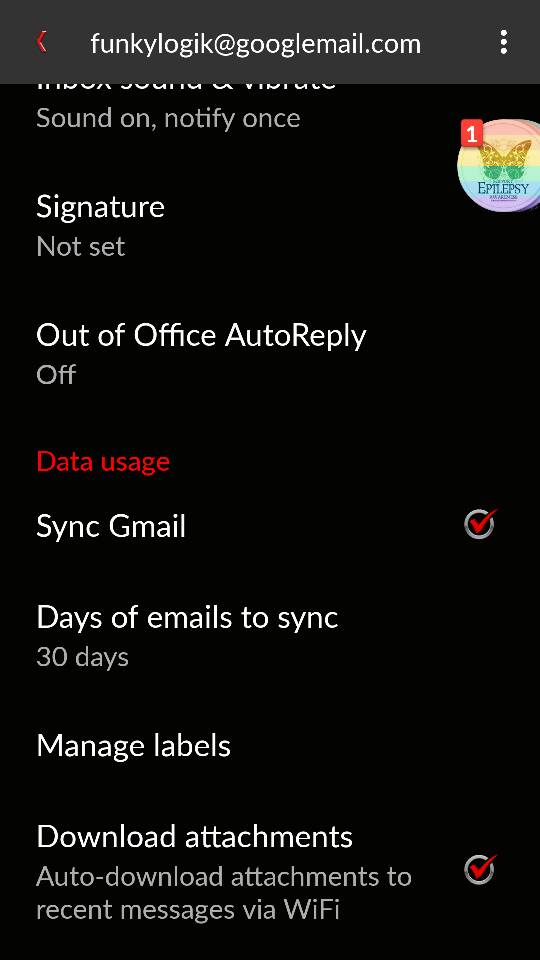
Looks like you just turn off sync and tell it how many days of mail u want but could (probably) be wrong
Looks like you just turn off sync and tell it how many days of mail u want but could (probably) be wrong
Last edited:
funkylogik
share the love peeps ;)
Take it "days to sync' didn't help? After thinking about it I kinda figured it wouldn't. Sorry

Crashdamage
Android Expert
You're getting immediate notifications via IMAP push, which is not the same as doing an email pass (sync). The phone doesn't check for notifications, the notifications are 'pushed' to the phone, which requires very little power, much less than doing an actual sync pass.
A push notification is just a very small file sent to the phone. But a sync pass logs into the email account, checks for mail, downloads new mail, uploads/downloads changes, gets everything in sync and logs off.
So lengthening the time between email syncing can help save a bit of power, a significant bit if it's been set, for example, every 5 minutes and it's changed to every 20, 30 or even even few hours. But push notifications don't work on a schedule and disabling them makes a fairly insignificant impact on the battery.
A push notification is just a very small file sent to the phone. But a sync pass logs into the email account, checks for mail, downloads new mail, uploads/downloads changes, gets everything in sync and logs off.
So lengthening the time between email syncing can help save a bit of power, a significant bit if it's been set, for example, every 5 minutes and it's changed to every 20, 30 or even even few hours. But push notifications don't work on a schedule and disabling them makes a fairly insignificant impact on the battery.
funkylogik
share the love peeps ;)
Ahh. Learn something new........
Thanks for explaining that. OK now let me ask: how do I change how often it syncs? I see in the settings that funkylogic showed above, the "Days of mail to sync," and it is set to 30.
What does this mean--that every 30 days, my Gmail account is synced? Or that only the last 30 days of email is synced.... or?
What does this mean--that every 30 days, my Gmail account is synced? Or that only the last 30 days of email is synced.... or?
You're getting immediate notifications via IMAP push, which is not the same as doing an email pass (sync). The phone doesn't check for notifications, the notifications are 'pushed' to the phone, which requires very little power, much less than doing an actual sync pass.
A push notification is just a very small file sent to the phone. But a sync pass logs into the email account, checks for mail, downloads new mail, uploads/downloads changes, gets everything in sync and logs off.
So lengthening the time between email syncing can help save a bit of power, a significant bit if it's been set, for example, every 5 minutes and it's changed to every 20, 30 or even even few hours. But push notifications don't work on a schedule and disabling them makes a fairly insignificant impact on the battery.
Crashdamage
Android Expert
That setting means that it syncs the last 30 days of mail. It could be a little mail or a lot depending on how much mail has been received and sent, but only the last 30 days of mail will be saved on the phone. It has nothing to do with the sync frequency.
I prefer an email client that allows setting the number of emails to sync rather than the age of emails to sync. But that's just me...
If you're using the standard Gmail app I have it disabled so I can't check to see where or if there's a setting for sync frequency. Sorry. But I think there's gotta be one somewhere.
I prefer an email client that allows setting the number of emails to sync rather than the age of emails to sync. But that's just me...
If you're using the standard Gmail app I have it disabled so I can't check to see where or if there's a setting for sync frequency. Sorry. But I think there's gotta be one somewhere.
funkylogik
share the love peeps ;)
I can't find it if it exists but as crash explained it doesn't really matter as it only syncs when an email is "pushed" to the phone, its not constantly polling for emails (if I understood correctly?)
Crashdamage
Android Expert
Not quite, Funky. Push notifications can come anytime, and as often or as seldom as email arrives. IOW, someone sends an email, a notification arrives. There's no scheduling involved.
Sync is scheduled - every 30 minutes, 2 hours, whatever. Email is not synced when a notification arrives. Email is not pushed to the phone, only the little notification file is pushed. Sync only happens when a scheduled time comes up or when the email client is opened, which initiates a manual sync pass.
IOW, sync really has nothing to do with push notifications and push notifications has nothing to do with sync. They are separate processes.
I hope I've made this understandable...
Sync is scheduled - every 30 minutes, 2 hours, whatever. Email is not synced when a notification arrives. Email is not pushed to the phone, only the little notification file is pushed. Sync only happens when a scheduled time comes up or when the email client is opened, which initiates a manual sync pass.
IOW, sync really has nothing to do with push notifications and push notifications has nothing to do with sync. They are separate processes.
I hope I've made this understandable...
Last edited:
funkylogik
share the love peeps ;)
Perfectly brother. So which system does Gmail use? Sync?
D
Deleted User
Guest
Only thing I know about sync, is that you can actually turn on-off sync schedule from drop down menu( when you swipe top of the screen downwards).
Crashdamage
Android Expert
Hmmm...maybe not so perfectly. Let me put it another way...Perfectly brother. So which system does Gmail use? Sync?
All IMAP email can sync. Sync is not a system, it's a function. The IMAP system provides the sync function.
Similarly, push notifications is not a system, it's a function. The IMAP push system provides the push notifications function.
IMAP push is an optional function to IMAP. Not all IMAP email systems offer push notification functionality, and not all email clients support push notifications.
To complicate things a bit more, there's true push and faux push. In a nutshell, some services like BlackBerry and Exchange offer true push notifications. Gmail does it with a kind of tricked-out version of IMAP push. Most IMAP email systems accomplish basically the same functionality using a kind of faux push notification called the IMAP IDLE command.
Remember this: Mail is not pushed, mail is synced. Notifications are pushed, not synced.
Does that help - or did I make things worse?
funkylogik
share the love peeps ;)
Worse tbh mate but it's OK.. I don't use much email lol.
Sorry for my stupidity.. Had a hard day
Sorry for my stupidity.. Had a hard day