• After 15+ years, we've made a big change: Android Forums is now Early Bird Club. Learn more here.

Help Google Maps Battery Drain?

Roadie1015

Well-Known Member
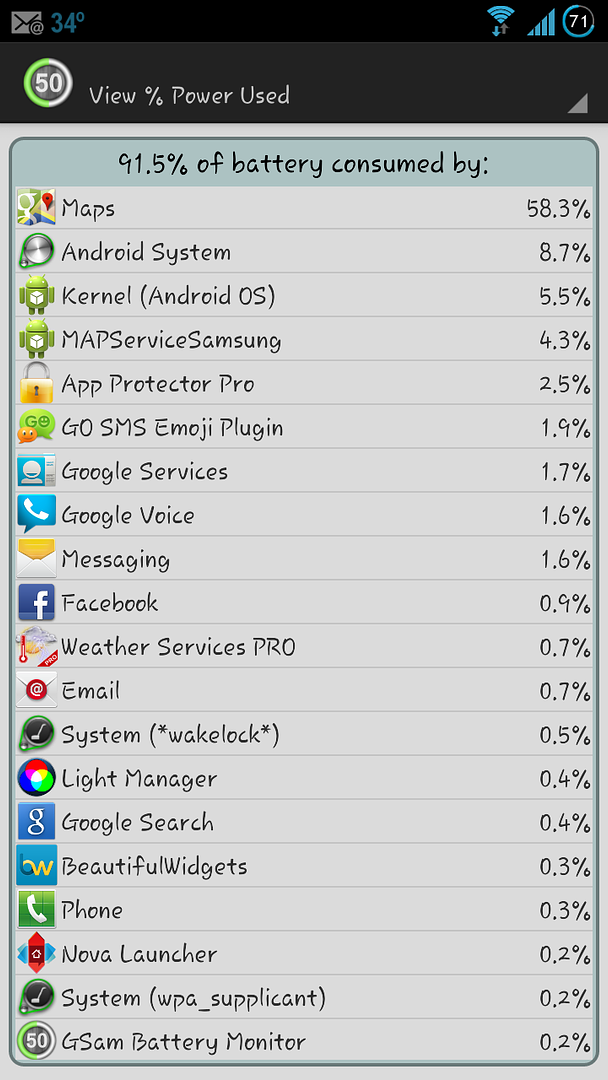
My phone says Google Maps has accounted for 19% of my battery drain, yet I haven't even opened it since I took it off my charger this morning. The last time I used it was last night very briefly.

I checked and I'm not signed into Latitude, I've never even used it.

The only thing I normally run that uses location services is WeatherBug.

I'm not sure what the heck it's doing, I don't really want to have to force stop it every time I use it, and I don't want to turn GPS off. I guess I can try clearing the cache and uninstall and reinstall updates.

Just curious as to if this happens to anyone else or not.
 
I think it is a Googlemaps thing as this same issue happens on my Droid Bionic. I have to force close it when I am not using it.
 
Yeah reboot does the trick, force stop and clearing cache does nothing. Just annoying that's all. I shouldn't have to reboot my phone every time I launch Maps to kill it.
 
I've read elsewhere that if you use the 'home' button to exit an app, it doesn't close the app. It exits the app, but the app remains running in the background, therefore using more battery life. It is suggested that you use the 'back' button to exit apps and this will allegedly stop the app from running in the background. You may want to try this method of exiting apps, if you haven't already.
 
Update:

Just glanced at my battery use this morning and Google Maps suddenly appears to be running in the background and eating up battery even though I haven't opened it in days. Any other ideas? It wasn't there yesterday.
 
Update:

Just glanced at my battery use this morning and Google Maps suddenly appears to be running in the background and eating up battery even though I haven't opened it in days. Any other ideas? It wasn't there yesterday.

I'm having the same issue. I just bought the s3 and upgraded to 4.1.1 on the first day. Maps always draining my battery even on fresh boot. Overnight goes from 98% to 12%.

Google now is turned off. Location services all off. Gps toggled off.
 
Yea, that's definetly not right. Overnight, assuming you sleep 8 hours, I wouldn't think you'd lose more than 20% (Your Carriers Service, Certain things set up on your phone would also affect how much you'd burn I'm sure.)
 
Yea, that's definetly not right. Overnight, assuming you sleep 8 hours, I wouldn't think you'd lose more than 20% (Your Carriers Service, Certain things set up on your phone would also affect how much you'd burn I'm sure.)

Yea it's not right at all. I've been going over iterations every night. First night I switched off wifi. Second night I switched off location services and gps. Third night I switched off google now. Over 8 hours it drains about 65-80%. Battery says that google maps is the highest battery drain. But it is not running.
 
Yea it's not right at all. I've been going over iterations every night. First night I switched off wifi. Second night I switched off location services and gps. Third night I switched off google now. Over 8 hours it drains about 65-80%. Battery says that google maps is the highest battery drain. But it is not running.
Yeah I never figured it out. Yours sounds excessive though. My battery drains about 3% per hour with light use, even if I tried to turn all location based apps off it was still running and battery wasn't much better. I ran out of ideas.
 
Any updates on this? I'm having the exact same problem. Google Maps is eating up my battery even though I haven't opened it.
 
Happening to me as well

Screenshot_2012-12-28-14-14-44.png
 
If you guys would just put a little effort into REMEMBERING where the topless bars are located and stop relying on the GPS there wouldn't be a problem now, would there?
 
If you guys would just put a little effort into REMEMBERING where the topless bars are located and stop relying on the GPS there wouldn't be a problem now, would there?

lol. i've left google-now enabled...but disabled location sharing in the maps settings. that may have fixed it. my drain-rate seems to have slowed way down.

others having this problem....try disabling location sharing in maps settings and see if it works.
 
lol. i've left google-now enabled...but disabled location sharing in the maps settings. that may have fixed it. my drain-rate seems to have slowed way down.

others having this problem....try disabling location sharing in maps settings and see if it works.

I have had Google Now running with location sharing running since the second I updated to 4.1.1 and have never had the Maps Battery Drain problem. Just remember that disabling location settings for Gopogle Now takes away half of its usefulness. ;)
 
I have had Google Now running with location sharing running since the second I updated to 4.1.1 and have never had the Maps Battery Drain problem. Just remember that disabling location settings for Gopogle Now takes away half of its usefulness. ;)


I understand...but what would be your better solution? When I went to the battery settings MAPS was listed first and was by-far the highest user of resources...even though I hadn't opened the maps app since I got the phone on 1/1/13.
 
I understand...but what would be your better solution? When I went to the battery settings MAPS was listed first and was by-far the highest user of resources...even though I hadn't opened the maps app since I got the phone on 1/1/13.

I really have no idea because I don't have that problem. It's obviously stuck in some kind of loop. Maybe force stop, clear the cache and disable the Maps app, restart your pone and then re-enable the Maps app and see what happens.

Good luck.
 
I too have this issue. Generally, I take my battery off the charger and the first thing I do is go into battery settings and force stop maps. My experience is ~8 out of 10 times maps is listed there as soon as the charger is unplugged. There are very few occasions that it doesn't start when the charger is unplugged. This is a hassle, but until this gets fixed that is how I'm combating this issue.
 
I'm not rooted so it is not un installable for me. I have un installed the updates and re installed the updates to no avail. In addition, after the Jb update, I did a factory reset and the problem persists.
 
make sure your location reporting, location sharing and location history are off(all under maps location settings). This might help as I was having the same problem, turned these off and then rebooted and the problem has not shown up for the last few days.
 
Back
Top Bottom