• After 15+ years, we've made a big change: Android Forums is now Early Bird Club. Learn more here.

Help GPS showing incorrect locations

I don't know if anyone has had any luck on this in the last week, but I thought I would add the following on some testing I did. I was also getting occasional weather in locations far away. Note that I always leave GPS off to save battery unless I am specifically searching for something in Google Maps. Yesterday I was in Dayton, Ohio and noticed the Weather widget said I was in Detroit (200 miles away). I checked the Google Maps app (with GPS still off) and it also thought I was in Detroit. Both must have been using cell tower reception, but getting a bogus reading somehow. I turned GPS on and Maps zoomed right to my correct location. Went back to Weather and it was still wrong (must have still been using cell tower). Turned GPS off and Maps went back to Detroit.

To try and force Weather to use the GPS, I went to Settings->Location->Use Wireless Network and unchecked it. The Weather app STILL had me in Detroit.

From this, it would seem that there are two, probably related problems.

1) Why is the cell tower locator detecting locations far away? and
2) Why doesn't the Weather widget get the forecast from the GPS if it is the only locator method enabled?

Hope this info helps someone smarter than me get to the bottom of this.
 
rbasl - I am in dayton, oh too (centerville) and my husband and I are experiencing the same issue as you! Hope they get this fixed!!!
 
Since I am a major tinkerer, I can't say for sure what features/settings I have turned on or off, but I do know...

I made sure there are no other cities in my Weather app (just "My Location"). It used to tke it a few seconds (or more) to decide which weather I "wanted to see". Not any more

I have all three setting turned on in "Location" and this friggin thing can narrow down which parking spot I am in at work. Inside it gets a little less accurate (wrong end of the building. Next door neighbor's house) but it's as close as I expect a civilian GPS to be.

HOWEVER, my results may not be typical. Just a reminder (because I'm sure you know this) anything you rely on Verizon to provide to you will vary by location. So, if you're in Philly, your results will vary from mine here in the Twin Cities. Different towers, antennaes, etc.

GPS should be relatively consistant anywhere in the same hemisphere, though, depending on how much you have between you and the sky.
 
I too am in Dayton, Ohio and yesterday it was continually telling me I was somewhere up near Cleveland. But it somehow fixed itself by the end of the day. Could it have been a satelite issue / glitch?
 
I too am in Dayton, Ohio and yesterday it was continually telling me I was somewhere up near Cleveland. But it somehow fixed itself by the end of the day. Could it have been a satelite issue / glitch?
# 4 from Dayton... Is it telling you "North Royalton", by chance ? It has placed me in Worthington (OH?), Washington (??), and a few other places in the past week.

Verizon, are you listening ?

40_LTDShooter, LGreek, and rbasl: Call Verizon tech support and report this. At this point, they told me to return my phone to a store and get a replacement.
 
# 4 from Dayton... Is it telling you "North Royalton", by chance ? It has placed me in Worthington (OH?), Washington (??), and a few other places in the past week.

I haven't gotten those cities. I got Akron and Farmington Hills, MI last week. Both were while I was traveling (nowhere near those cities). When I am at home in Dayton, it seems "less inaccurate". It is placing me in neighborhoods 10-15 miles away. I previously used Google Maps with my old Blackberry (without GPS). The cell tower accuracy routinely placed you inside 2 miles, so I'm pretty sure what I am seeing with the Eris is not right.

40_LTDShooter, LGreek, and rbasl: Call Verizon tech support and report this. At this point, they told me to return my phone to a store and get a replacement.

If you go in for a replacement, do they copy everything to the new phone? I have paid for a few apps and spent a lot of time configuring others, so I would hate to loose all of that.
 
As I mentioned to the tech support rep, the store employees are sometimes less-than-helpful in situations like this, i.e. they're all commission-paid and get nothing for the time spent in this scenario.

Yesterday, I don't recall where it said I was, but when I was in Union, it knew. Then went through Englewood and it updated. When I got home in Dayton, it was still stuck on Englewood. Turned phone off last night and this morning, when turned on, it says I'm in "North Royalton".
 
thats messed up you guys still got this issue.
i had it for one day (a day i REALLY needed it nonetheless!).
i think what fixed it is *228 option 1 then *228 option 2.
i think i restarted it a few times.
maybe i unchecked and re-checked the location settings (i have all checked even the google one).
hope this helps.
 
Did the *228 option 1 and *228 option 2. Now it says "location is temporarily unavailable". I guess that's better than being wrong???? At least now its honest.....
 
Today I have the right location. Phone was turned off last night. Let's see what happens if I refresh it (for "Current")... Working like it should at the moment. When I open the weather app and refresh it, it cycles to "Current location", then "Dayton (Current)", and finally to just "Dayton".
 
Hollywood,

Just curious,

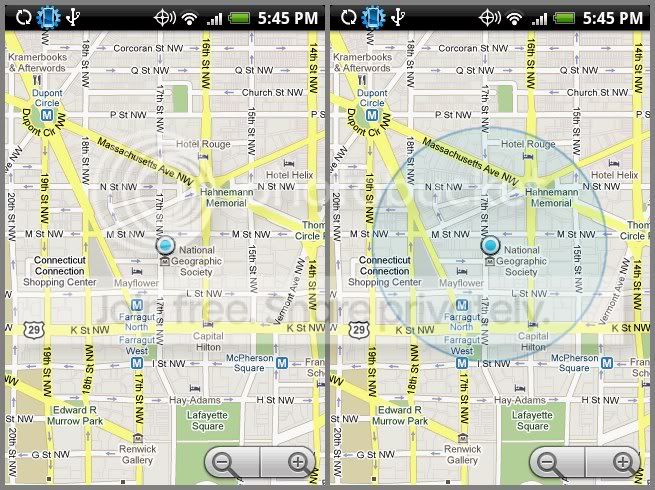
When you open up Google Maps (the app, not web page), and zoom in fairly tight (so that the width of the display contains 10-20 city blocks) to the position reported using Menu -> My Location, does the position display you see for the incorrect position look like the image on the right, or the one on the left:

fix_uncertain.jpg


??

eu1

Mine is like the one on the right, the big circle. Google maps is always a few blocks off for me. What is the difference between the right and the left?
 
Usually, it's pretty good. At home, it puts me a 1/2 block to 3-4 blocks away. Based on cell towers, I ain't complaining. When at work, on Monument Ave, east of downtown, it often put me near Valley and Keowee. Again, not bad. Hmmm, right now, it's saying intersection of N Main and Siebenthaler...
 
with gps off, here at work in a 2 story building top floor, i guess it gets its location from cell towers? i am about 6 blocks off. i turned on gps and i am dead on right now. the goog app updated automatically...took about 3 minutes.

also i noticed that the blue shade is off. so i gather that the blue ring shade is on when located from cell towers (no gps) as it is less accurate and you get no ring or shade with GPS is on.
 
Mine is like the one on the right, the big circle. Google maps is always a few blocks off for me. What is the difference between the right and the left?

That can mean one of two things.

1) If Google Maps is NOT using GPS, but using cell tower locations, you will see a huge "error circle" like that. Unlike with GPS, it is unlikely that the error is actually computed - the map application just uses a big circle of a fixed size when estimating your position from cell towers. (In my case, location estimated this way can be 1 - 3 miles off from my actual location.)

2) It is possible, but far less likely, for the GPS to produce "fixes" which have large error estimates. If you are using the GPS for finding your location, you will note that the little error circle will change from time to time, but generally will be far smaller - usually, you won't see the error circle at all, just the little blue "button".

Note that you can observe the error estimates produced by the GPS module on a fix-by-fix basis using the "GPS Status" app (see my post above).

Or, to put it more simply - if you see that large error estimate circle, you are probably NOT using the GPS.

eu1
 
i did notice the ring "zeroing" in and out a bit before it disappeared when i flicked on gps...nice explanation EU1
 
Hey just to let you know that I was having the same problem. I live in Miamisburg, just south of Dayton and my latitude put me in Michigan. Detroit to be exact. I tried the soft reset and all that. When that didn't work I just turned on my GPS and left it on for 10 min. I was in Google Maps and then all of a suden I was in my home area. I turned off the GPS and everything works right. My weather bug shows my correct location and all is well on my phone.
 
...and everything works right.
See if it sticks though. See what happens as you move around. It should change from Miamisburg to Centerville to Beavercreek to Dayton to Vandalia and so on as you drive...

Once again, mine is saying "Current city" on the clock widget and "Current location" for the weather widget. Earlier, I went outside and turned on GPS and it located me accurately. Turned it off and waited and it then said something like "Your current location is unavailable...".
 
I'm convinced this is a cell tower issue. As I drove home, it updated (as I passed into different tower's ranges). Makes me think some of the local towers are mis-configured.
 
I drove to toledo and back today (with no GPS). I checked it on the way up a few times and it seemed to be updating OK. On the the way back it got stuck on a tower in some town called Eagle south of Findlay. Stayed stuck on that one for about 3 hours after I returned. Just now refreshed and it is back to my home tower in Kettering. Go figure.
 
Had to run to the Meijer in Kettering and as I neared there, it updated to read "Kettering" for the location. Got home, in Dayton, and it still said "Kettering". Opened the weather app, refreshed, and it reads Dayton again.
 
Turned phone off overnight again and when turned on (at home), it says I'm in "Dayton". Now at work and it says "Brook Park" for the time and weather widget. Opened Google Maps and it started in the right (general) area but then moved to "Brook Park", outside of Cleveland.

Has anyone else called VZW support about this ?
 
Interesting.... Downloaded "Nav4All", a GPS navigation type all, and hit the "Where am I ?" link. It says "(Cell-site) Near address: snow rd brook park us".

I'm inside and it can't get good GPS reception so it's falling back to triangulation from cell towers.
 
Back
Top Bottom