
Install the app
How to install the app on iOS
Follow along with the video below to see how to install our site as a web app on your home screen.
Note: This feature may not be available in some browsers.
-
After 15+ years, we've made a big change: Android Forums is now Early Bird Club. Learn more here.
You are using an out of date browser. It may not display this or other websites correctly.
You should upgrade or use an alternative browser.
You should upgrade or use an alternative browser.

gbiggie
La patience et le pardon
 :thumbdown:
PlayfulGod
Extreme Android User
how many devices you have sluty? lol
gbiggie
La patience et le pardon
how many devices you have sluty? lol
Yeah slutyman how many phones do you have brother

gbiggie
La patience et le pardon
like many im getting the galaxy indulge next friday or this sunday
You keeping all the other phones you have or selling them?

Shabbypenguin
Extreme Android User
root can be achieved
its not a one click root, been trying but seems that is not possible. anyways run the batch file at the prompt run teh command listed and it should finish ya up
www.shabbypenguin.com/OUDstuff/Score-M/Score-M-Rooter.zip
super awesome thanks to playfulgod and gbiggie
its not a one click root, been trying but seems that is not possible. anyways run the batch file at the prompt run teh command listed and it should finish ya up
www.shabbypenguin.com/OUDstuff/Score-M/Score-M-Rooter.zip
super awesome thanks to playfulgod and gbiggie

corbryant
Newbie
root can be achieved
its not a one click root, been trying but seems that is not possible. anyways run the batch file at the prompt run teh command listed and it should finish ya up
www.shabbypenguin.com/OUDstuff/Score-M/Score-M-Rooter.zip
super awesome thanks to playfulgod and gbiggie
Did I miss something? I run this and I see a bunch of "Device not found" errors, but no root. Do you turn USB Storage Mode on, or USB Debugging? Is this all you do, unzip the Rooter, run the bactch file and it's supposed to work?
gbiggie
La patience et le pardon
Did I miss something? I run this and I see a bunch of "Device not found" errors, but no root. Do you turn USB Storage Mode on, or USB Debugging? Is this all you do, unzip the Rooter, run the bactch file and it's supposed to work?
Yup turn on USB debugging and run the bat. They rooted my ZTE with this so confirmed working. Just remember though-there is no recovery yet-PG is workin on it:thumbup:
Have started to write up a guide-been busy this week-should have it done this weekend.
Let me.know how it goes:thumbup:
Edit: install the drivers before anything above

https://www.box.com/shared/707d2d40dd444453225f
should we use the driver on this post at the bottom
http://androidforums.com/zte-score-m/526830-drivers-tool.html
or this one?
https://www.box.com/shared/707d2d40dd444453225f
http://androidforums.com/zte-score-m/526830-drivers-tool.html
or this one?
https://www.box.com/shared/707d2d40dd444453225f
corbryant
Newbie
Yup turn on USB debugging and run the bat. They rooted my ZTE with this so confirmed working. Just remember though-there is no recovery yet-PG is workin on it:thumbup:
Have started to write up a guide-been busy this week-should have it done this weekend.
Let me.know how it goes:thumbup:
Edit: install the drivers before anything above
https://www.box.com/shared/707d2d40dd444453225f
Arrrr harrrrr! Drivers. Duh... I'm sure that's it. I think in my tiny little mind I was assuming that since the SD-Card showed up on my box, the drivers were installed. Now that I think about it. They aren't. I bet that'll work. Unfortunately I only have Macs at home so I gotta wait till I get to the office tomorrow.
corbryant
Newbie
Forgot I had my new laptop. =) Well, I got further than I did the first time. It found the phone and got to the # sign, but what the hell does it want? It shows:
when you get to the # prompt please type the following command
C:\Users\Corey> echo ./data/local/tmp/root.sh
C:\Users\Corey> adb shell "sync_agent ztex1609523"
#
I can't type anything at the # prompt and I tried typing ./data/local/tmp/root.sh and adb shell "sync_agent ztex1609523" and lastly just tried sync_agent ztex1609523 thinking I just couldnt see the text. Just sits there.
Ideas?
when you get to the # prompt please type the following command
C:\Users\Corey> echo ./data/local/tmp/root.sh
C:\Users\Corey> adb shell "sync_agent ztex1609523"
#
I can't type anything at the # prompt and I tried typing ./data/local/tmp/root.sh and adb shell "sync_agent ztex1609523" and lastly just tried sync_agent ztex1609523 thinking I just couldnt see the text. Just sits there.
Ideas?
PlayfulGod
Extreme Android User
Actually the CWM for the Cricket Score works. I am stil lworking on one tho so it can be submitted for official buildYup turn on USB debugging and run the bat. They rooted my ZTE with this so confirmed working. Just remember though-there is no recovery yet-PG is workin on it:thumbup:
Have started to write up a guide-been busy this week-should have it done this weekend.
Let me.know how it goes:thumbup:
Edit: install the drivers before anything above
https://www.box.com/shared/707d2d40dd444453225f
the dev for the cricket one seems to refuse to push to github n submit it or just isnt savvy enough one
gbiggie
La patience et le pardon
should we use the driver on this post at the bottom
http://androidforums.com/zte-score-m/526830-drivers-tool.html
or this one?
https://www.box.com/shared/707d2d40dd444453225f
They are the same so either or..both from the ZTE site:thumbup:
gbiggie
La patience et le pardon
Actually the CWM for the Cricket Score works. I am stil lworking on one tho so it can be submitted for official build
the dev for the cricket one seems to refuse to push to github n submit it or just isnt savvy enough one
The sooner the better:thumbup:
Root without recovery is a nightmare waiting to happen-unless you have a stock rooted rom


corbryant
Newbie
Okay, now I know I'm not crazy. This may work on some Metro PCS phones but it doesn't work on others. Mine and a coworkers included. In fact, the coworker just walked in the door with hers - bought it this morning, so no apps or changes have been made at all. I've tried running the batch file on 5 different PCs, Win XP and Win 7 and it does the same thing on both phones and on both PCs.
It gets to the # prompt and sits there. You can't type at the prompt, it doesn't let you. It just sits until you cancel the batch file or unplug the phone. I'm confused because I would have thought it was something up with my phone or the PC I was using. Now that I've tried multiple phones and multiple PCs with the same exact results it kind of makes me think I'm either missing something or something is up with this batch file.
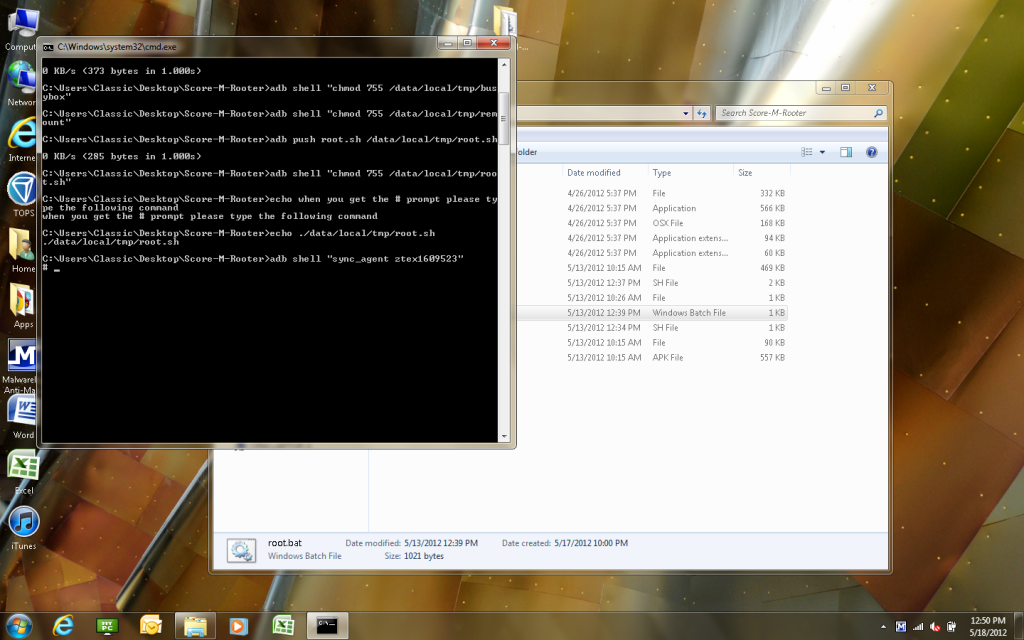
This is basically what I'm seeing in the CMD prompt box:
C:\Users\Corey> echo ./data/local/tmp/root.sh
C:\Users\Corey> echo adb shell "sync_agent ztex1609523"
#
Am I supposed to be typing something on the PHONE? If so, what - excactly, and where on the phone? In a terminal window?
This is a pic of what I'm seeing -- I just can't type at that prompt. Not on this computer or any other...
It gets to the # prompt and sits there. You can't type at the prompt, it doesn't let you. It just sits until you cancel the batch file or unplug the phone. I'm confused because I would have thought it was something up with my phone or the PC I was using. Now that I've tried multiple phones and multiple PCs with the same exact results it kind of makes me think I'm either missing something or something is up with this batch file.
This is basically what I'm seeing in the CMD prompt box:
C:\Users\Corey> echo ./data/local/tmp/root.sh
C:\Users\Corey> echo adb shell "sync_agent ztex1609523"
#
Am I supposed to be typing something on the PHONE? If so, what - excactly, and where on the phone? In a terminal window?
This is a pic of what I'm seeing -- I just can't type at that prompt. Not on this computer or any other...
Shabbypenguin
Extreme Android User
ok good to know, well you can do it all manually :/ since apparently a script doesnt appear to be working. im flying blind here so i did what i figured would work
corbryant
Newbie
ok good to know, well you can do it all manually :/ since apparently a script doesnt appear to be working. im flying blind here so i did what i figured would work
Oh really? Well if you have time to give me a quick lesson on how to do it manually, please do! My employer told me that my cell bill would no longer be paid by the company if I didn't have my email working by Monday. I was going to go buy yet another new phone and I really like this one! I just bought it a few weeks ago!
corbryant
Newbie
You fkin rock brother. =) Have a good holiday!
corbryant
Newbie
Do recovery too! Remember-backup backup backup
Yeh, I'm reading about the ClockWorkMod for the Cricket. PG said that would work, so I'm going to give it a shot.
Tonight is the night.. =) I can just feeeeeeel it..