
• After 15+ years, we've made a big change: Android Forums is now Early Bird Club. Learn more here.

Root help me fix this battery issue once and for all

yea.. i wish i checked but i after that instant 5% jump i didn't want my phone to die suddenly and miss a call.. plus i was driving so checking spare parts at the time might not have been a good call haha. i haven't rebooted yet so i will just check it throughout the day and overnight tonight. i feel like it's a pretty standard kernel/profile combo (just to recap: NA 4.3.2 nohavs/nosbc/suv + profile showen in original post). i don't have any mods. i'll see what happens overnight tonight, i was hoping to switch to trying no no profiles tomorrow but i think i will keep everything constant until this is either figured out or doesn't happen tomorrow. :(

Good plan. See how it goes throughout the day and tonight, then switch to no profiles after.
 
Im going to try these as well, because i dont always have what i think is the best battery life either.

So im starting with 4.3.2 noHAVS with static undervolting. Same one JP is trying out.
And i set up some profiles with setcpu. From the top down:
Charging........245/998
Screen Off......128/245
Temp>44c......128/729
Battery<50%..128/691
Battery<35%..128/499

My "main" is set at 245/998..conservative.

Im going to try with then without profiles.
When i try without, should i stay on conservative or switch to smartass?

(I chose noHAVS because i tend to be on my phone frequently. I have great battery during [rare] longer periods of sleep. But like JP, when i am using the phone and in need of the battery, such as while im out, it drops like a brick)

is max 499 a little low? or even 691 for that matter? that seems like a lot of underclocking.

now i wanna take a moment and be the giver of advice for a change :) ... may i suggest that you make the temp profile a higher priority? my rationale being that preventing the cpu from overheating is the highest priority, and if your phone is freaking out and heats up while you have it on the charger the temperature profile won't kick in to slow it down. i've had my phone heat up like crazy when i was using trapster while plugged in my car charger. back then the only profile i had was max temp because i was using havs w/ smartass governor at the time; but, if i wasn't and i had a charging profile set the temp one woulda been useless.
 
is max 499 a little low? or even 691 for that matter? that seems like a lot of underclocking.

now i wanna take a moment and be the giver of advice for a change :) ... may i suggest that you make the temp profile a higher priority? my rationale being that preventing the cpu from overheating is the highest priority, and if your phone is freaking out and heats up while you have it on the charger the temperature profile won't kick in to slow it down. i've had my phone heat up like crazy when i was using trapster while plugged in my car charger. back then the only profile i had was max temp because i was using havs w/ smartass governor at the time; but, if i wasn't and i had a charging profile set the temp one woulda been useless.

~500 MHz will most definitely result in choppiness, but the phone *should* still be usable. Just don't expect to be able to do much. I'd recommend keeping it above 700 MHz until all you want to do is keep the battery alive. Perhaps consider waiting until 35% to go lower than that.

Also, you are right, it's fine to have both a power plugged in profile and a > temp profile, but make sure to make the temp profile priority 100, and the plugged in priority 99. Screen off should be 98, and everything below that is up to you. You just want those top three to be in that order.
 
is max 499 a little low? or even 691 for that matter? that seems like a lot of underclocking.

now i wanna take a moment and be the giver of advice for a change :) ... may i suggest that you make the temp profile a higher priority? my rationale being that preventing the cpu from overheating is the highest priority, and if your phone is freaking out and heats up while you have it on the charger the temperature profile won't kick in to slow it down. i've had my phone heat up like crazy when i was using trapster while plugged in my car charger. back then the only profile i had was max temp because i was using havs w/ smartass governor at the time; but, if i wasn't and i had a charging profile set the temp one woulda been useless.
~500 MHz will most definitely result in choppiness, but the phone *should* still be usable. Just don't expect to be able to do much. I'd recommend keeping it above 700 MHz until all you want to do is keep the battery alive. Perhaps consider waiting until 35% to go lower than that.

Also, you are right, it's fine to have both a power plugged in profile and a > temp profile, but make sure to make the temp profile priority 100, and the plugged in priority 99. Screen off should be 98, and everything below that is up to you. You just want those top three to be in that order.

You both are right. I used to have my temp profile the highest (I make quite a lot of calls while plugged in, and it gets quite hot) I dont know why i didnt set it up like that this time, but thanks for helping me out and get it put back where it belongs.

About the underclocking, Ive been using it at those speeds/percentages for maybe a month now..? I havent had any issues with the phone being to slow or unresponsive below 50 or 35% when the cpu clock drops down that low.
I have noticed a little battery saving by doing it, and no harmful side effects so i left it like that. (stays in my pocket at like...12% for a few hours lol)
If im out, say im out late for a night, and i need my phone to last as long as possible without any charging, im not going to be playing angry birds or doing any heavy web browsing, all i want is calls/texts/yahoo messenger on 3g. So for MY usage, slowing it way down is suitable for me.
 
That's perfectly fine. If it works for you, then go for it. To be honest, everyone needs to just try out different levels for themselves.
 
I know this is not the answer you are looking for, but I finally got fed up with battery life and bought the Seidio 3500 and all my problems are solved. I have even started turning back on all the little things that increased my drain issues. I can now easily go a whole day with ridiculous heavy use, up to 2 or more hours of phone calls, dozens of emails, Etc., and still have around 50% battery remaining.

I hope you get this figured out, I know how frustrating this can be for all of us.
 
Or, another option is a backup battery. I dont always need it. Actually, most times i dont. But when i do know ill be out for a while and want a backup, ill throw it in my car or pocket.. (its so small)

So you either have convenience and have it care free but make the phone fat, or you can keep the phone looking sexy, while having to switch out a battery 8-12 hours later. I found an OEM red htc battery on craigslist for a few bucks.
 
Or, another option is a backup battery. I dont always need it. Actually, most times i dont. But when i do know ill be out for a while and want a backup, ill throw it in my car or pocket.. (its so small)

So you either have convenience and have it care free but make the phone fat, or you can keep the phone looking sexy, while having to switch out a battery 8-12 hours later. I found an OEM red htc battery on craigslist for a few bucks.

i do like that idea, i used to keep spares for my blackberry (although that thing lasted through days).

maybe i will do that as a failsafe, never hurts to keep one in the car and just switch them out everyone once in a while to keep them charged. about how long do you think one of these things holds charge sitting unused but full?
 
I havent gotten to test it out enough to give you a good answer. But charging it all the way up (not a bump charge, just till green) and then taking into account the initial drop, after a few days it always has about 93 or so percent when i put it in. I dont get to use them a lot, so this aspect on how long they hold a charge was important.
I looked it up, and these lithium batteries hold a charge well. For example, the battery powered drills i use, are lithium batteries and hold a charge for a couple weeks when im not using them. (work has been slow;) )

It was cheap enough i did it anyway haha. You could always keep one around for those times you know you will be out and about for an extended period of time.
 
pretty normal drain over night last night with NA 4.3.2cfs-nohavs-suv w/ conservative + profiles. about 8 percent over 8-9 hrs. I did get less screen off drain before. The real issue, to recap, is the drain throughout the day. I'm down 9-10% since I got up for work and have only made one 2-minute phone call. Just pressing the battery monitor widget and going to "View History" I've lost 4% of my battery--that whole process took some 20 seconds... so screen on drain is still a problem... this is with profiles currently underclocking to max 960 (I know that's not much).

I think I'm going to abandon this config and move on to the next... which will be all the same minus the profiles... gonna charge up now at work and see how it goes...

everyone say a little phone prayer for me to the android gods
 
Interesting. What was your battery % at when you went to bed? If it was 100%, that's a bad baseline, as the battery is going to drop a lot even if the phone is idle. Starting at something like 93% will give you a better baseline (ignore that advice if you switch to sbc). Also, did you check spare parts to make sure the phone is sleeping (not going to affect screen-on, obviously, but still). So, go ahead and see how it goes without many profiles. Let me know how it goes.
 
Interesting. What was your battery % at when you went to bed? If it was 100%, that's a bad baseline, as the battery is going to drop a lot even if the phone is idle. Starting at something like 93% will give you a better baseline (ignore that advice if you switch to sbc). Also, did you check spare parts to make sure the phone is sleeping (not going to affect screen-on, obviously, but still). So, go ahead and see how it goes without many profiles. Let me know how it goes.

My battery was at 83% when I went to sleep at midnight, I woke up around 8:30 and it was at 75%. After a couple minute phone call it was down to the 60's. I got to work at 66%, checked the battery monitor and dropped to 62% while checking.

I should mention I have the battery monitor widget collecting stats every minute. This is something I began recently and my battery problem has been much longer than this, but is that too often that it could adversely affect the battery life? i.e. maybe this new config fixed the problem i had before and now battery monitor is the culprit?
 
Anything that is constantly monitoring like that could easily cause problems like that. I know some don't. Get rid of it for a day/night, and see. Aside from config issues, you might just have some app issues. Did you ever check partial wake usage? Also in spare parts, do you see anything high on the list for cpu usage?
 
Anything that is constantly monitoring like that could easily cause problems like that. I know some don't. Get rid of it for a day/night, and see. Aside from config issues, you might just have some app issues. Did you ever check partial wake usage? Also in spare parts, do you see anything high on the list for cpu usage?

i did check it, nothing was unusual. the partial wake usage looked like the one i posted in post #3 except no maps. cpu usage looked like the one in the original post, with nothing really sticking out.
 
Hm, ok, well try it without the monitor for a while. It's one of those things where you try to monitor something, but you affect it by simple fact of the matter that you're monitoring it... Just because it doesn't show much on usage stats doesn't mean *that* much.
 
:mad: 4 hrs 15 min since unplugged... 65% battery remaining. this morning i got to work, posted about the drain, started charging her up, unplugged a little after noon and 4 hrs 15 min later goodbye 35% of my battery.
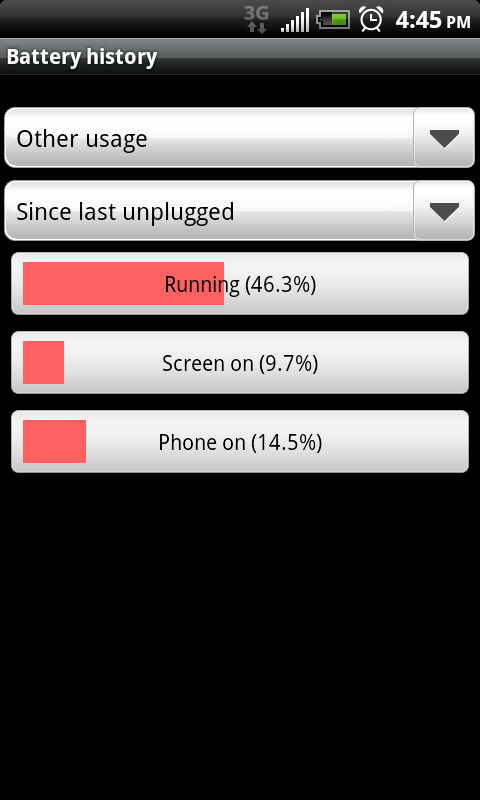
NA 4.3.2-cfs-nohavs-suv
governor: conservative
setcpu profiles: screen off 128/245. charging 128/998
fresh 3.5.0.1

I have noticed something odd though, i have not seen this before. i went to system panel and clicked end-task on google voice to see if the battery usage for the rest of the day changes

snap20110208_164507.png


snap20110208_164503.png


that "facebook" is not the "facebook for htc sense" which integrates facebook with all my stuff, it's just the app that i presume only uses data when I'm running it.
 
Heh, yeah, it looks like google voice was holding a wake lock there. That would definitely cause major battery drains. See if it improves. I don't have any better advice at the moment beyond what you already did. Let me know if it improves.
 
Heh, yeah, it looks like google voice was holding a wake lock there. That would definitely cause major battery drains. See if it improves. I don't have any better advice at the moment beyond what you already did. Let me know if it improves.

should i reboot to get spareparts to reset so I can see if this continues? I'm presuming this may be what caused that huge drop the other night that i spoke about before, when i didn't check spare parts but just plugged in immediately.
 
Could be. I've never had Google Voice do that to me, but I've heard of it happening to other people before. You don't need to reboot. As long as you killed Google Voice to make it stop holding a wake lock, just plug the phone in, then unplug it right away. That will reset the stats for "since last unplugged".
 
the google voice issue is gone. yesterday something called "htc dm" was holding a wakelock, but not nearly as bad. today it's not even in my spare parts partial wake usage. I've used my phone pretty lightly today and I'm at 85% with about 3 hrs off the charger, which is pretty good for my phone, but emphasis on pretty light usage.

I still see the same thing as always though that's killing me. and that's when my screen is on and I do a couple simple tasks i lose more than i think i should. i got a text, turned on the screen and saw 88% battery. answered the text with a couple texts, go back to home and i'm at 85%.

i haven't gotten rid of the battery monitor widget, because i don't have a mod right now that shows % in my battery meter so it would make it hard for me to keep track of the percent i'm losing without it. this has been an issue before the monitor widget so i'm assuming it's not the cause. i did disable history on it so it's not saving history every minute.
 
I'm thinking maybe you should try getting a baseline. If you have the time, and don't mind making your phone kind of useless for a bit, put it in airplane mode, make sure no radios are on, and turn off auto sync. See if the battery still drains a lot. Also, I noticed from your screenshot above (way above) you have wifi on *almost* 100%. Are you actually connected for most of this time?
 
I'm thinking maybe you should try getting a baseline. If you have the time, and don't mind making your phone kind of useless for a bit, put it in airplane mode, make sure no radios are on, and turn off auto sync. See if the battery still drains a lot. Also, I noticed from your screenshot above (way above) you have wifi on *almost* 100%. Are you actually connected for most of this time?

I haven't had it on today yet but yes if it's on it's connected, either in home or in the office. Whenever I took that screenshot must have been when I had been at either one or the other since last unplugged. Sometimes I'll forget it on when I'm driving from one to the other. I think tonight I might try that baseline idea.
 
I didn't get a chance to do that baseline thing yet.... is it something I should do and let it idle for hours or use it and see if the screen on usage is as bad as usual.

Today I'm less than 8 hrs off the charger, only used it for voice calls (although they totaled about an hour). No wifi, no 4g, no gps, no bluetooth, no browsing, no fb, no writing or reading emails on it. Time spent without signal 0%. Battery... 34% remaining...33% remaining. This is frustrating. At this rate I'm looking at under 12 hours today on this charge.

Spareparts says lookout held a 5 min wakelock, and android system held a 5 minute wakelock, those are the top under "partial wake usage". CPU ranks Android System, dialer,and HTC sense, with none of them being extraordinarily high. System Panel top apps for last 8 hrs are system at 4.2%, dialer 0.7%, system processes 0.6%.

32%...

Is there any more information I can provide to see what's sapped it especially fast today? Yesterday I went to sleep with around 20% left and it was unplugged for like 16-17 hours.... One of the best battery days I've had in a while but it was in my pocket unused most of the day so even "light" use would probably be an overstatement. And it dropped from like 50% to 20% in the couple hours after I got home from work and started actually using it.

edit: still on na 4.3.2-nohavs-suv-nosbc w/ conservative gov and only screen off profile... maybe it's time to move onto another configuration? is it safe to say that using this most other probable causes of the battery drain have been eliminated?
 
Hmm. I'd say go for that baseline, and let's take it from there. That'll help us narrow it down to system issues or application issues (hopefully). Or maybe you just have a bad battery. That's always a possibility.
 
Hmm. I'd say go for that baseline, and let's take it from there. That'll help us narrow it down to system issues or application issues (hopefully). Or maybe you just have a bad battery. That's always a possibility.

ok. but during that time i'm in airplane mode with sync off and all that, should i let the phone sit unused or should i do something with it to see if battery drains really fast while use? because that's primarily the problem.

although since my last post i literally did not touch my phone, it sat idle next to me and i got a text a minute ago and my battery was at 22%, so it dropped 9% during several minutes idle :(
 
Back
Top Bottom