• After 15+ years, we've made a big change: Android Forums is now Early Bird Club. Learn more here.

Help help please

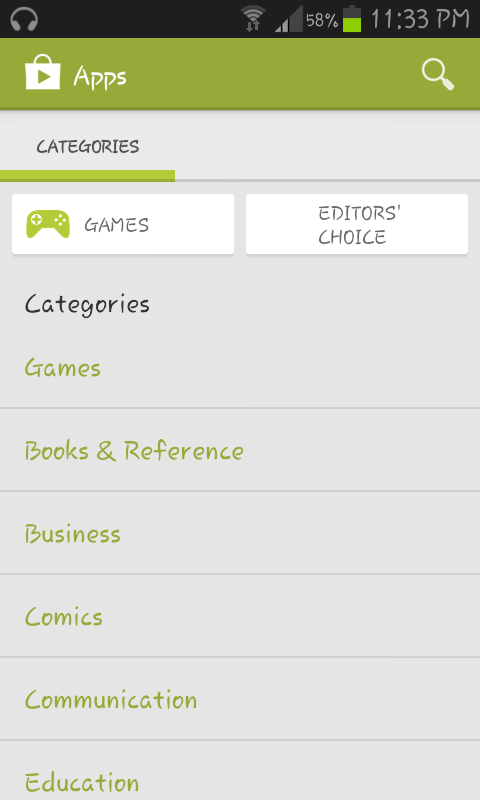
So i have a samsung galaxy s2 plus gt-i9105 running on jelly bean 4.1.2 bought it 3 months ago, and i have a problem with my play store, when i enter it i only see categories and when i click on one of them no apps are showing but a white page with no errors. I tried entering play store with my browser, i wanted to download something and i chose to download via play store and an error appeared that this app is not available in your country. This is a new problem i didnt face a problem like this before. I cleared data and cache of play store but still same problem. And another question about rooting, is rooting s2 and s2 plus same? Or different zip is needed? Thanks.
 
Hi again, Alex. I'm sorry no one's been able to offer any ideas yet. I don't have your device and am not familiar with it, so I don't know how much help I can be.

So i have a samsung galaxy s2 plus gt-i9105 running on jelly bean 4.1.2 bought it 3 months ago, and i have a problem with my play store, when i enter it i only see categories and when i click on one of them no apps are showing but a white page with no errors. I tried entering play store with my browser, i wanted to download something and i chose to download via play store and an error appeared that this app is not available in your country.
When you tried via browser, was that on your phone? What happens if you access the Play store with a browser on a computer? Same result? Or different?

And are you actually accessing Google's Play Store? https://play.google.com/store If you are, your option when you select something you want should be to 'install' it, not 'download' it.

This is a new problem i didnt face a problem like this before.
Do you mean before you had this phone? Or you have the problem now on this phone but didn't until now?

And another question about rooting, is rooting s2 and s2 plus same? Or different zip is needed? Thanks.
I believe that you always need the specific files for your device. So, no, I would not think they're the same. But, again, I don't have your phone, so...
 
This is how my play store looks
TueAug27235034EEST2013_zps4040ea32.png
 
In your settings its a box needs to be checked . The box should say all unknown sources . This is fo the app store . Check to see if its checked . If not you want to check it . Of this dont fix the problem u may need to download a different version of playstore . I will post a file in a second
 
try this apk


Installation Guide:
1.Download the apk from the links
2.put the apk on the phone ,don't use adb install *.apk in won't work it will say it already exists
3.Open the apk from the phone using a File explorer (ASTRO for example)
4.it will ask you if you want to replace the current market,press yes.
5.wait for install and voila you have the new market

NOTE:this method replaces the old market.
Quote:
Troubleshoot:
If you have download problem after Installing new market do this

" Connect your phone to your computer,
set in usb mass storage mode. Look for
a hidden folder called ".android_ secure"
and then delete the file
"smdl2tmp1 .asec". Unmount and you
should be good to go."
 

Attachments

i downloaded the file and installed it with astro file manager. The only thing that changed is that now i have the old play store. I didnt find those files to delete them also.
 
Back
Top Bottom