• After 15+ years, we've made a big change: Android Forums is now Early Bird Club. Learn more here.

Help How do I change white back ground in messaging and phone applications..?

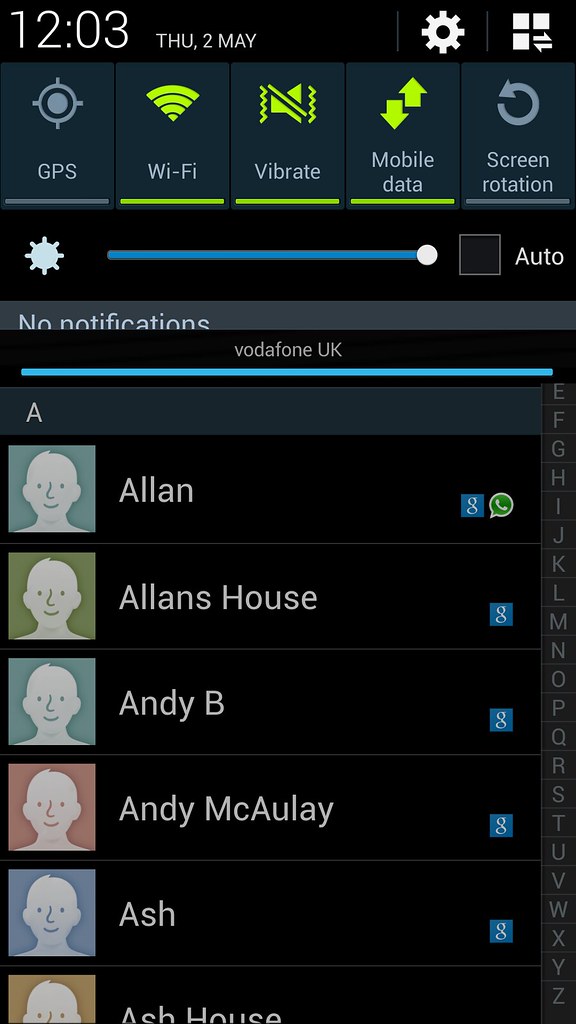
8700696887_90bf15e22a_b.jpg


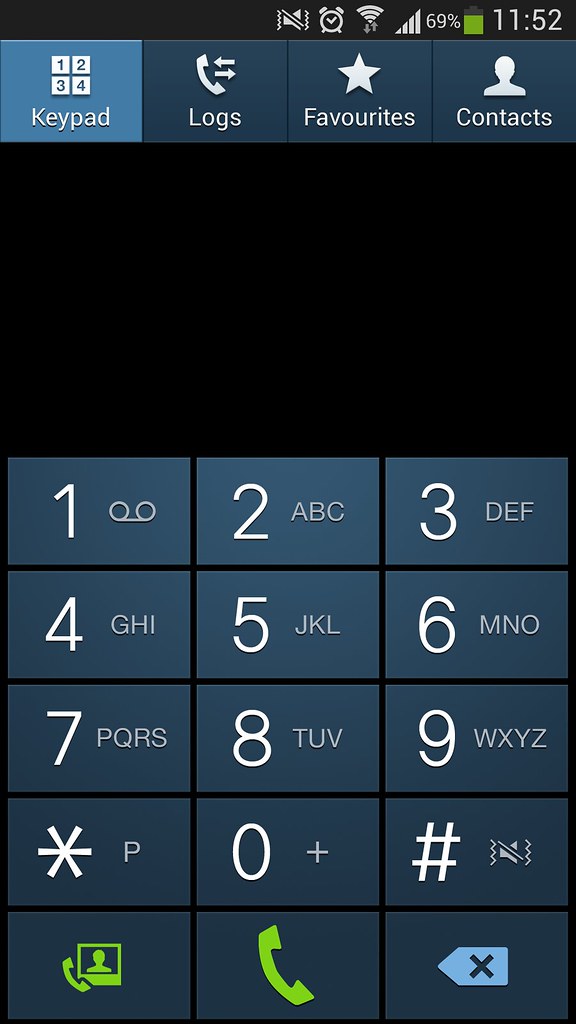
8701817856_b6fcdd3956_b.jpg


Thanks I'm not sure inverting the colors would have shown the keys this color. I'm sure everyone will appreciate this.

Not sure which one i like better personally.

Both are fine to me and would like to be able to switch back and forth myself when I get the phone.

I know a coworker gs4 from att has a white dialer so it may be a regional thing or software related.


Also the white looks a lot like iOS 6.0 dialer. Samsung still at it, lol
 
No problem and to be honest its just exact same as the S3 dialer when its black! Could someone post up the white one for me to have a look at?
 
So is it carrier specific? Region specific? I hope Verizon's is white. I prefer the light background.
 
has anyone with the dark colored phone app tried loading the contacts.apk from someone with a white colored phone app?
 
Funny, I can not stand the white background of the dialer app. Seems pointless changing from how it is in other S4 carriers and how Verizon was on the S3 (black/gray). The message app also did this, but that can be changed in options. Wonder why no option for the dialer app?

White ain't right for this, IMO.
 
Thanks, jj. I'm not planning to flash away from stock or even route with this phone, though. It also doesn't look exactly the same, but some people may prefer the way that the one you posted looks.

I'm curious if installing the contacts.apk like tdevaughn mentioned would work. It worked for the camera and gallery to install the stock versions without root or anything.
 
I think the contacts.apk is a system app, so you may not be able to replace it without root access.

Edit: But maybe you can have two contacts applications (like what you indicated with the gallery/camera app)
 
Yeah, I agree that either one may be the case. But if it can be done (w/o root, like the camera/ gallery), I'm sure that people who are much smarter than me will figure it out. And then I'll either see it on here or droid life. lol. Thanks.
 
I was doing my screenshots, went for dinner before upload, and pufff.... lots of replies, images.. all done...

Anyway, I'm. Mind. Blown!
I have never seen white dialer or sms white background in my life. Well, I do live in a very small country, away from the civilized lot. Nevertheless, seriously, none of the YT videos I ever watch, Android blogs I read, or product launch and demos, ever featured white. For a while there, I thought my lame English comprehension led me to misunderstand the OP.

My S2, S3, Note (R.I.P), and now Note2 and S4, all came with black background stock.
Even the carrier models here, comes black stock. So it has to be very small minority of models, just some carrier specific.

I mean no offense, but the white indeed does not look good. I understand why you would like to change it.
 
Personally I prefer the dark background on the dialer. I wish Samsung/ATT would at least give us an option of either a light or dark background.

I also have the white dialer background.
 
I was watching episode 3 of Ray Donovan and his secretary has an S4 and hers had the black background. Wish there was an easy way to change it.
 
Old thread I know. But I recently changed a setting in Accessibility (show button shapes) and it kicked me out of my theme.. which is minimalist black. This made my dialer and messaging screens go white. Took me ages to find out what it was. If you want a black or white background apply a theme that gives it.. and change the settings you dont want back to your faves. Just remember if you get a weird message about show shapes... see above.
 
Back
Top Bottom