• After 15+ years, we've made a big change: Android Forums is now Early Bird Club. Learn more here.

Apps How Does Android know which Java to Execute First ???

ac4android

Well-Known Member
Hi. I am working thru some codes and cannot see the wood for the trees at the moment.

I have several layers of activities, the topmost is called "TopLevelActivity", then followed by several activities and some pure Java codes.

How does Android know which code to execute first? There's no "public static void main(String[] arghs)" in any of the activity- Java to kick off the sequence of activities.

 
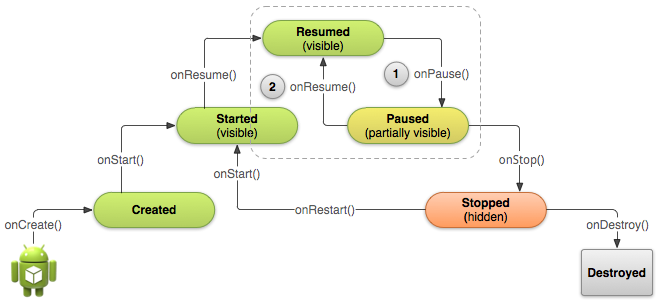
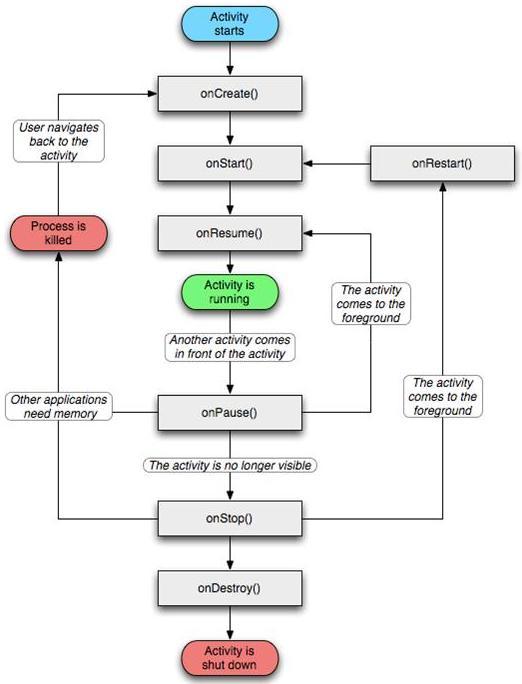
There's no main method because your app, along with all the others runs in a kind of container, managed by the Android runtime environment. All apps have a lifecycle, with specifically defined methods being called at various points e.g. to suspend or restart the app.
As for your main activity, that's all configured using the manifest XML file

Code:
<application
       android:icon="@drawable/ic_launcher"
       android:label="@string/app_name"
       android:theme="@style/AppTheme" >
      
       <activity
          android:name=".MainActivity"
          android:label="@string/title_activity_main" >
      
          <intent-filter>
             <action android:name="android.intent.action.MAIN" />
             <category android:name="android.intent.category.LAUNCHER"/>
          </intent-filter>
      
       </activity>
      
   </application>
 
^^^ +10, @LV426! :)

A couple other lifecycle resources and references for you, @ac4android:

http://developer.android.com/training/basics/activity-lifecycle/index.html

http://www.vogella.com/tutorials/AndroidLifeCycle/article.html

Android_application_life_cycle.png


fcaf25c811f85f46.jpg
 
There's no main method because your app, along with all the others runs in a kind of container, managed by the Android runtime environment. All apps have a lifecycle, with specifically defined methods being called at various points e.g. to suspend or restart the app.
As for your main activity, that's all configured using the manifest XML file

Code:
<application
       android:icon="@drawable/ic_launcher"
       android:label="@string/app_name"
       android:theme="@style/AppTheme" >
     
       <activity
          android:name=".MainActivity"
          android:label="@string/title_activity_main" >
     
          <intent-filter>
             <action android:name="android.intent.action.MAIN" />
             <category android:name="android.intent.category.LAUNCHER"/>
          </intent-filter>
     
       </activity>
     
   </application>


Thx.
 
Back
Top Bottom