
Install the app
How to install the app on iOS
Follow along with the video below to see how to install our site as a web app on your home screen.
Note: This feature may not be available in some browsers.
-
After 15+ years, we've made a big change: Android Forums is now Early Bird Club. Learn more here.
You are using an out of date browser. It may not display this or other websites correctly.
You should upgrade or use an alternative browser.
You should upgrade or use an alternative browser.
How to bypass "tethering block" on Three network?
- Thread starter kcbuds2
- Start date

Snarly Yow
Lurker
I kicked up a load of fuss when I had to leave the One Plan, so I went on a rolling sim in case any other networks introduce unlimited tethering.. Anyway I STILL have unlimited tethering - I am using a xperia Z5 compact but I'm not upgrading to Marshmallow in case I lose it..
Very strange
Very strange
hello please help I recently moved into an area which broadband is not available and the only network here what gives me anything above 2mbps is 3pay uk ! and I use a lot of data so would like to use the £25 payg all I can eat data bundle , is there anyway for this to be made possible as I receive an error message now ( but worked previously for 3 days ) saying this chip canot be used in a dongle/ modem please replace back into your phone . it isn't a problem for me to buy a new chip or modem but I no they will do it again. is there a way for me to change the apn or any other settings to sort the problem(either on my currently blocked 1 or if I get a new setup) ... . not super techey my self but can take it to someone who is to sort the problem for me with the right instructions. thank you any help is much apreciated
9
Yes but when i placwvthe blocjed sim into an old android phone i have it still lets me tether & if i put it back in mifi device it gives error and message saying this sim is not for dongles pls put back into phone. Its my inly option to get this sorted so im gonna gave a pretty good shot at it just where to start nowAm I right in thinking that you have used your 3 sim card in a dongle and now three have blocked that sim ?

9
Yes but when i placwvthe blocjed sim into an old android phone i have it still lets me tether & if i put it back in mifi device it gives error and message saying this sim is not for dongles pls put back into phone. Its my inly option to get this sorted so im gonna gave a pretty good shot at it just where to start now
Quite frankly I just don't think you'll be able to do that with 3 phone only "unlimited data" SIM. A MiFi is a data only device and all it does it tether, and no doubt 3 will be able to determine that from the IMEI and capabilities, e.g. it doesn't do voice calls or SMS. Plus the fact they've already determined that it is a "dongle" you're trying to use, which are usually data only device, no phone calls.
No way around it I think. It's one thing trying to tether using a phone, which is mainly what this thread is about, but this is something completely different.
Whilst browsing this website. Looking for a way to bypass tether limits, i received this random text from Three..
Don't worry if you use up your Personal Hotspot allowance. Keep your devices connected with a Personal Hotspot add on. Click here URL REMOVED Optout@My3
Weird!!! They are definitely keylogging me tut tut (jokes, but its weird huh)
Don't worry if you use up your Personal Hotspot allowance. Keep your devices connected with a Personal Hotspot add on. Click here URL REMOVED Optout@My3
Weird!!! They are definitely keylogging me tut tut (jokes, but its weird huh)
Jack Rudkin
Lurker
Thanks to threes feel at home service I will have 12GB of data to use on my mobile device which is the cap they put on unlimited data plans (as well as a 4GB personal hotspot which this solution also works for).
However, while abroad three does not allow the device to share its data via USB tethering or wifi hotspot so under normal circumstances the data abroad is confined to the phone and back in the UK you're limited to 4GB (or nothing at all if your plan doesn't allow tethering).
To get around this restriction I use an app called clockwork mod tether, which allows a mobile device to share its internet connection with (in my case) a windows laptop over USB and does not require root and was recently fixed to work with windows 10 (previously only 7, linux and mac).
Once I have my phone tethered to my laptop I can then use a program called connectify to then create a wifi hotspot by selecting the virtual ethernet port the clockwork software uses as the source connection and then the laptops wifi to share this for multiple devices to connect to wirelessley.
This solution obviously doesn't let you tether wirelessley from the handset but it will let you either tether via USB to one device (if you just use clockwork mod) or many if you go a step further and use connectify to use the connection as the source for a wifi hotspot.
Hope this helps someone.
However, while abroad three does not allow the device to share its data via USB tethering or wifi hotspot so under normal circumstances the data abroad is confined to the phone and back in the UK you're limited to 4GB (or nothing at all if your plan doesn't allow tethering).
To get around this restriction I use an app called clockwork mod tether, which allows a mobile device to share its internet connection with (in my case) a windows laptop over USB and does not require root and was recently fixed to work with windows 10 (previously only 7, linux and mac).
Once I have my phone tethered to my laptop I can then use a program called connectify to then create a wifi hotspot by selecting the virtual ethernet port the clockwork software uses as the source connection and then the laptops wifi to share this for multiple devices to connect to wirelessley.
This solution obviously doesn't let you tether wirelessley from the handset but it will let you either tether via USB to one device (if you just use clockwork mod) or many if you go a step further and use connectify to use the connection as the source for a wifi hotspot.
Hope this helps someone.
andyroochoo
Newbie
My phone has recently updated to 6.0 android .
And I changed the mobile network name to three network, three network . And this has completely solved my tether issue. Hope it helps anyone .[emoji106][emoji106][emoji106][emoji106][emoji106][emoji106][emoji106]
Which phone do you have and can you explain in more detail what you have done to get this working.
Many thanks

mowe13
Newbie
Let me just say .I hope you are not working for three network [emoji28]cos I will cry if you fix this [emoji22].
I'm using samsung s5 . Go to settings / more networks /mobile network / access point names . Then + a new network name , under name type (three network ) and then under APN type three network ,then restart your device this works mostly for me depending on what I am tethering for . Hope this helps . Also like I said it didn't really work until my device updated to 6.0
Hope it helps .and please post your results [emoji108]
I'm using samsung s5 . Go to settings / more networks /mobile network / access point names . Then + a new network name , under name type (three network ) and then under APN type three network ,then restart your device this works mostly for me depending on what I am tethering for . Hope this helps . Also like I said it didn't really work until my device updated to 6.0
Hope it helps .and please post your results [emoji108]
andyroochoo
Newbie
Let me just say .I hope you are not working for three network [emoji28]cos I will cry if you fix this [emoji22].
I'm using samsung s5 . Go to settings / more networks /mobile network / access point names . Then + a new network name , under name type (three network ) and then under APN type three network ,then restart your device this works mostly for me depending on what I am tethering for . Hope this helps . Also like I said it didn't really work until my device updated to 6.0
Hope it helps .and please post your results [emoji108]
Hi, thanks for the reply.
no, i dont work for three, i only asked because I could never get this to work with Android 5,
I'm wondering if its worth the upgrade to marshmallow if this works. Im on a note 4.
I don't work for three, or four or five either.
andyroochoo
Newbie
I don't work for three, or four or five either.
what a pointless comment.
A pointless carrier, and I've had it up to here with them previously.
In fact every time I go back to the UK, I think, NO Three! Although their Hong Kong network and service was actually OK.
In fact every time I go back to the UK, I think, NO Three! Although their Hong Kong network and service was actually OK.
Last edited:
andyroochoo
Newbie
A pointless carrier, and I've had it up to here with them previously.
In fact every time I go back to the UK, I think, NO Three! Although their Hong Kong network and service was actually OK.
three are alright if you want unlimited data, but you're right, they shaft their loyal customers and up the price every 'three' months.

Brian9239
Newbie
Is this thread still going? :O
I told you they would abolish the "All in one 15".
Honestly though, Three have done a really good job in improving the network in my area for since a year ago look at the beautiful speeds....

Man I really hope they don't drop the unlimited for 15 add on coz I'm using around 50gb a month (I know, selfish...).
Don't know where I'll go to if they drop that.. Maybe back to giffgaff?
I told you they would abolish the "All in one 15".
Honestly though, Three have done a really good job in improving the network in my area for since a year ago look at the beautiful speeds....
Last edited:
MRSeuphoria
Lurker
Hi guys! I am not android user but thats not the point. Whenewer I want to use internet on PC-i I just put my sim card in old phone-samsung gallaxy gt-19000. Doing this about half a year-allways working. Good luck!

CenturionB
Well-Known Member
guys, you received impresed speed
i have 28 mbps on download max ;(
i have 28 mbps on download max ;(

Michael Barrymore
Lurker
What's a hotspot not? ITS NOT FOR TETHERING
Or in this case it is.
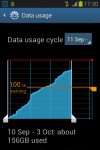
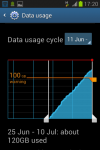
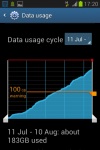
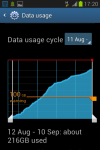
Using a galaxy fame as the hotspot, its running JB 4.1.2 and has a regular p&g 3 SIM installed.
Using their £25 a month all you can eat, with various devices such as iPads, iPhones connecting ad hoc and with thrsr devices constantly attached
Xbox 360
Xbox One
Galaxy tab 3
Galaxy tab E
Galaxy s3 mini
Find attached data usage logs for last 4 months.
Normal usage, including bit torrent, Netflix, bit torrent, YouTube, iPlayer, 4OD, bit torrent, browsing, eBay, online gaming and bit torrent.
I know I said BT 5 times, I like BT.
I would suggest that Jelly bean isn't reporting back to the network with regard to its tether status
Useful little device the Galaxy Fame
Or in this case it is.
Using a galaxy fame as the hotspot, its running JB 4.1.2 and has a regular p&g 3 SIM installed.
Using their £25 a month all you can eat, with various devices such as iPads, iPhones connecting ad hoc and with thrsr devices constantly attached
Xbox 360
Xbox One
Galaxy tab 3
Galaxy tab E
Galaxy s3 mini
Find attached data usage logs for last 4 months.
Normal usage, including bit torrent, Netflix, bit torrent, YouTube, iPlayer, 4OD, bit torrent, browsing, eBay, online gaming and bit torrent.
I know I said BT 5 times, I like BT.
I would suggest that Jelly bean isn't reporting back to the network with regard to its tether status
Useful little device the Galaxy Fame
Attachments
Brian9239
Newbie
What's a hotspot not? ITS NOT FOR TETHERING
Or in this case it is.
Using a galaxy fame as the hotspot, its running JB 4.1.2 and has a regular p&g 3 SIM installed.
Using their £25 a month all you can eat, with various devices such as iPads, iPhones connecting ad hoc and with thrsr devices constantly attached
Xbox 360
Xbox One
Galaxy tab 3
Galaxy tab E
Galaxy s3 mini
Find attached data usage logs for last 4 months.
Normal usage, including bit torrent, Netflix, bit torrent, YouTube, iPlayer, 4OD, bit torrent, browsing, eBay, online gaming and bit torrent.
I know I said BT 5 times, I like BT.
I would suggest that Jelly bean isn't reporting back to the network with regard to its tether status
Useful little device the Galaxy Fame
Just don't complain to Three if your mast suffers congestion in the near future because you would have caused it.