
Faizan Shergill
Lurker
Hi, i am an android developer, and i am trying to run/test my app on my android device i-e LG G3 cat-6, which is loaded with custom ROM, but when i connect it to my PC and run the command on terminal/ADB "adb devices", it doesn't show any device, as my phone is not recognized by my the PC or ADB as an android device. (It is recognized as media device).
...
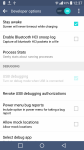
I have enabled the Developer Options in the phone, but the USB debugging option is greyed out in the option, which makes it unselectable, when i disconnect my device from PC, only then the USB debugging option is turned to black to be selectable, i check/enable this option then again connect my phone to PC and the option again turns to grey.
...
I found on some other thread that this is due to USB settings of the android device.
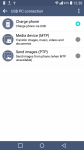
When i go to USB setting option from notification bar, to see USB PC connection Setting, i only get these 3 options to choose from i-e
1- Charge Phone via USB
2- Media Device (MTP) .. -> {currently selected due to which it is recognized as media device as told earlier}
3- Send Images (PTP)
Of these 3 options whatever i select, i cannot get my issue to be resolved.
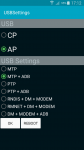
In that that someone wrote that by dialing this code *#0808# you will get these additional USB settings as shown in PICTURE (if uploaded) .. But the thing is that even this code is not working on my android LG G3 Cat-6, coz when i dial the code and hit send it says "Connection Problem or Invalid MMI Code". I am wondering is, is this code not working because it is Korean Built Phone (Cat-6 is Korean version), or is it due to the custom ROM that is in the device??
...
So i want to ask if there is another way to change the USB Setting of this phone to enable USB Debugging option and to be able to be recognized by the ADB in my PC [which is my main issue needed to be solved], without changing the current ROM of my device.
I am also uploading screen shots of USB connection setting screen AND Developer Options screen. also the USB settings screen (taken from that thread) that is presumably shown when you dial the above code
Hoping that someone might solve this issue.
Thanks
...
I have enabled the Developer Options in the phone, but the USB debugging option is greyed out in the option, which makes it unselectable, when i disconnect my device from PC, only then the USB debugging option is turned to black to be selectable, i check/enable this option then again connect my phone to PC and the option again turns to grey.
...
I found on some other thread that this is due to USB settings of the android device.
When i go to USB setting option from notification bar, to see USB PC connection Setting, i only get these 3 options to choose from i-e
1- Charge Phone via USB
2- Media Device (MTP) .. -> {currently selected due to which it is recognized as media device as told earlier}
3- Send Images (PTP)
Of these 3 options whatever i select, i cannot get my issue to be resolved.
In that that someone wrote that by dialing this code *#0808# you will get these additional USB settings as shown in PICTURE (if uploaded) .. But the thing is that even this code is not working on my android LG G3 Cat-6, coz when i dial the code and hit send it says "Connection Problem or Invalid MMI Code". I am wondering is, is this code not working because it is Korean Built Phone (Cat-6 is Korean version), or is it due to the custom ROM that is in the device??
...
So i want to ask if there is another way to change the USB Setting of this phone to enable USB Debugging option and to be able to be recognized by the ADB in my PC [which is my main issue needed to be solved], without changing the current ROM of my device.
I am also uploading screen shots of USB connection setting screen AND Developer Options screen. also the USB settings screen (taken from that thread) that is presumably shown when you dial the above code
Hoping that someone might solve this issue.
Thanks

 Thank u, i really appreciate your help