
Install the app
How to install the app on iOS
Follow along with the video below to see how to install our site as a web app on your home screen.
Note: This feature may not be available in some browsers.
-
After 15+ years, we've made a big change: Android Forums is now Early Bird Club. Learn more here.
You are using an out of date browser. It may not display this or other websites correctly.
You should upgrade or use an alternative browser.
You should upgrade or use an alternative browser.
Help How to sign-out email
- Thread starter BillTan
- Start date
-
- Tags
- lg optimus one
Really no need to but you can go to settings and clear cookies. That will sign you out and require you to sign back in. I never sign out and my passwords are auto saved in my phone anyway. I ALWAYS do, however force close my browser after I am through. The app and account are garbage and through a shortcut method I do have that option. I just don’t use it.

Try this
Goto settings > Accounts & Sync > Click the account u want to remove > Click Remove account..
It definitely works for removing ur Gmail & FB account, dunno about Yahoo..
It does not work.
Yahoo account does not show in Account & sync.
I unchecked Auto sync and Background data, account still open automatically.
if you want to sign out then after using the app just force stop it ...then it wont sync on its own....
It works.
Thanks!
I have same problem and can't sign out of Yahoo email so my emails stay open all the time. What do you mean by 'force stop'? This is my first 'Smart' phone and I am very slow in catching up.if you want to sign out then after using the app just force stop it ...then it wont sync on its own....

samrox144
Android Expert
force stop is nothing but force closing the app..I have same problem and can't sign out of Yahoo email so my emails stay open all the time. What do you mean by 'force stop'? This is my first 'Smart' phone and I am very slow in catching up.
to force close app follow the below steps
go to settings
>applications
>manage applications
and find the yahoo mail app and select it ...then it will show options to force stop just select force stop and it wont sync or wont stay open then
example--

Heroine
Member
I tried the above for gmail but when I opened again I was still signed in.force stop is nothing but force closing the app..
to force close app follow the below steps
go to settings
>applications
>manage applications
and find the yahoo mail app and select it ...then it will show options to force stop just select force stop and it wont sync or wont stay open then
example--
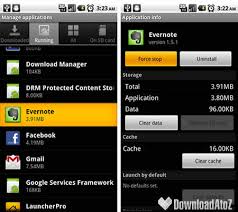
This is concerning if u let someone else use the tablet and they can read all your emails etc

I tried the force stop, too, but the sign in page still has my user name and password already entered. When I delete both of those they reappear when I enter through the Yahoo mail app again, meaning anyone using my tablet can get directly into my email with one click. I deleted the app.
wasabi991011
Lurker
All you have to do is:
1-Go in settings
2-Go to applications
3-Click on Y! Mail
4-Click clear data
1-Go in settings
2-Go to applications
3-Click on Y! Mail
4-Click clear data