• After 15+ years, we've made a big change: Android Forums is now Early Bird Club. Learn more here.

Apps How to wirelessly transfer data?

Puppet Man

Lurker
Hello all!

I've been developing Android apps for about 4 months now, so I'm still pretty new. There are two apps I am currently working on, and I'm stuck at a similar point in both of them - connecting and sending data to another device wirelessly. In one, I would like to transfer strings (specifically strings of data I've collected from the accelerometer) from the device to a computer via wifi. In the other app, I would like to connect two devices and send the GPS data to each other, so each knows where the other is.

I've done a lot of research, but I'm still unclear what the best way to go about this is. I've seen people suggesting the use of servers for others who were trying to do something similar, but I have no idea how to even start setting that up. From what I've seen, the Socket Android class appears to be what I should use, but I really don't understand how it works. It looks like I connect to a device by providing the IP address, but I don't understand how the other device will receive the data....or really how it works at all lol. Am I on the right track? If someone could give me some explanations/suggestions/guidance I would be very appreciative. Thanks!

 
I think the method you ultimately end-up using will depend on how close the devices are to each other.

This question/answer talks about bluetooth sockets and regular sockets:


also: http://android-er.blogspot.co.il/2014/02/android-sercerclient-example-server.html

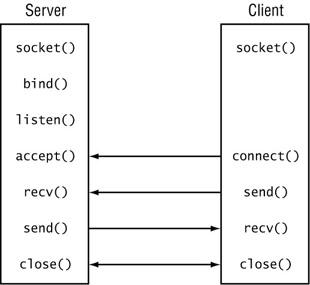
I've always described a client/server sockets session as being similar to a telephone call:

ClientServer.jpg

- you've got two parties, the caller (client) and callee (server) [person waiting to be called]
- the IP address of the callee (server) is like their phone number
- let's assume the callee (server) is not currently on a call and is waiting (doing a listen()) for an incoming "call" (connection) [after already having done the proper setup in calling socket() and bind())
- the caller (client) will try to call / connect() to the callee (server)
- the callee (server) will (hopefully :p) accept() the incoming call/connection
- the callee (server) will then post a read / recv() in order to accept incoming data from the caller (client)
- now that the call / connection has been established, the caller (client) can start sending / send() data to the callee (server)
- they then exchange data this way until the caller (client) is finished sending all of their data and the client will close() the connection (and so will the callee (server))

You should be able to find lots of TCP/IP sockets examples and setup two parties (one of which doesn't even have to be an Android device, of course--it could be any socket client or server).

Best of luck!
 
Thank you so so much for the reply, scary alien. That definitely helped me understand how the whole server thing works better. I hope you don't mind if I ask you a couple of questions to help clear things up.

So if I have two devices (and we'll just say they're both android phones that are less than a mile away but not on a wifi network or anything), if I want to connect them, I should probably use a server? That's what looks like the best option is but feel free to correct me if I'm wrong. If so, my understanding is that it is kind of like a third party that both the phones connect to and then somehow it sends data between the two phones, but I am still kind of hazy on how exactly that would work, because from my point of view, your analogy seems to only apply to one device and the server.
 
Sorry for the delay in replying...

I mentioned the distance issue purely based on whether or not you had bluetooth sockets in mind--i.e., close proximity devices. It sounds like the devices being in close proximity is not a requirement for what you have in mind.

So for what it sounds like you want to do, you'll need to have one of the devices--the sending / client device--know the IP address of the receiving / server device. The receiving / server device doesn't need to know the IP address of the sending / client device, but it can see or find that out after they've connected.

Also, I forgot to mention, you'll have to designate a port number to use for the initial connection. To further the phone conversation analogy, this is like having the other party's extension--i.e., you know the company's main phone number, but the person you're trying to reach has their own extension. That's what the port number is for.

So, the device that is going to be connected to--the server--is really just the one that is LISTENing (via the listen() call) for an incoming connection on a specific port number.

There's countless code examples out there for doing this and testing it, even for your Windows or Linux PC or Android device(s), etc. that should give you a better feel for things. I believe there's a typical one called the echo client and echo server that is used to demonstrate how the whole thing works (I'll try to dig something up after hitting submit on this post).

I think the challenge you might have is that you'll have to have some mechanism for deciding which device is going to assume which role. That will dictate which device needs to know the IP address of the other. I don't know if you've already got something planned for this (and I don't necessarily have a solution for you re. this).

You don't even have to restrict which role a device has (client or server) for deciding who is going to be the one sending data. It's just typical that it's usually the client that provides/sends data and that the server receives the data. But there's nothing in the TCP/IP protocol that says that you can't switch things around (and many implementations do).

One final note, in the data exchange between your client and server, you'll typically have the server/receiving party send back an acknowledgment string to let the sender know that you successfully received the data that was sent. That acknowledgement can be anything you want, as long as the two sockets interfaces are coded to recognize and react to each acknowledgement. Something like this:

sending client: "here is some data for you"
receiving server sends back: "ACK"
sending client: "here is some more data for you....blah-blah-blah"
receiving server sends back: "NAK"
sending client: "oh, sorry, I forget we weren't going to say blah"
receiving server send back: "ACK"
...etc., etc., etc...​

The above shows how the receiving servers sends a positive acknowledgement ("ACK") or a negative acknowledgement ("NAK").

There are, of course, countless variations in how something like this can be coded and implemented...i.e., as simple as you like or as complicated as you need it to be (with retry logic, sending size limits, timeouts, simple or custom acknowledgments, etc., etc., etc.).

I hope that helps--it's a lot to absorb, but use the coding examples you'll find on-line and try and test something that will work for you.

Cheers! :)
 
All right, thanks for the help! You'll probably be hearing from me again in the not too distant future lol

Hello again, scary alien. Would you happen to have any experience with Google App Engine?

(or anyone else reading this)
 
Last edited by a moderator:
lol well thanks for trying. It's what I am trying to use. It provides a fully-functional backend and so far I can get it to send data (a string) to my app, but I'm a bit stuck on how to go about reversing that process and adding another phone into the mix.
 
Back
Top Bottom