@jcawesome87
I just replaced my screen as well... took about 1:30 the directions below are correct but still a little vague
I'll put some addendums to Jc awesome's steps...
1. Remove backcover
2. Remove Battery, sim chip, and memory card
3. Unscrew the top two screws (meaning the end farthest from the memory card.)
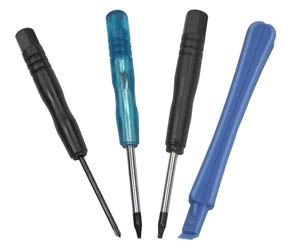
4. Using a flat plastic wedge, (I used the one that came from my ebay order, it looks like the blue tool in this pic
)
5. Carefully pull off the parts at the top being very cautious not to break anything. (Do not pull the circuit board out, only lift the end closest to the edge of the phone)
** there are two pieces to pull off....with the phone laying flat (screen down and the top facing away from you) a larger yellow piece with an attached back speaker comes out towards you. a second piece pulls up (north as if on a map)... but becareful because there is a bunch of tape and tackiness all throughout this thing (literally I felt it was held together by tape). I actually pulled off the grill on front as well.
** the circuit board is kept attached near the top right. the element that is the power button snaps off. (there are two little dots just to the right of the speaker with what looks like blackish tape that connects to the circuit board... you can pop this off.
With that off, I could lift the circuit board about 30 degrees or so... I wasn't comfortable pulling it back any farther than that.
I did step 5 AFTER I got the screen off.
6. Using the flat plastic wedge again, push the wedge tool between the phone and the broken screen. (It will feel like you are breaking it but it is fine, it is held on by a sticky paste that will slowly give way)
** careful on this part... especially difficult depending on how your screen is cracked. but it is just a bunch of sticky tape that is keeping it attached.... I had to peel away the goo and connection near the top sensitive areas as my ear piece speaker came off with the goo.
7. Disconnect the connecter from the old digitizer to the new one and remove the old digitizer.
**I used a small little tweezer and sneaked it in underneath the circuit board to pull the digitizer connection out.... a little difficult to push back in, but just took some patience.
8. Being careful not to put fingerprints on any exposed surface of either the phone lcd or the replace screen, place the new digitizer in the exact spot of the old one.
** have some lint free microfiber cloth handy and perhaps some screen cleaner.... I spent about 15 minutes cleaning the lcd screen before laying the replacement digitizer back on.
I actually did step 9 before step 8.
9. Connect the connecter from the new digitizer to the board, be careful not to pull the circuit board out and do not scratch the board.
10. You may want to use some glue to hold the new screen on, hopefully this will not happen again. My phone still had enough of the sticky paste left to hold the new screen fine.
** I agree... the first time you replace it will be fine.... afterwards tho, I can see it running out of tackiness.....
11. Put the phone back together in reverse order.
12. Turn it one and everything should be working again.
** in a nut shell
1) take out two screws
2) detach two yellow shell pieces
3) un hook a latch that is the power button
4) pry off the screen
5) lift the circuit board approx 30 degrees.
6) detach digitizer connection
7) replace digitizer connection, return circuit board flat
8)position digitizer and press down to adhesive.
9)replace two plastic yellow shell pieces
10) screw it back on.
done.
let me know if you have any questions.=)
enjoy your "brand" new aria.