
Install the app
How to install the app on iOS
Follow along with the video below to see how to install our site as a web app on your home screen.
Note: This feature may not be available in some browsers.
-
After 15+ years, we've made a big change: Android Forums is now Early Bird Club. Learn more here.
You are using an out of date browser. It may not display this or other websites correctly.
You should upgrade or use an alternative browser.
You should upgrade or use an alternative browser.
Root HTC Desire 626s Root?
- Thread starter IsaacGuti
- Start date
-
- Tags
- htc desire 620


If you have an unlocked bootloader and a copy of the boot.img file for this device, you should be able to unpack the boot.img, change the ro.secure system property from "1" (one) to "0" (zero), re-pack the boot.img and flash it back to your device.
That would allow you to then start-up adb (which will now run as root) and install root manually.
There's a couple of caveats and details omitted from the above *, but this is one way to achieve root.
~ ~ ~
* some of the caveats and details:
Cheers!
That would allow you to then start-up adb (which will now run as root) and install root manually.
There's a couple of caveats and details omitted from the above *, but this is one way to achieve root.
~ ~ ~
* some of the caveats and details:
- you have to have a copy of the current boot.img file for this device
- you might need to know the boot base address when re-making the boot.img
- you'll need access to a Linux or Cygwin environment to do the un-packing and re-packing
- installing root manually is not really trivial...but Chainfire's UPDATE-SuperSU-v#.##.zip file contains all the files you need and an installation script; however, it does assume that it's being run from a custom recovery
- etc...
- you might need to know the boot base address when re-making the boot.img
- you'll need access to a Linux or Cygwin environment to do the un-packing and re-packing
- installing root manually is not really trivial...but Chainfire's UPDATE-SuperSU-v#.##.zip file contains all the files you need and an installation script; however, it does assume that it's being run from a custom recovery
- etc...
Cheers!

Charliew410
Lurker
If you have an unlocked bootloader and a copy of the boot.img file for this device, you should be able to unpack the boot.img, change the ro.secure system property from "1" (one) to "0" (zero), re-pack the boot.img and flash it back to your device.
That would allow you to then start-up adb (which will now run as root) and install root manually.
There's a couple of caveats and details omitted from the above *, but this is one way to achieve root.
~ ~ ~
* some of the caveats and details:
- you have to have a copy of the current boot.img file for this device
- you might need to know the boot base address when re-making the boot.img
- you'll need access to a Linux or Cygwin environment to do the un-packing and re-packing
- installing root manually is not really trivial...but Chainfire's UPDATE-SuperSU-v#.##.zip file contains all the files you need and an installation script; however, it does assume that it's being run from a custom recovery
- etc...
Cheers!
9/26/2015
All of that may be easy for you to say and understand scary alien, but when you got passed the bootloader unlocking and got to the boot.img that is where you lost this noob. I have 1 device bricked and am working on #2. The exacts and detail that is needed for a noob like me to understand and/or watch are almost nonexistant and the velocity of Android growth is astounding, Do you mean unzip the boot.img? Then does ro.secure mean read only? and how to know which number to change in system properties? Next you said pack it back up, I would assume in a zip file by itself to flash (because I saw 2 different methods with cmd one instruction said zip the other said leave in folder). And, I flashed but don't really know how that occurred.
I know this is so easy for you guys but is almost completely out of my grasp. Is there anyone willing to slow down and take a noob by the hand, so to speak, and teach him the basics of this shebang? For I truly need help and instruction in rooting the HTC Desire 626s MetroPCSas once again I duped myself into buying a device that looks as though will never have support(as was the case with the LG Lucid 3).
Ah, no worries, Charlie  .
.
I was simply trying to open a dialog with the original poster here to shed some light on how root might be achieved (I don't have an HTC Desire 626s device myself). This particular discussion is admittedly a bit advanced and has a lot of what-ifs.
Posting detailed instructions here would be way too early for the discussion at this point since you'd have to have your hands on a copy of the boot.img for this device as a starting point to help those of you that might have the base knowledge and desire (no pun intended ) to try to do what I suggested.
To answer some of your questions, the boot.img is comprised of two parts, a kernel and a RAM disk. It takes special scripts to break apart (unpack) and to re-assemble (re-pack) a bootable image file like that.
The ro.secure system property is a setting/variable in one of the files in the RAM disk that controls whether or not adb gets to automatically run as root when connecting to a device where that setting has a value of 0 (i.e., insecure).
Having adb run with root access should then give you the ability to remount the /system partition in read-write mode and install the needed root files--which would NOT be a straightforward, simple process in this case since you wouldn't be using a custom recovery to flash (install) the rooting package.
See this post for explanation of some of these terms and components.
Hope that helps!
.I was simply trying to open a dialog with the original poster here to shed some light on how root might be achieved (I don't have an HTC Desire 626s device myself). This particular discussion is admittedly a bit advanced and has a lot of what-ifs.
Posting detailed instructions here would be way too early for the discussion at this point since you'd have to have your hands on a copy of the boot.img for this device as a starting point to help those of you that might have the base knowledge and desire (no pun intended
) to try to do what I suggested.To answer some of your questions, the boot.img is comprised of two parts, a kernel and a RAM disk. It takes special scripts to break apart (unpack) and to re-assemble (re-pack) a bootable image file like that.
The ro.secure system property is a setting/variable in one of the files in the RAM disk that controls whether or not adb gets to automatically run as root when connecting to a device where that setting has a value of 0 (i.e., insecure).
Having adb run with root access should then give you the ability to remount the /system partition in read-write mode and install the needed root files--which would NOT be a straightforward, simple process in this case since you wouldn't be using a custom recovery to flash (install) the rooting package.
See this post for explanation of some of these terms and components.
Hope that helps!

Piplup702
Member
We have root people!http://forum.xda-developers.com/des...t-recovery-t3169169/post63073192#post63073192
He got cyanogen recovery ported (still buggy) but you can flash super user zip and get root. He's also working on porting twrp
He got cyanogen recovery ported (still buggy) but you can flash super user zip and get root. He's also working on porting twrp

RicanFlow37
Member
Question this is for htc desire 626s all variants
Piplup702
Member
I believe it's just for 626s. You would need the boot.img for whatever other variants need root to port a custom recovery to itQuestion this is for htc desire 626s all variants
RicanFlow37
Member
Yea 626s that for that variants rightI believe it's just for 626s. You would need the boot.img for whatever other variants need root to port a custom recovery to it
We have root people!http://forum.xda-developers.com/des...t-recovery-t3169169/post63073192#post63073192
He got cyanogen recovery ported (still buggy) but you can flash super user zip and get root. He's also working on porting twrp
Awesome guys!
Happy for you all
.Charliew410, would it help if I say your not alone I to have a HTC Desire 626s that I need to figure out how to unlock the bootloader and get the phone rooted. I to can't afford the higher prices for the realey nice phones ether. The old ZTE warp 4G I have finely croaked for good this time. But I got everything I needed download off the ZTE to my laptop. I also know your frustration over learning Android. This is my 3rd Android phone but only the 2nd one to be rooted. At lease the ZTE I didn't have to worry about unlocking the bootloader. I wanted to get a ZTE Elite phone but that was around $80.00 more then the HTC. I was pushing the envelope on the budget just to get the HTC. But I needed a new phone.
9/26/2015
All of that may be easy for you to say and understand scary alien, but when you got passed the bootloader unlocking and got to the boot.img that is where you lost this noob. I have 1 device bricked and am working on #2. The exacts and detail that is needed for a noob like me to understand and/or watch are almost nonexistant and the velocity of Android growth is astounding, Do you mean unzip the boot.img? Then does ro.secure mean read only? and how to know which number to change in system properties? Next you said pack it back up, I would assume in a zip file by itself to flash (because I saw 2 different methods with cmd one instruction said zip the other said leave in folder). And, I flashed but don't really know how that occurred.
I know this is so easy for you guys but is almost completely out of my grasp. Is there anyone willing to slow down and take a noob by the hand, so to speak, and teach him the basics of this shebang? For I truly need help and instruction in rooting the HTC Desire 626s MetroPCSas once again I duped myself into buying a device that looks as though will never have support(as was the case with the LG Lucid 3).
Charliew410
Lurker
Charliew410, would it help if I say your not alone I to have a HTC Desire 626s that I need to figure out how to unlock the bootloader and get the phone rooted. I to can't afford the higher prices for the realey nice phones ether. The old ZTE warp 4G I have finely croaked for good this time. But I got everything I needed download off the ZTE to my laptop. I also know your frustration over learning Android. This is my 3rd Android phone but only the 2nd one to be rooted. At lease the ZTE I didn't have to worry about unlocking the bootloader. I wanted to get a ZTE Elite phone but that was around $80.00 more then the HTC. I was pushing the envelope on the budget just to get the HTC. But I needed a new phone.
Charliew410
Lurker
Unlocking the bootloader can be found on the htc develop[er site. http://www.htcdev.com/bootloader . The phone has also been rooted.
We have root people!http://forum.xda-developers.com/des...t-recovery-t3169169/post63073192#post63073192
He got cyanogen recovery ported (still buggy) but you can flash super user zip and get root. He's also working on porting twrp
HasH_BrowN and scary alien like this.
Sep 30, 2015
We have root people!http://forum.xda-developers.com/des...t-recovery-t3169169/post63073192#post63073192
He got cyanogen recovery ported (still buggy) but you can flash super user zip and get root. He's also working on porting twrp
HasH_BrowN and scary alien like this.
Sep 30, 2015
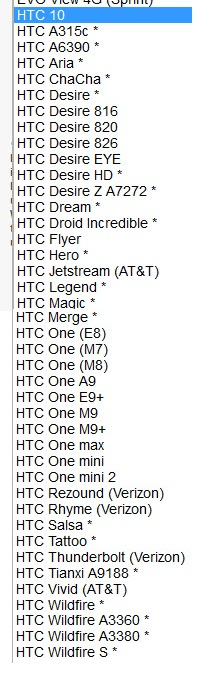
I looked at the list of HTC phones at http://www.htcdev.com/bootloader on the list in the pull down menu on the right. And I don't see the HTC Desire 626s that I have in the list of HTC phones bellow. Which model do I use? Also in my phone the model number is OPM92. On the recept from the local phone store it says HTC Desire 626. I don't want to brick my new phone. I had to rob Paul to Pay Peter to replace the old ZTE phone that crapped out.
Unlocking the bootloader can be found on the htc develop[er site. http://www.htcdev.com/bootloader . The phone has also been rooted.