• After 15+ years, we've made a big change: Android Forums is now Early Bird Club. Learn more here.

Help HTC EVO 4G LTE Glitches (Screen Rotation issues)

Oh sorry my post was misleading it was stuck in Landscape until I checked auto rotate again then it went back to normal. But I was saying I like unchecking it and having it stuck in Landscape for at night for this thing I use as a dock. Sorry my post was confusing.

Permanently in landscape? That's different from my experience. For me, if I put I turned off auto rotate it would go into landscape instead of portrait, but auto rotate worked fine. Sorry, I don't know what to do to resolve your situation. Have you tried holding the power button for 10secs to force a hard reset?
 
OK, then your experience is exactly like mine. I never did figure out how to create that glitch, but I know that it can be undone by swapping back and forth between auto rotate on and off while alternating between the two different areas in settings that allow you to lock the orientation (see earlier posts for more info if you are interested).
 
Thanks, I just never knew the part about unchecking auto rotate and it going to Lanscape mode which is great for when we dock our phones at night since there's no dock mode anymore. There is in the car which I love. But I have this deskclock plus I sometimes put it on so I don't need to uncheck auto rotatr and recheck it all the time that's a pain LOL!

OK, then your experience is exactly like mine. I never did figure out how to create that glitch, but I know that it can be undone by swapping back and forth between auto rotate on and off while alternating between the two different areas in settings that allow you to lock the orientation (see earlier posts for more info if you are interested).
 
So is the unchecking of the auto rotate and your screen going into Landscape considered a glitch or is it suppose to do that? Now I am confused cause when I uncheck mine it goes into Landscape on my home screen but yesterday we kept trying his phone and his wouldn't do it and we compared all settings. I am hoping Jelly Bean will just have auto roate on home screen that would be cool.
 
Did anyone figure out a fix for this?? My evo goes in and out of landscape mode whenever it feels like it. Even after a hard reset and no third party apps. I reclabirated the G sensor and still no change, unchecked auto rotate too. I want to see if anyone has any ideas before I waste an afternoon at the sprint store.

Thanks.
 

Attachments

  • Screenshot_2012-08-10-01-01-50.png
    Screenshot_2012-08-10-01-01-50.png
    687 KB · Views: 133
I have two friends and there's don't do it but when I uncheck auto rotate that is the only time mine goes into Landscape mode and when I recheck it then it goes back. But my two friends uncheck thee's and nothing happens and they would like it to go to Landscape like mine for when it's in the home dock. Mine auto does it in the car dock though. I would go to the sprint store.

Did anyone figure out a fix for this?? My evo goes in and out of landscape mode whenever it feels like it. Even after a hard reset and no third party apps. I reclabirated the G sensor and still no change, unchecked auto rotate too. I want to see if anyone has any ideas before I waste an afternoon at the sprint store.

Thanks.
 
I'm not rooted or have any rom It's just stock everything but when I uncheck auto rotate I get landscape even lockscreen and I can dock my phone like that at night in this thing I keep it in. But both of them there's don't move at all when they uncheck it. Mine does and when i check it then it goes back to normal.

Mine goes in landscape because of the Rom and lockscreen does it as well
 
Did anyone figure out a fix for this?? My evo goes in and out of landscape mode whenever it feels like it. Even after a hard reset and no third party apps. I reclabirated the G sensor and still no change, unchecked auto rotate too. I want to see if anyone has any ideas before I waste an afternoon at the sprint store.

Thanks.
...it can be undone by swapping back and forth between auto rotate on and off while alternating between the two different areas in settings that allow you to lock the orientation.
Hope that helps :)
 
Unchecking auto rotate in display and gestures also unchecked it automatically in accessibility. When I do this it locks in portrait mode, even if I unchecked it while in landscape (in which case it switches it to portrait and keeps it there.) Checking it again brought rotation back without a problem.
 
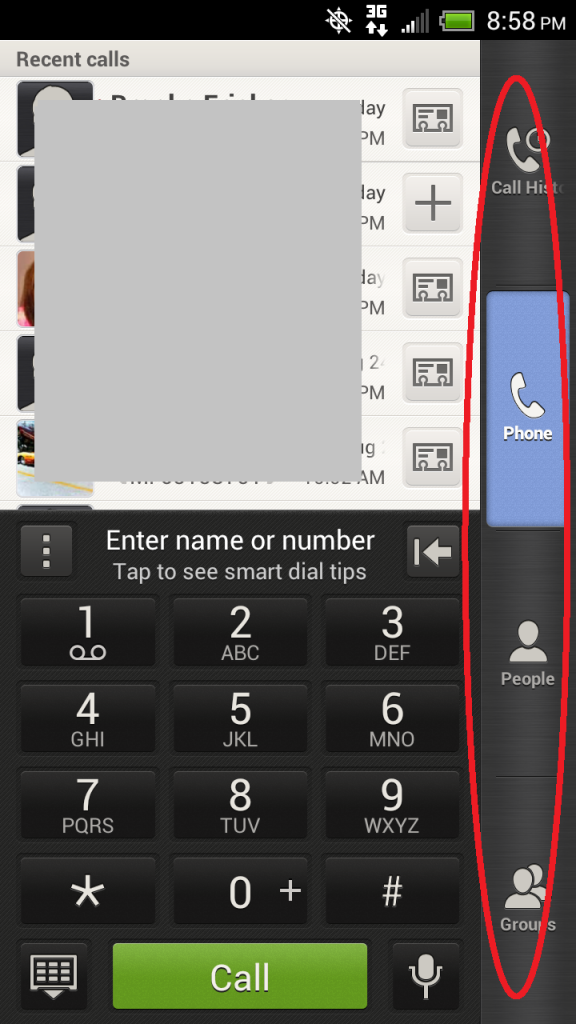
Does the tab bar (or whatever it's called) circled in red look normal to you? I could have swore it was at the bottom of the screen, and now somehow in the last few days it founds it's way to the side of the screen. I've looked all over and can't find a way to relocate this tab bar. Is this movable, and if so, how?

Thanks in advance.

Screenshot posted below.
 
Does the tab bar (or whatever it's called) circled in red look normal to you? I could have swore it was at the bottom of the screen, and now somehow in the last few days it founds it's way to the side of the screen. I've looked all over and can't find a way to relocate this tab bar. Is this movable, and if so, how?

Thanks in advance.

Screenshot posted below.

This is a strange one. It is not movable that I know of, though the tabs can be put into a different order. As far as I've seen the tabs should always be at the bottom unless you force the handset landscape with a 3rd party application (even then, the dialer pad and recent calls area should be landscape as well).

Could this be another bug in the Aluminum Skin? However, I'm not able to recreate this issue. If the restart doesn't work (try a regular restart and forced restart -hold power for 10 seconds), you could try changing to a different skin to see if it will clear or on the off chance re-calibrate your G-sensor?
:confused:
 
just reading through this thread a little. for those who are not rooted and want landscape home screen and lockscreen check out the app set orientation in the market.
 
Apex launcher is supposed to have this feature, but it is not working on my phone.

Edit: Nova Launcher allowed landscape for the home screens.
 
Mine still goes into Landscape when I uncheck auto rotate and my friends don't it's weird. I am not rooted or using anything different.
 
I had to get a new phone and the new phone doesn't do it. But my old phone I would uncheck auto rotate andmy home screen would go in to Landscape and stay that way till I rechecked auto rotate. It was nice for at night in my dock. Maybe in JB it will rotate.
 
Just got a new Evo 4G LTE. auto rotation was working fine. I did install the Rotation Control app, and everything was working fine, now, 2 days later auto rotation isn't working at all even after I uninstalled Rotation Control app. Any suggestions? Thanks!
 
Ok, never mind! After a bit more research I realized that I had recalibrated the g sensor by laying the phone on its edge during calibration as opposed to laying the phone on its back like you're supposed to. Hopefully, this will help the other idiots like me....... ;)
 
I just started having this problem with my Evo 4g LTE. When I'm in a program like Facebook the screen starts going crazy. I try to scroll down and it will scroll left/right or if I try and 'click' an icon it won't register. When this starts the home/back/recent programs buttons do not work either. I hold the power button and can reboot the phone and it will work okay for a couple hours.

Does this sound like the touch screen or what?
 
digitizer issue from what you describe.
if you have a case or screen protector, remove those and experiment.

could also be solved by a factory reset.

there is a thread that speaks about changing the digitizer out yourself if you are comfortable with such tasks. this is assuming the digitizer is at fault.
 
Back
Top Bottom