
• After 15+ years, we've made a big change: Android Forums is now Early Bird Club. Learn more here.

Help HTC_IME Keyboard for X8

Installed it ok! Any skins other than the white default one?
(I m talking about the low resolution keyboard which works well on our phones)

And yes, I copy paste from the little bmw devil because I wanted to say the same thing :)
 
I asked the question on the Gimpsta page on XDA but got no response. Shame cos I love my X10 skins for the keyboard.
 
Awww, suits my girly fingers nicely! Have you tried Thick Buttons... never used it myself but a fellow user over on the X10 forum swears by it for his chubby digits!
 
You can have the HTC one set on compact qwerty if that helps your chubby little fingers at all:eek:. Takes a little getting used to, its like a merge of the T9 numeric and qwerty.

Forgot about the Greek thing! You kind of need your own language really. It's just that your English is so good that it never occurred to me.:D
 
You can have the HTC one set on compact qwerty if that helps your chubby little fingers at all:eek:. Takes a little getting used to, its like a merge of the T9 numeric and qwerty.
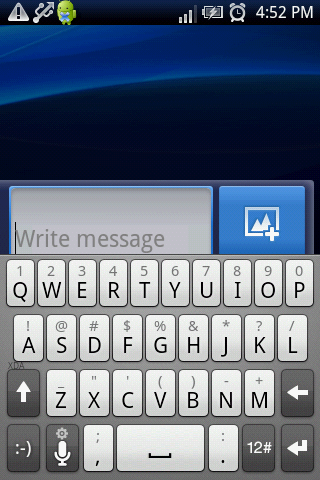
Forgot about the Greek thing! You kind of need your own language really. It's just that your English is so good that it never occurred to me.:D

Hehe thanks but I need greek for SMS! ;)
Anyway,I ll have to wait for a greek update on Thick Buttons!
N.
 
Hi i am looking for a non qwerty keyboard for my x8 and i have tried the HTC product installed in but i cannot find where i go to change my old keyboard for the one i have just installed
 
Hi i am looking for a non qwerty keyboard for my x8 and i have tried the HTC product installed in but i cannot find where i go to change my old keyboard for the one i have just installed

If you follow the instruction, you will find it how to change.
1. please check your setting, then go to locale and text, find it then, select the keyboard that you already installed. then you also find the setting for it.
2. then close the setting page. find the text box (you can choose in new message, or you can go to address page, or others). then, press and hold the text box, new text option will show up. then select 'input metode'. then select your keyboard.

try it then.
 
I have just edited the how to post to include the difference in 1.6 Locale & Text and 2.1 Location & Keyboard.
 
The more I used the more I love it :-)

keyboard.png
 
Hey - love the htc keyboard reminds me of my HTC Tattoo. But I cant seem to move the cursor with finger when typing text - ie if i want to insert a word in the middle of a sentence ive written i cant do it.

I think the reason being that most HTC phones had cursor or pad
buttons to move the cursors position.

Anyone got any ideas?
 
See above post, some1 ask the same question as you and answer is given.

Yeah - use settings to enable volume keys - I seen that - I was hoping there was a more permanent solution that enabled the actual touch screen to move cursor
 
If you jab the screen where you want to insert the word the cursor goes back to that place, its not always very accurate which is where I think the side keys come in. You can also set your swipe gestures to cursor before word or cursor after word so you can move back a word at a time.
 
If you jab the screen where you want to insert the word the cursor goes back to that place, its not always very accurate which is where I think the side keys come in. You can also set your swipe gestures to cursor before word or cursor after word so you can move back a word at a time.


Thanks - my big fingers are not conducive to jabbing!!!!!

Ill try the swipe thingy
 
thanks for the htc keyboard...it really is the best....however, i miss the "select", "all", and "paste" buttons in the standard X8 keyboard (coz i do a lot of copying and pasting....especially from contacts to messaging)....i think it's the only disadvantage....
 
Ok maybe I have missed a trick here, where are the copy and paste keys in the default keyboard? I prefer the HTC but like to learn new stuff! You can still long press in the text input area and do select and paste but despite looking at my default I can't see where you mean.:)
 
Back
Top Bottom