• After 15+ years, we've made a big change: Android Forums is now Early Bird Club. Learn more here.

Root Hydro bloatware removed.

i'm new to all this but after some "stupid" issues i got my hydro rooted and the only thing it changed was my background pic. it set it to the defalt boost screen, didn't affect any of my apps i already had
 
I think I know what you're trying to say, but just in case - can you please type your questions from a computer instead of your phone?
So many type on their phones - and frankly, between Auto-correct, and fingers too big for the Android keyboard... I just can't understand what many are asking.

:o

Sorry
 
im thinkin maybe ill just stick to freezing an app till i can boot into clockwork.
Using an app called root app delete to disable apps, everything mentioned above but i have noticed a lttle "slowness" at times when Holo launcher reloads, and had to pull the battery a couple times when opening a app before my widgets reappear all the way, froze up but could just be my phone.....maybe watching family guy in the shower is not what the had in mind when they said "waterproof"?
 
for hidden apps on the hydro how are they accessed or are they simply & purely bloatware?

ie: MusicFX - I haven't found it yet (other than in Titanium)
or some Live wallpapers which are not available to choose when changing wallpapers, ie: system/media/video/sunset.240p.mp4
 
how do i uninstall these programs? do i need a app to do it? im fully rooted but dont understand the uninstall process
 
i froze it for a while and used holo launcher..but that didnt seem to help my battery any..of course i had just reset my battery stats and timing, i switched back. But other than the suspected battery drain i didnt have problems..but thats just me..
 
i froze it for a while and used holo launcher..but that didnt seem to help my battery any..of course i had just reset my battery stats and timing, i switched back. But other than the suspected battery drain i didnt have problems..but thats just me..

Yeah I'm a holo launcher fan. I usally switch the launcher to holo as long as it is still stable.
 
I know this is a something you add instead of removing but link2sd works which will give you more room. Confirmed with fat32 partition. No side effects
 
i froze it for a while and used holo launcher..but that didnt seem to help my battery any..of course i had just reset my battery stats and timing, i switched back. But other than the suspected battery drain i didnt have problems..but thats just me..

Try add juice defender ultimate works great for me 2.6x improvements get a go 8 hours on go usage
 
Removed launcher with no side effects as of yet. Done some memory tweaks still stable. And some kernel tweaks waiting to see what happens.
 
i've installed to '/system' (via "/system/app mover" from the play store)
______
apex launcher
notification toggle


(will edit when more are moved as needed)
 
Added:

1. Apex launcher
2. Rom toolbox pro
3. Fx file manager
4. Replaced gallery with QuickPic

With same app mover

Will update If I add more
 
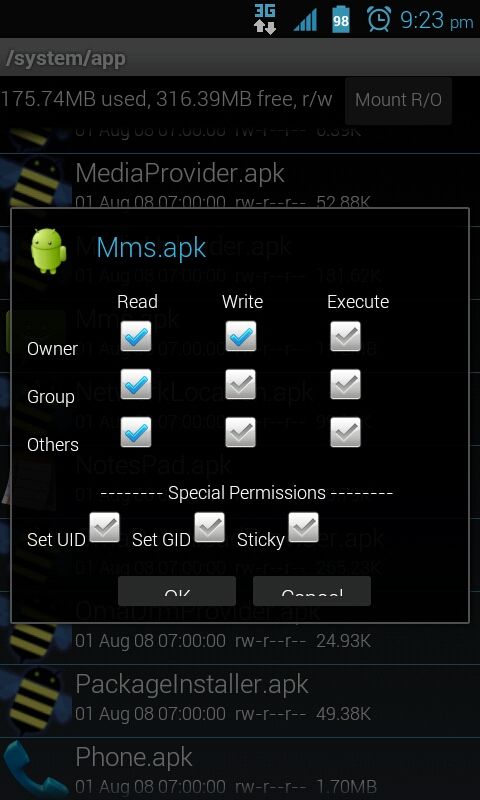
removed the stock sms texting app (mms.apk) since i like GOsms pro far better. hit a snag when i realized i was unable to send/receive traditional mms messages (pictures, video, audio) and restoring the stock app has proved to be impossible since i neglected to back it up with titanium. luckily gosms has a setting where you can manually enter the server info and restore mms functionality.
win :)

2012-12-05%2020.38.56.png


and for the record i tried using mms.apk from my full backup of the system folder, managed to push the file back into system but it still refused to install.
 
You need to set permissions correctly
20121205212351_zps13f36a4f.jpg

I use root explorer. Would definately recommend purchasing this app!
 
i set the permissions exactly like those specified in your screenshot to no avail. i'll try root explorer but i dont know that it's much different than es file explorer as far as functionality, only interface.
 
Eco mode removed with no lingering side effects that I can see. Only suggestion is kill the process "com.Kyocera.ecomode" before uninstalling the app or u get a recurring error popup until u reboot. Still, everything seems to be gravy :)

how do you kill the process "com.kyocera.ecomode"?
 
Back
Top Bottom