
Install the app
How to install the app on iOS
Follow along with the video below to see how to install our site as a web app on your home screen.
Note: This feature may not be available in some browsers.
-
After 15+ years, we've made a big change: Android Forums is now Early Bird Club. Learn more here.
You are using an out of date browser. It may not display this or other websites correctly.
You should upgrade or use an alternative browser.
You should upgrade or use an alternative browser.
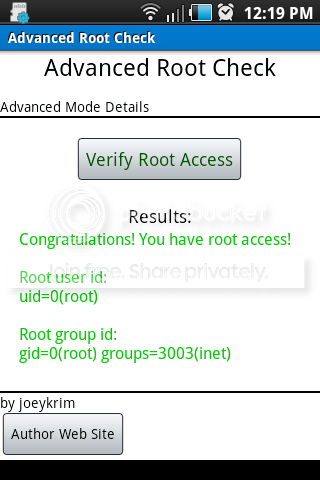
Root i have root access!
- Thread starter rjsweesy
- Start date
 Like how you achieved this @_@
what i did was:
used the soup to gain root, closed down the command prompt and opened a new terminal with my adb
adb shell
su
remount rw....or mount rw cant remember
i removed the su, busybox and superuser.apk files
rm /system/bin/su
rm /system/xbin/su
rm/system/app/superuser.apk
rm /system/bin/busybox
rm /system/xbin/busybox
adb push su /system/bin/su
adb push su /system/xbin
adb push busybox /system/bin
adb push busybox /system/xbin
then i
chmod 6775 /system/bin/su
chmod 6775 /system/xbin/su
chmod 6775 /system/bin/busybox
chmod 6775 /system/xbin/busybox
adb shell reboot
pulled battery and blamo!
i used the 76 k su file instead of the 26 k, the 76 su file is the one that grants superuser to any root app
i want to test this on another indulge though
the superuser.apk may not be valid, when i try to intsall it from adb it states it is an invalid apk so maybe an older version will work for us or boot to recovery turn off sig verification the try and adb install superuser..i dunno
used the soup to gain root, closed down the command prompt and opened a new terminal with my adb
adb shell
su
remount rw....or mount rw cant remember
i removed the su, busybox and superuser.apk files
rm /system/bin/su
rm /system/xbin/su
rm/system/app/superuser.apk
rm /system/bin/busybox
rm /system/xbin/busybox
adb push su /system/bin/su
adb push su /system/xbin
adb push busybox /system/bin
adb push busybox /system/xbin
then i
chmod 6775 /system/bin/su
chmod 6775 /system/xbin/su
chmod 6775 /system/bin/busybox
chmod 6775 /system/xbin/busybox
adb shell reboot
pulled battery and blamo!
i used the 76 k su file instead of the 26 k, the 76 su file is the one that grants superuser to any root app
i want to test this on another indulge though
the superuser.apk may not be valid, when i try to intsall it from adb it states it is an invalid apk so maybe an older version will work for us or boot to recovery turn off sig verification the try and adb install superuser..i dunno

what i did was:
used the soup to gain root, closed down the command prompt and opened a new terminal with my adb
adb shell
su
remount rw....or mount rw cant remember
i removed the su, busybox and superuser.apk files
rm /system/bin/su
rm /system/xbin/su
rm/system/app/superuser.apk
rm /system/bin/busybox
rm /system/xbin/busybox
adb push su /system/bin/su
adb push su /system/xbin
adb push busybox /system/bin
adb push busybox /system/xbin
then i
chmod 6775 /system/bin/su
chmod 6775 /system/xbin/su
chmod 6775 /system/bin/busybox
chmod 6775 /system/xbin/busybox
adb shell reboot
pulled battery and blamo!
i used the 76 k su file instead of the 26 k, the 76 su file is the one that grants superuser to any root app
i want to test this on another indulge though
the superuser.apk may not be valid, when i try to intsall it from adb it states it is an invalid apk so maybe an older version will work for us or boot to recovery turn off sig verification the try and adb install superuser..i dunno
SU that grants access to all apps bypass's superuser.apk and it is not used. it just grants access to all apps without going to superuser.apk to ask the user for permission to grant root access for an app.
If its working and thats the case, the issue would then be just something with the superuser su or apk.
can you zip up the files you used and post them for us? I'll try it out today and see what I get.
OK, look like our rooting issue are due to Samsung blocking the superuser.apk binary.
rjsweesy post what SU file you used that doesnt have the superuser hook.
rjsweesy post what SU file you used that doesnt have the superuser hook.
i used whatever busybox i could find, here is the su file i used
i have another indulge im going to try later today
MEGAUPLOAD - The leading online storage and file delivery service
i have another indulge im going to try later today
MEGAUPLOAD - The leading online storage and file delivery service
OK, I have added this to the bloatware removal scripts.
Download the updated bloatware remover scripts and run them agian. after removing the bloatware it will swap out the SU with this other SU that doesnt use superuser.apk.
***Warning***
just keep in mind rooting with this SU leaves your phone open for all apps to get root access. You will not be prompted when apps request root access.
Download the updated bloatware remover scripts and run them agian. after removing the bloatware it will swap out the SU with this other SU that doesnt use superuser.apk.
***Warning***
just keep in mind rooting with this SU leaves your phone open for all apps to get root access. You will not be prompted when apps request root access.
your the manOK, I have added this to the bloatware removal scripts.
Download the updated bloatware remover scripts and run them agian. after removing the bloatware it will swap out the SU with this other SU that doesnt use superuser.apk.
***Warning***
just keep in mind rooting with this SU leaves your phone open for all apps to get root access. You will not be prompted when apps request root access.
Jessehesse133
Newbie
Soit worked
LightningTH
Newbie
When I downloaded soup or root the su it had didn't work so i linked over to busybox which would su after asking for the password. Congrats on finding a su that doesn't request privs. If someone wants priv request then they have to go my route, link su to busybox and create a /etc/passwd file.
nickrussel
Well-Known Member
OK, I have added this to the bloatware removal scripts.
Download the updated bloatware remover scripts and run them agian. after removing the bloatware it will swap out the SU with this other SU that doesnt use superuser.apk.
***Warning***
just keep in mind rooting with this SU leaves your phone open for all apps to get root access. You will not be prompted when apps request root access.
Hey Thanks, Mike: Looks like this gives us root access. Any idea how to get to wifi tethering settings and change the freakin code then?
Yep just download it again any you will get the new one.Mike: Thanks, does the post #1 on your bloatware removal thread that we used before, now have the updated version of the script that has the new su?
nickrussel
Well-Known Member
Yep just download it again any you will get the new one.
Thanks, Mike! Looks like we finally have root. Yahoo! Still can't get any of the wifi tethering apps to work. wifitether for rot users fails to install. everything else doesn't work. worst of all, we know we have droid native hotspot feature, we can turn it on but we can't change the code. I think someone was going to let someone else crack that wpa2 code on one of our phones. any word on how that went?
cc'd to tethering thread
Jessehesse133
Newbie
Ok guys that's awsome... now I am new to this so how do I root it? And what are the advantages of rooting it?
Jessehesse133
Newbie
:l glad to hear that
That's samsung for ya~ It might not be the standard root, but so far I've tried the following apps that req root: Titanium backup, quick boot, LCD density, Set CPU, and root explorer. The only problem I'm experiencing is that Set CPU only likes conserve lol. Though I was able to lower the cpu in order to conserve battery.
well i guess we will have to take what we can get for now until a rom or something comes out for it or someone figures how to get these blocked binarys on the systemThat's samsung for ya~ It might not be the standard root, but so far I've tried the following apps that req root: Titanium backup, quick boot, LCD density, Set CPU, and root explorer. The only problem I'm experiencing is that Set CPU only likes conserve lol. Though I was able to lower the cpu in order to conserve battery.
so much for open source eh? thanks samsung!
Still doesn't feel like root....I don't have that warm and fuzzy you know....
I still want to try lightnings kernel and samsung definately has some sort of lockdown on this thing
I think samsung has some sort of binary check or something thats rejecting certain apps from installing/running.
If you really have root, could one of you test setCPU clock down and then do a linpack test and see if your score is noticeably lower? This should be pretty positive proof root is working as intended.
I installed the overclock widget to bring the processor down a bit and keep it low when the screen is off. this is the results from linpack. First one is with the max cpu set at max, and the second is with cpu all the way down.
With Max set to 1,000,000:
MFLOPS: 13.759
Time: 6.09
Norm Res: 5.68
Precision: 2.220446049250313E-16
With Max set to 100,000:
MFLOPS: 0.833
Time: 100.68
Norm Res: 5.68
Precision: Inaccurate Result
When I set it to minimum and pressed save, that second I was thinking OH NO, Please don't make the phone so slow it stops working and the app loads on boot. But the phone was still usable, extreamly slow but I was able to navigate. I would swipe for the next screen and have to wait a few seconds. ROFL.