
For those of you who cannot wait to taste ICS, but know it's not coming soon enough for you I've made an EXTREMELY light ICS Status bar.. no apps are themed in this, I am unable to currently due to odex files..
FIRST:
I AM NOT RESPONSIBLE IF YOU BRICK YOUR PHONE OR SCREW IT UP IN ANY WAY, DOESN'T MEAN I WONT TRY TO HELP, BUT IT'S ON YOU! ALSO DO NOT USE ANY OTHER FRAMEWORK-RES OR SYSTEMUI IF YOU DID NOT GET IT FROM THIS PHONE OR YOU WILL BRICK IT.
SECOND: THANKS TO UOT for helping me with creating most of this.
THIRD: LETS CHECK IT OUT!
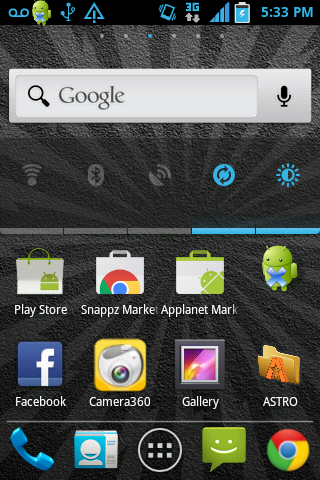
With the new theme you will have a 1% modded battery and blue themed status bar/loading circle/ downloading bar/glow/dividers.. well, you'll see
ScreenShots:
THE SIGNAL BARS LOOK LIKE THE FIRST SCREENSHOT AND ONLY THE FIRST SCREENSHOT, EVERYTHING ELSE LOOKS LIKE THE OTHERS..IF YOU WANT THE POWER WIDGET IT IS LISTED BELOW:


If there is anything you think should be changed, let me know.. Maybe I will.
Credit for WIDGET icons : Ktb83 THANKS!
DOWNLOAD FOR WIDGET: http://www.4shared.com/android/xpgOPAZs/Settings_2.html
INSTRUCTIONS FOR WIDGET: Put on sdcard with name Settings.apk
copy and paste to /system/app/
1. DOWNLOAD FOR THEME: https://dl.dropbox.com/u/88781290/ICS THEME.rar
2. Unpack to where you want it.(Mine on my Desktop for ease.)
3A. IF 3A STEP WORKS YOU DO NOT NEED TO MOVE ON AT ALL.. STOP HERE IF THIS WORKS..IF IT DOES NOT WORK THEN DO STEP 3B AND ON.
CD to the spot where you unpacked the systemui and framework-res in cmd
then run:
then reboot your phone.
IF YOU GET AN ERROR MOVE ON TO 3B if it pushed congratz cause mine didn't work this way lol. HAVE FUN!
3B. put the SystemUI.apk and framework-res.apk on your sdcard with:
adb push framework-res.apk /sdcard/ and
adb push SystemUI.apk /sdcard/
Or just use mass storage to do it.. but just know how to get to them when your on the phone in root explorer.
4. (DO THE SYSTEMUI FIRST SO THAT YOU CAN DO THE FRAMEWORK WITHOUT REBOOTING)
goto something like root explorer andcopy SystemUI.apk from /sdcard/ and paste it in /system/app
NOW copy the framework-res.apk from /sdcard/(where you placed it) and paste to /system/framework
5. once that is done, if your phone doesn't restart automatically, then restart it yourself.
HAVE FUN!
If you would like to donate to UOT:
http://uot.dakra.lt/
Or to me:
https://www.paypal.com/cgi-bin/webs...=PP-DonationsBF:btn_donateCC_LG.gif:NonHosted
FIRST:
I AM NOT RESPONSIBLE IF YOU BRICK YOUR PHONE OR SCREW IT UP IN ANY WAY, DOESN'T MEAN I WONT TRY TO HELP, BUT IT'S ON YOU! ALSO DO NOT USE ANY OTHER FRAMEWORK-RES OR SYSTEMUI IF YOU DID NOT GET IT FROM THIS PHONE OR YOU WILL BRICK IT.
SECOND: THANKS TO UOT for helping me with creating most of this.
THIRD: LETS CHECK IT OUT!
With the new theme you will have a 1% modded battery and blue themed status bar/loading circle/ downloading bar/glow/dividers.. well, you'll see
ScreenShots:
THE SIGNAL BARS LOOK LIKE THE FIRST SCREENSHOT AND ONLY THE FIRST SCREENSHOT, EVERYTHING ELSE LOOKS LIKE THE OTHERS..IF YOU WANT THE POWER WIDGET IT IS LISTED BELOW:
If there is anything you think should be changed, let me know.. Maybe I will.
INSTRUCTIONS
Credit for WIDGET icons : Ktb83 THANKS!
DOWNLOAD FOR WIDGET: http://www.4shared.com/android/xpgOPAZs/Settings_2.html
INSTRUCTIONS FOR WIDGET: Put on sdcard with name Settings.apk
copy and paste to /system/app/
1. DOWNLOAD FOR THEME: https://dl.dropbox.com/u/88781290/ICS THEME.rar
2. Unpack to where you want it.(Mine on my Desktop for ease.)
3A. IF 3A STEP WORKS YOU DO NOT NEED TO MOVE ON AT ALL.. STOP HERE IF THIS WORKS..IF IT DOES NOT WORK THEN DO STEP 3B AND ON.
CD to the spot where you unpacked the systemui and framework-res in cmd
then run:
Code:
adb push SystemUI.apk /system/app
adb push framework-res.apk /system/frameworkIF YOU GET AN ERROR MOVE ON TO 3B if it pushed congratz cause mine didn't work this way lol. HAVE FUN!
3B. put the SystemUI.apk and framework-res.apk on your sdcard with:
adb push framework-res.apk /sdcard/ and
adb push SystemUI.apk /sdcard/
Or just use mass storage to do it.. but just know how to get to them when your on the phone in root explorer.
4. (DO THE SYSTEMUI FIRST SO THAT YOU CAN DO THE FRAMEWORK WITHOUT REBOOTING)
goto something like root explorer andcopy SystemUI.apk from /sdcard/ and paste it in /system/app
NOW copy the framework-res.apk from /sdcard/(where you placed it) and paste to /system/framework
5. once that is done, if your phone doesn't restart automatically, then restart it yourself.
HAVE FUN!
If you would like to donate to UOT:
http://uot.dakra.lt/
Or to me:
https://www.paypal.com/cgi-bin/webs...=PP-DonationsBF:btn_donateCC_LG.gif:NonHosted


 I'm looking into it hopefully another fix by tomorrow

